

How to Choose a Headless CMS

Bryna Dilman
Director of Marketing

Key Takeaways
- Every headless CMS on your shortlist has the same core capabilities, which is why an RFP comes back with yes across the board and tells you very little about which one to choose.
- The constraints that decide whether a headless project succeeds usually surface three or four months after launch, once the frontend and the content have both been committed to the platform.
- Pricing models differ more than prices do. The metrics a vendor charges against, particularly traffic, API calls, and languages, shape your renewal far more than the number on the pricing page.
- Agility CMS answers all four criteria in this guide, with page management, unlimited locales, and onboarding support included at every tier, including the free proof of concept.
If you’re an engineering lead or digital director who has decided on headless architecture, you might think the hardest part is evaluating your team’s technical skills, content needs, and delivery channels. But when the majority of platforms on your shortlist look the same on the surface, the decision becomes much harder.
Most teams handle this with an RFP, which results in about 40 questions going out to 6 vendors and 40 yeses coming back from each, because a GraphQL API, structured content modeling, previews, webhooks, and role-based permissions are features almost every headless CMS on the market already offers.
However, the constraints that determine whether the project actually works don't appear on that list or during evaluation; they appear only after three or four months, once content has already been migrated.
When enterprises don’t select the right headless CMS, marketers can't build a campaign page without filing a ticket, so the frontend team ends up absorbing work that has nothing to do with engineering. Alternatively, a content model built for a website has to be ported to a mobile app, and retrofitting it costs more than modeling it properly in the first place.
This guide isn't another list of forty questions. We'll cover the key criteria where headless platforms genuinely differ, what to look for in each one, and something you can test during a trial rather than ask about in a demo. Then we'll show you how Agility CMS handles them, including where Agility isn't the right fit.
What Every Headless CMS Already Does
Selecting a headless CMS based solely on a list of features is the wrong approach, because most headless CMSs, particularly those built for enterprise teams, will offer many expected features. If a vendor made it onto your shortlist at all, you can assume some version of the following:
Multichannel Content Delivery and Developer Tooling
-
REST and GraphQL APIs for delivering content to a website, an app, or any other frontend your team decides to build
-
A global CDN sits in front of both API responses and media assets
-
SDKs and starter kits for the frameworks your developers are likely already using, including Next.js, React, Vue, and Nuxt
Content Modeling and Authoring
-
Structured content modeling, with custom content types, custom fields, and relationships between entries
-
Localization, usually as locale variants of an entry with some form of fallback
-
A media library that handles image resizing and format conversion on delivery
Workflow and Governance
-
Roles and permissions, with draft, review, and published states.
-
Scheduled publishing, version history, and the ability to roll a piece of content back
-
Preview, so editors can see unpublished work before it goes live
Extensibility
-
Webhooks, so your frontend knows when something has changed.
-
A marketplace or integration library covering common features, including search, analytics, translation, and asset management
While these are very much real requirements, and a platform that couldn't meet them wouldn't belong on your list, the problem is that they don't tell you anything, because most vendors are capable of meeting these requirements.
However, just because multiple vendors answer yes doesn’t mean the feature works the same way across all platforms. For example, each shortlisted platform might support multiple languages, but one gives you a translation workflow, assignment, and side-by-side editing, and another gives you a language dropdown and expects your team to manage the rest in a spreadsheet.
So CMS decision committees need to ask whether the platform has that capability in a form your team can use at the scale you'll actually be working at, and whether the things that will constrain you later were on the list at all.
The Criteria That Separate Headless CMS Platforms
-
Can Your Content Team Build and Change Pages Without Opening a Ticket?
Decoupling content from presentation is what makes headless work, and it's also what most platforms have given up to get there. Once the frontend is code, a page stops being something anyone can assemble inside the CMS. Content teams get a form with fields, and everything governing how those fields appear on a page lives in a repository they don't have access to.
For the first few months after launch, this rarely comes up. The templates cover what marketing needs, and content updates move through the CMS the way everyone expected. However, the friction starts when marketing needs something the templates weren't built for. That might be a landing page that runs its sections in a different order, or a product page that needs a comparison table inserted into the middle.
None of that is engineering work, but in a pure headless build, all of it becomes a ticket. Your frontend team ends up maintaining a backlog of layout requests, and marketing waits days for changes they used to handle themselves in an afternoon. This is the most common reason a headless migration gets written off internally as a mistake, even when the architecture is sound, and the APIs are doing exactly what they should.
Platforms vary widely here, and that variation doesn't show up in a feature list. A few give editors real page composition, meaning they can add, reorder, and configure components on a live page against the same content model developers are building against. Others offer visual editing that's limited to changing text and images inside a layout a developer defined in advance. There's also a third group that treats this as a hosting-layer problem and expects you to solve it outside the CMS entirely, usually through your frontend framework's preview and editing tooling. All of them will tell you they have a visual editor.
What to Look For
-
Whether an editor can create a new page, not only edit one that already exists
-
Whether they can add and reorder components on that page without a deployment
-
Whether embedding a video, inserting a table, cropping an image, or adding a widget requires a developer.
-
Whether the visual editing surface reads from the same content model your developers build against, or a separate structure that has to be kept in sync manually
-
Whether page-level changes can go live independently of a frontend release
How to Test
Ask your content team to build a new page from scratch, with no developer sitting next to them and no page to copy from. The gap between platforms that treat page composition as a first-class capability and platforms that bolt an editing overlay onto a form tends to be obvious well before they finish.
Ready to see how Agility CMS gives your content team page-level control without adding to your developers' backlog? Book a personalized demo today.
-
Does Your Pricing Stay Predictably Consistent or Will There Be Unexpected Increases?
The subscription price for a headless CMS is hardly ever the full cost. Instead, a headless implementation also includes the initial build, migrating the content you already have, the ongoing development to maintain and extend the frontend, and the internal time spent administering the platform.
Depending on the size of the project, the software can end up being a fairly small share of the first-year total. That doesn't make the subscription unimportant, but it does mean a platform that's cheaper on paper and harder to build against isn’t necessarily cheaper.
The other part is that headless vendors price on usage, and they don't all meter the same things. Between the platforms on your shortlist, you'll see some combination of users, API calls, content items, bandwidth, storage, environments, projects, and custom roles.
For example, API calls might scale with traffic, so if a campaign works, it could cost you money. Or if locales scale with expansion, entering a new market might mean renegotiating before you've earned anything there. Additionally, some vendors throttle when you cross a limit, while others simply move you to a higher tier.
What to Look For
-
Which usage metrics does the vendor price on, and which of those will your growth actually push against
-
Whether the metrics tied to success, meaning traffic, API calls, and languages, are priced or included
-
What happens at the limit, whether that's throttling, an overage charge, or a forced upgrade
-
Whether the capabilities you're buying the platform for are available at your tier or gated above it
-
What's excluded from the subscription and sold as a service, particularly onboarding, training, and migration support
How to Test
Create pricing scenarios for 24 months, not just for today. Take your projected editor count, your content volume, your environments, and your traffic, and price every shortlisted platform against that.
Agility's ROI Calculator is one way to model it if you want a starting point for the internal cost side, rather than just the subscription.
-
Is the Platform Truly Ready for AI Agents and Machine Consumption?
Until recently, the only thing consuming your content was a browser. That's no longer true, and it's changed what a content API needs to do.
First, you need to understand whether answer engines can read your content and accurately represent it. When someone asks ChatGPT or Google's AI Overview about your product, the model is working from whatever it can parse, and content that's well structured gets summarized correctly far more often than content buried in a page of markup.
All of this depends on whether your content exists as discrete, labeled pieces or as a wall of HTML. A model that consumes a rich text field containing a heading, three paragraphs, a callout, a CTA, and an embedded table has to infer that structure from the markup. It usually gets most of it right and occasionally invents something. Content that arrives already labeled doesn't leave the same room for interpretation.
Second, you need to determine whether AI tools can work with your content directly, which is a workflow question rather than a visibility one, and depends on whether the vendor offers a Model Context Protocol server.
MCP is a standard for connecting AI tools to external systems. For a CMS, it means a developer (or even a non-technical user in the right CMS) can query the content model, create entries, or check what's live from inside tools like Claude, Cursor, or GitHub Copilot, without switching to a separate dashboard.
What to Look For
-
Whether rich text is returned as structured data or as an HTML string
-
Whether the platform can express structured items inside rich text, such as a callout or an embedded entry
-
Whether the vendor offers an MCP server, and if so, whether it's read-only or supports writes
-
Which operations the MCP server exposes, and how authentication and permissions are handled through it
-
Whether metadata, schema, and taxonomy are available through the API rather than only in the interface
How to Test
Connect the content API to an AI tool and ask it to describe the content of a page. If it can identify the heading, the sections, the CTA, and any embedded items without you explaining the structure, the content is in usable shape. If it returns an HTML summary, it isn't.
-
What Happens After You Sign?
If you have any real content volume, moving to a headless CMS is a project rather than a task, and the question worth asking is who owns that project. Some vendors run the migration with you. Some provide tooling and documentation and expect your team to do it. Some hand you to an implementation partner, which can be the right answer, but it means the people who know the platform best are one step removed from your build, and you're paying agency rates for the privilege.
Then there's the gap between onboarding and training, which vendors tend to blur together and shouldn't. Onboarding is getting the platform set up and configured for how you work. Training is getting your people competent in it, and your people don't all need the same thing.
For example, developers need API patterns, deployment workflow, and content model design. On the other hand, editors need to know how to build a page and where the guardrails are. Most vendors are demonstrably better at one of those than the other, and it's usually the developer side, because that's who built the product.
What to Look For
-
Whether the vendor runs migrations directly, provides tooling, or refers you to a partner.
-
What migration support costs, and whether it's included at your tier
-
Whether training is split by role, and whether non-technical training exists at all
-
Where the support team is located and what hours are genuinely covered
-
Whether response times are contractual with a remedy attached, or a target
-
Whether there's a named contact after implementation, or you go back into a general queue
How to Test
Open a real support ticket about something you actually don't understand, and note how long the reply takes and whether it answers the question or points at a documentation page.
Why Teams Choose Agility CMS as Their Headless CMS
Picking a CMS isn't a single decision; it's a stretch of work that runs from figuring out what you need, through choosing and architecting it, into launch and every year after. The teams we work best with want a partner for all of that, not a tool they buy and then use on their own. So we're there while you're still weighing options, while you're setting things up, and long after you've gone live.
Build and Change Pages Without a Developer in the Loop
Most headless platforms treat a page as something that only exists in your frontend code. Agility treats it as a first-class object in the CMS, which is why page management and layouts are features rather than a visual editing layer bolted onto a form.
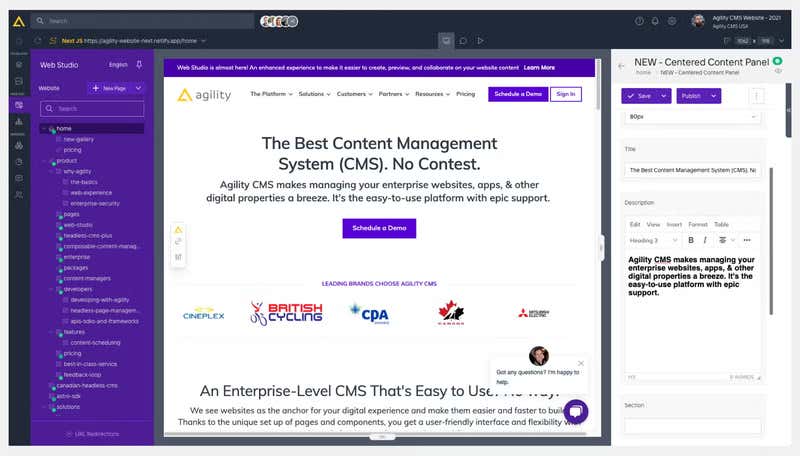
Content editors work in Web Studio, where they can create a new page, drag components onto it, reorder sections, and configure each one, all against the same content model your developers build with. A developer defines a component's schema once, and that same definition is what an editor works from. There's no second structure to maintain and nothing that drifts out of sync when one side changes without the other knowing.
Learn More: Try out the Developer-Dependent CMS Calculator to determine if your CMS is holding back your content team.
Predictable Pricing That You Can Plan Around
Some headless CMS vendors measure the variables that grow fastest and least predictably. For example, if traffic goes up or a new market is added, the API is called more, and the renewal quote moves with it.
Agility doesn't price against any of those. API and asset requests are unlimited across all plans, including the free tier. Similarly, locales are unlimited, so adding a language or a region isn't a pricing event, while content models and types are also unlimited.
Agility CMS’s pricing is based on team size and content volume, which are the two things you can actually forecast. If you know roughly how many people will be in the CMS and roughly how much content you'll be managing in two years, you know where you'll land.
Additionally, critical features such as page management, approval workflows, content versioning, multilingual content, localized publishing, webhooks, and the GraphQL API are included on every plan.
Content Your AI Agents and Answer Engines Can Actually Use
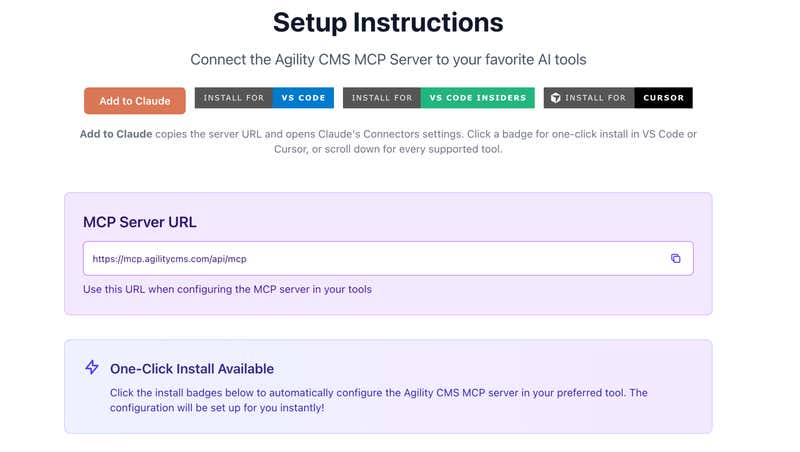
Agility runs an MCP server that connects directly to Claude, GitHub Copilot, Cursor, and Windsurf. Content can be created, updated, or queried from inside the tool a developer is already working in, without switching to a separate dashboard to check a content model or confirm what's live.
Meanwhile, content stored as structured components rather than as large rich text fields is content that a model can parse without inferring structure from markup. That's the same property that makes the content reusable across channels, which is why the two criteria tend to be satisfied or failed together.
Read More: How Your Website Becomes a Tool for AI Agents
Onboarding and Support that Gets Your Team Using the Platform
Agility provides dedicated tooling for the transition and hands-on support for when it’s time to migrate, rather than pointing you at documentation or simply handing you off to an implementation partner and stepping back.
On the onboarding side, Agility Academy offers free, self-paced courses and certification covering both headless concepts and the platform itself. Documentation is organized by role, so developers, editors, owners, and admins each work from material built for what they'll actually be doing, rather than a single undifferentiated set of reference pages.
Where Agility CMS Might Not Be the Right Fit
While Agility CMS works for a number of enterprises, we know we aren’t always the right fit for everyone. When it comes to choosing a headless CMS based on features, there are some areas where Agility CMS won’t work for you:
-
You want to host the CMS yourself: Agility is SaaS. If hosting on-premise or in your own cloud is a hard requirement, whether for control over upgrades or for where the software physically runs, an open-source platform you host yourself is the better answer.
-
You want the content model version-controlled in your repository: Agility's content model lives in the platform rather than in git. If your team gates every schema change through pull request review alongside frontend changes, there are platforms built specifically for that discipline.
-
You want to buy the CMS and then handle everything on your own: Every Agility customer gets onboarding, and it isn't an upsell we strip out to win on price. If what you want is a self-serve tool you set up in an afternoon and never speak to the vendor again, that's a legitimate preference, and we're not it.
Choosing the Right Headless CMS
There's no one-size-fits-all headless CMS; there are different platforms that are right for different people. Most of what an RFP measures is the floor, and every platform on your shortlist has APIs, content modeling, previews, and workflows. But none of that tells you which one your team will still be happy with in two years and beyond.
The criteria in this guide are where the platforms actually diverge, and Agility CMS can answer those common questions in its own way. This includes:
-
Page management and layouts, so your content team builds and changes pages without a developer ticket, and your frontend team stops carrying a layout backlog
-
Pricing indexed to team size and content volume rather than to traffic, API calls, or languages, with capabilities available at every tier rather than gated above yours.
-
An MCP server your developers can connect to, Claude, Cursor, GitHub Copilot, or Windsurf today, and structured content that answer engines can read without guessing
-
Migration handled with you rather than handed off, role-specific training through Agility Academy, and onboarding support included at every tier.
Cineplex moved off a platform that tied its developers to constant content-update requests, decoupling content from code so the team could focus on the product rather than routine edits. With Agility, they gained a marketing team that publishes on its own schedule.
Now, showtimes, promotions, and campaign pages can be published when the business needs them rather than when a developer has capacity. Additionally, the same content feeds the website and the app without being entered twice. Meanwhile, for the development team, the backlog stopped filling up with layout requests, so the work in front of them became product work that moved the needle.
However, the fastest way to know if you’re choosing the right headless CMS is to build something on it. Our team builds a working POC with you, usually in a couple of days, against your content and your stack.
Talk to us about a proof of concept and see if Agility CMS is what you need in a headless CMS.


