

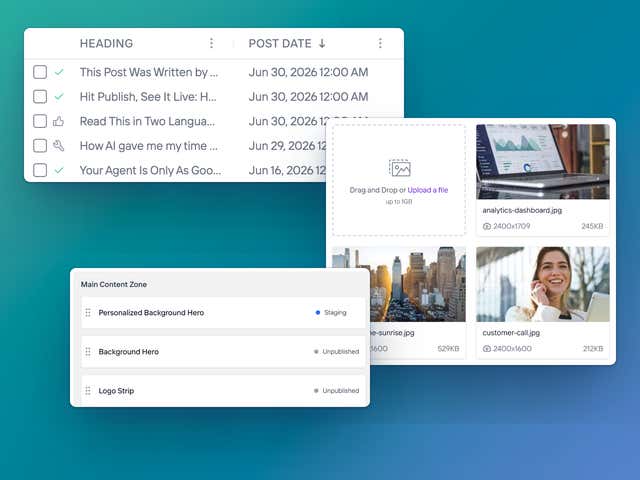
What you see is what you get. Literally.
Click into any page in Studio, type, and watch it change live. Drag in new sections and preview every edit before it goes live. No developer, no ticket, no waiting.
Who Says Headless Isn't for Marketers?
That's the trade most headless platforms make you accept, and the one we built Agility to avoid. Developers, admins, and marketers each get their own experience here.
Everything you get as a marketer
Drag, drop, and see it live
Build and rearrange pages, and see exactly what visitors will see.
Manage every asset in one place
Images, documents, and video, governed the same way as the rest of your content.
Publish inside the guardrails your team set
Approval steps and permissions stay in place, so speed doesn't cost you control.
Reuse content instead of rebuilding it
Write something once and place it across as many pages as you need.
Publish in as many languages as you need
No limit on languages. Manage every market from the same screen, and translate as you copy with DeepL, including regional versions like Canadian French.
AI TranslationPublish with your team's process
Use roles, permissions, approvals, and scheduling to keep publishing organized.
Publish from your AI tools
Create, update, and publish content from Claude or ChatGPT without opening Agility.
Edit inline in Studio
Click on the page, type, done. Changes show up exactly where visitors will see them.
Preview before you publish
See every change on the real page before it goes live.
Schedule launches
Set content to go live, and come down, exactly when you planned.
Built-in forms
HubSpot and Formstack forms drop straight into your pages.
Run every site from one place
Multiple sites and brands, one login, with shared content where it makes sense.
Version history
See who changed what, and roll back in a click.
Apps from the marketplace
Plug in analytics, translation, forms, and more without waiting on a developer.


Agility CMS is a huge improvement from our previous content management platform. Creating and publishing content is now simple and streamlined.

Gary Li
Former Digital Marketing Specialist at Living Arts Centre
See how you would use Agility
Take a look at Studio and see how you'd build, edit, preview, and publish a page.
Questions marketers ask before they start publishing
What is Studio?
Studio is our visual editor. You click into a page, edit it inline, drag sections around, and preview every change before it goes live, without touching code.
Do I need to know how to code?
No. In Studio you edit text, swap images and rearrange sections visually, so you never have to touch HTML or CSS.
How long will it take my team to learn Agility?
Not long. Onboarding is included with every plan, and we train your team on your own site, not a generic demo. Agility Academy has short courses for anyone who wants to go deeper, and our team is a call away when you get stuck.
Can marketers create pages on their own?
Yes. Once your developers set up the building blocks, you can create and update pages yourself, without filing a ticket. How much you can change depends on how your site is set up.
Can I see what my page will look like before it goes live?
Yes. You see the page as you build it, and you can preview every change before you publish, so there's no guessing what will go live.
What happens if I make a mistake?
Nothing you can't undo. Every save creates a new version, so you can see who changed what and roll back to an earlier version at any time. Changes save to Staging first, so nothing goes live until you publish it.
Can I schedule content to go live later?
Yes. Set a release date and a pull date on any page or content item, and it goes live, and comes down, exactly when you planned. Perfect for launches, promos and time-sensitive announcements.
Can I set up approvals before content goes live?
Yes. Add approval workflows to any content list or page, so the right people sign off before anything is published. Everyone sees what's waiting, and every approval is logged.
Can we control exactly who can touch what?
Yes. Nine built-in roles cover most teams out of the box. If you need more control, add granular permissions and approval workflows.
Can I manage SEO without a developer?
Yes. Every page has its own SEO title and meta description that you control. Add the SEO Analysis app and you get an SEO and readability score right in the editor, so you know what to fix before you publish.
Can I publish in more than one language?
As many as you need, with no limit on languages. Manage every market from the same screen, and translate as you copy with DeepL, including regional versions like Canadian French.
Can I add forms to my pages?
Yes. HubSpot and Formstack forms drop straight into your pages, so you can capture leads without waiting on a developer or adding a separate plugin.
Where do my images and files live?
In one media library inside Agility. Upload, organize and reuse images, documents and video across every page and site, all served fast through our CDN.
Can I see how my content is performing?
Yes. With the Google Analytics app, each page's numbers sit right beside the editor: visitors, page views, engagement time and top traffic sources. The PostHog app (in beta) goes further and shows how a single piece of content performs across every page it appears on.
Can I A/B test my content?
Yes. With the PostHog app, you can test versions of a headline, call to action or other component against each other. Once your developers set up a testable component, running a new experiment is a content task you can do yourself.
Can I publish content from ChatGPT or Claude?
Yes. Our MCP server lets your AI tools create, update, and publish content directly, while your roles and approval steps stay in place.