
What Is the Agility CMS MCP Server? (And How to Install It)
The bridge between your AI and your CMS. Here's what it does and how to wire it up.

TL;DR
- What it is: The Agility CMS MCP server connects AI tools (like Claude) directly to your CMS using Model Context Protocol — no custom API integration needed
- How it works: A hosted translator at mcp.agilitycms.com sits between your AI client and Agility's Management API, exposing 18 tools for reading and writing content
- Two main use cases: Developers can generate content models directly from their code without leaving their editor; marketers can turn rough drafts into structured, staged content items automatically
- Read vs. write: Read tools (list containers, query content, browse models) run freely; write tools (create/update content, upload media) always require your approval first
- Setup takes minutes: Add the MCP server URL in Claude's Connectors settings, authorize with your Agility account, and you're connected
- Works beyond Claude: MCP is an open standard — the server is compatible with VS Code, Cursor, and any MCP-compatible client
- Free for Agility customers: Uses your existing Agility authentication; new tools appear automatically as Agility ships updates
You've probably heard a lot about MCP servers lately. What are they actually for, and why would you want one? Especially with a headless CMS like Agility CMS, where the whole point is that your content is already accessible through a clean API.
Here's the short version: an MCP server lets AI talk to your CMS directly. Not through brittle API glue. Not through copy and paste. Through a defined protocol that AI tools already understand. You get two superpowers out of the box: your AI can read from your CMS, and it can write to your CMS, with your permission on every call.
What Is an MCP Server?
MCP stands for Model Context Protocol. It's the emerging standard for how AI tools talk to external systems: databases, file systems, APIs, and yes, content management systems. An MCP server exposes a set of tools (functions, really) that an AI agent like Claude can call when it needs to get something done.
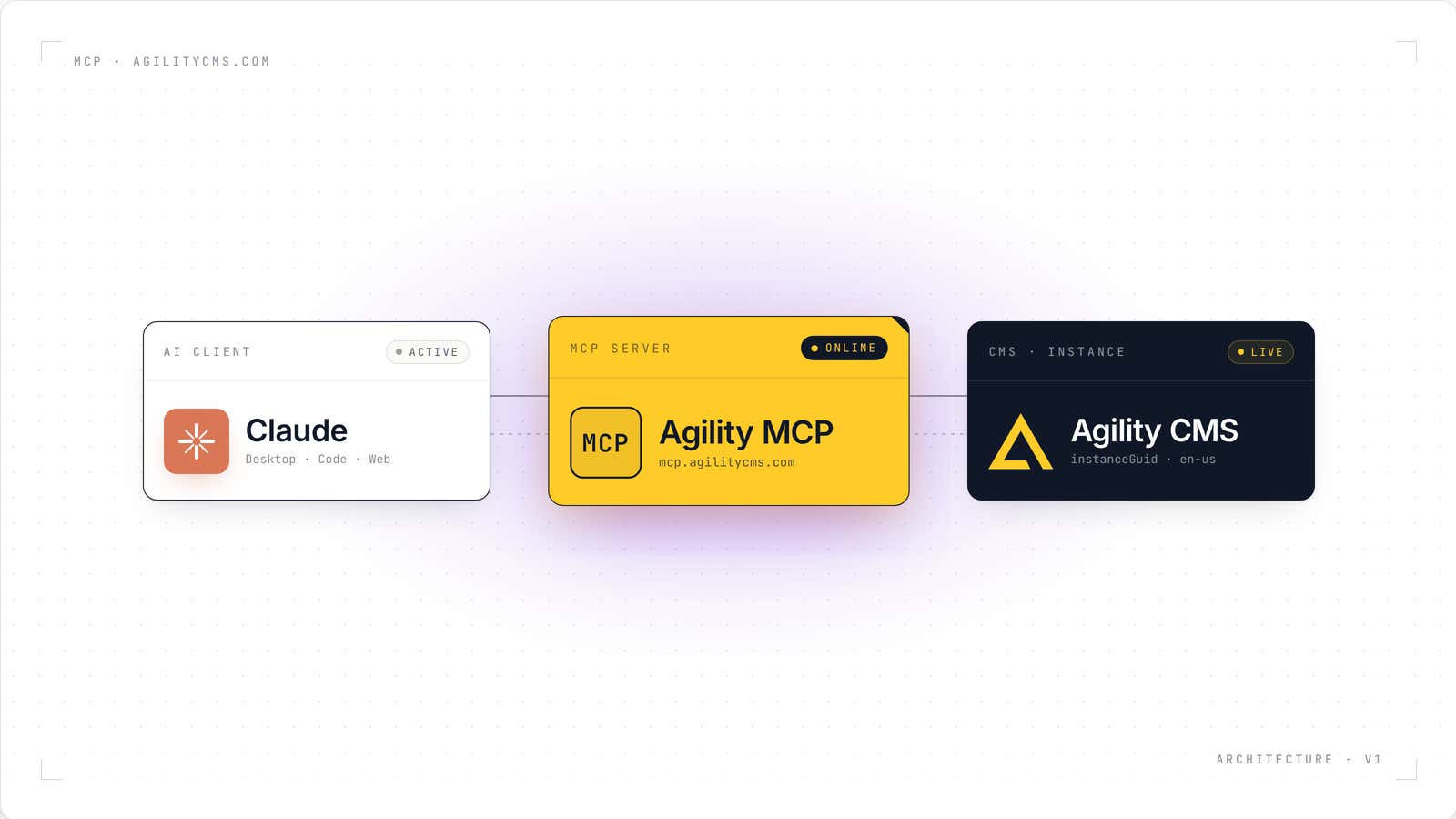
The Agility CMS MCP server sits in the middle as a small, focused translator. Claude speaks MCP, Agility speaks its Management API, and the server turns one into the other without either side needing to learn the other's language.
Claude
Desktop, Code, Web
Agility MCP Server
mcp.agilitycms.com, hosted
Agility CMS
instanceGuid, en-us
We're using Claude for all the examples in this post because Claude is the best AI agent out there right now, imo. But MCP is an open standard, and the Agility CMS MCP server works with any MCP-compatible client.
Why This Matters for a Headless CMS
Headless CMS was a bet that content should be separate from presentation. You put your content in a structured form, and any front end, any device, any channel can pull it. That's been a great bet for ten years.
MCP is the next layer. If your content is already structured and API-accessible, then it's also AI-accessible. Any AI tool your team uses can now read your CMS, understand your content model, and help you work with it, all without a developer writing integration code.
The copy-paste problem goes away. The context-switching problem goes away. The "wait, what field do I put the excerpt in again?" problem goes away. Your CMS becomes something you talk to.
Anatomy of a Tool Call
It helps to see what actually happens when you ask Claude to do something with Agility. Every request travels through four actors: you type a prompt, Claude picks a tool, the MCP server translates and authenticates, and Agility returns real data. Here's every step, in order.
Ask in plain English
You type a request. No API knowledge required, Claude decides which tool to call.
Pick a tool
Claude reads the tool catalog the server advertised at connect time and chooses get_content_items.
Send a tool call over MCP
Claude posts a structured request to the MCP server with arguments it inferred from the prompt.
Verify the OAuth token
The server checks the caller's token, scopes it to a specific Agility user, and loads the instance context.
Map to the Agility Management API
The tool call is rewritten as a concrete HTTP request against Agility's API, with paging, sort, and locale applied.
Fetch content items
Agility runs the query against your live instance and returns a paged list of items with system fields and dynamic fields.
Return a structured tool result
The server wraps the Agility response as an MCP tools/call result so Claude can read the fields directly.
Write the answer
Claude reads the returned items and drafts a summary in the chat, possibly calling another tool to fetch the full body of the newest post.
This is the shape of every MCP interaction. The server is the only component that speaks both sides. Claude keeps speaking MCP. Agility keeps speaking to its own API. The translator handles the rest.
The Two Big Use Cases
There are two distinct groups of people who get value from this, and they use it in completely different ways.
Developers
If you're building the front end, you live in VS Code. Switching back and forth to the content manager to set up a new content model for a component you're building is a tax on your flow. With the MCP server, you don't have to.
Write your component. Point Claude Code at it. It reads the code, understands what props you're using, figures out what content fields you'd need, and creates the model in Agility CMS for you. You stay in your editor. The model shows up in the CMS, ready to review.
Marketers and Editors
If you're a marketer, you probably don't love filling in CMS fields. You care about the story, the angle, the brand. Filling in slugs and meta descriptions and mapping categories is the tax you pay to get content published.
With the MCP server, you can build AI content pipelines that do the structural work for you. Drop unstructured content into Claude: a Word doc, a transcript, a rough draft, some images. The pipeline figures out how to fit that into your content model, applies your brand guidelines, and saves it to staging for review.
Rough input
You paste notes, an outline, a transcript, or a doc into chat.
Claude drafts fields
Claude writes a title, slug, excerpt, and body, matching your model's schema.
MCP checks the shape
Server verifies the locale, container, and every field type against the content model before it writes anything.
Attach the hero image
Server requests a signed URL, streams the image into the media library, and stitches the asset reference back onto the draft.
Write into Agility
A single call persists the item. Partial results per item so you know exactly what saved.
The full path from rough draft to saved content item runs the same way every time: Claude drafts, the MCP server validates and translates, Agility is the final source of truth. You stay in the loop. Nothing is written without your say-so. We wrote a full post on AI content pipelines that walks through exactly how this works.
How to Install It
This is genuinely fast. If you have a Claude account, you can be reading your CMS through Claude by the time you finish reading this section.
- Go to mcp.agilitycms.com. This is the home of the Agility CMS MCP server. The site documents what the server can do and hosts the install instructions for different clients.
- Hit the Install Now section. You'll see a URL for the MCP server, plus instructions for several different AI clients: Claude, VS Code, Cursor, and others. Copy the URL.
- Open Claude and go to Customize. Connectors used to live under Settings, and you can still find them there, but they're under Customize now. Click Add Custom Connector.
- Name it Agility CMS, paste the URL, and click Add. Then click Connect. Claude will open an authorization flow that logs you into Agility CMS and authorizes Claude to access your instances.
- That's it. The connector is live. Every tool it exposes now shows up when you start a new chat. Tools that read data will run automatically. Tools that write to the CMS will prompt you for approval on every call, which is the behavior you want.
Your First Prompt
The fun part is discovery. You don't have to know anything about how MCP works, or what tools are available, or how your CMS is structured. You just start a new chat and ask.
Try something like: "What's in my Agility CMS instance?"
Claude will figure out which tools it needs. It'll list your instances, pick one, pull your containers, read your content models, and summarize what it found. You end up with a clear picture of your CMS structure, written in plain English, in about ten seconds. If you're new to an instance, this is the fastest way to get oriented. If you've worked in it for years, it's a good sanity check.
From there, the conversation deepens. "What are the main containers in this instance?" "How would I create a blog post?" "Show me the content model for case studies." You're not clicking through screens. You're asking questions and getting answers. This is the part that feels like the future.
Push and Pull
Everything the MCP server does fits into one of two categories.
Pull is when the AI gets information out of your CMS. List containers, read content items, look up content models, search, query. These are the read-only tools. They run without asking because nothing in your CMS can change from reading it.
Push is when the AI puts information into your CMS. Create content items, update fields, upload media, save models. These are the write tools. The MCP server asks for your approval on every write by default, so nothing changes in your CMS without you saying yes.
That's the whole architecture. Read tools run freely, write tools need permission, you stay in control of everything that actually changes.
Where This Goes
Installing the MCP server is step one. What you build on top of it is where the value lives.
The AI content pipelines approach gives editors a repeatable way to turn unstructured input into staged posts ready for review. Claude Code integration lets developers build content models from their front-end code. Conversational querying gives anyone on the team the ability to ask questions of the CMS without knowing where to click.
Three use cases, all running on the same MCP server, all using the same protocol. Install it once. Use it everywhere.
Frequently Asked Questions
Is the Agility CMS MCP server free to use?
Yes, for any Agility CMS customer. The MCP server uses your existing Agility CMS authentication and authorization, so you only see instances you already have access to.
Does the MCP server work with AI tools other than Claude?
Yes. MCP is an open standard. The Agility CMS MCP server works with any MCP-compatible client, including Claude, Claude Code, VS Code with MCP extensions, Cursor, and others. The mcp.agilitycms.com site has install instructions for each.
Can the AI change my production content without my approval?
No. The MCP server asks for approval on every write operation by default. You can grant blanket approval for specific tools if you want things to run automatically, but that's an opt-in setting. The safe default is manual approval on every write. Also, the MCP does NOT have tools for any workflow actions like Publish or Approve yet. Nor does it have a Delete action. Those are coming later - potentially with the onset of MCP UI which in theory will bring the ability to have human intervention baked into those actions more clearly.
What if I have multiple Agility CMS instances?
The MCP server exposes all the instances your account has access to. You can tell the AI which instance to use for a given task, or let it choose based on context.
Do I need to be a developer to set this up?
No. The install process is a couple of clicks and a paste. There's no coding, no configuration file, no terminal commands. If you can install a browser extension, you can install the MCP connector.
What happens to this setup when Agility ships new MCP features?
They show up automatically. The MCP server is the single source of truth for what tools are available. When we add a new tool, every connected client picks it up next time it starts a chat. You don't have to update anything.

About the Author
Joel is CTO at Agility. His first job, though, is as a father to 2 amazing humans.
Joining Agility in 2005, he has over 20 years of experience in software development and product management. He embraced cloud technology as a groundbreaking concept over a decade ago, and he continues to help customers adopt new technology with hybrid frameworks and the Jamstack. He holds a degree from The University of Guelph in English and Computer Science. He's led Agility CMS to many awards and accolades during his tenure such as being named the Best Cloud CMS by CMS Critic, as a leader on G2.com for Headless CMS, and a leader in Customer Experience on Gartner Peer Insights.
As CTO, Joel oversees the Product team, as well as working closely with the Growth and Customer Success teams. When he's not kicking butt with Agility, Joel coaches high-school football and directs musical theatre.


