
WebMCP: How Your Website Becomes a Tool for AI Agents
What the standard actually asks of your content, and why most sites will struggle with it for reasons that have nothing to do with WebMCP.

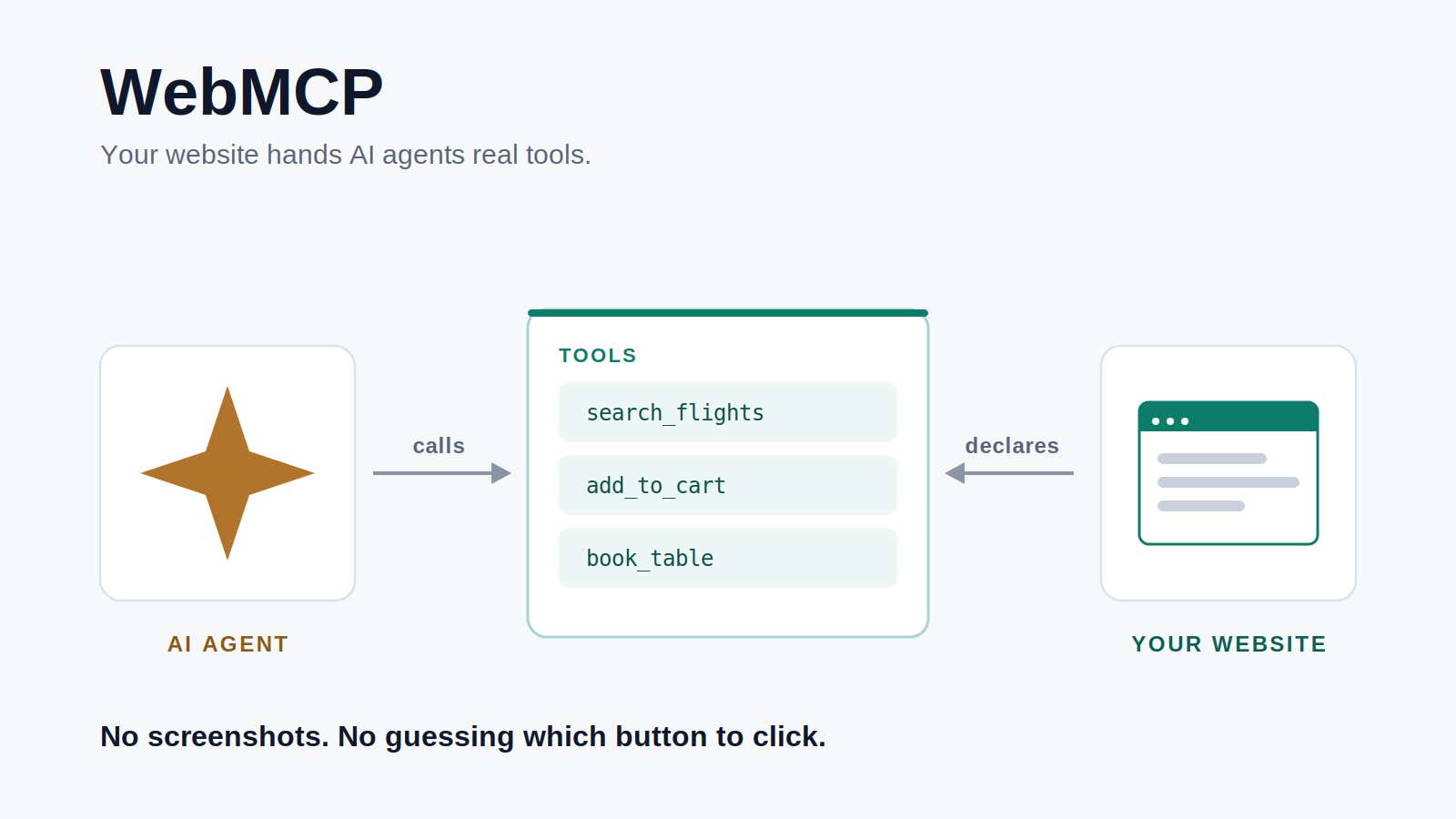
WebMCP is a proposed web standard that lets your website expose its own functionality as tools an AI agent can call directly. Instead of an agent screenshotting your page, guessing which button to click, and screenshotting again to check whether it worked, your page declares a function with a name, a plain language description, and a JSON Schema for its inputs. The agent reads the schema and calls the function.
The API is small. What it asks of you is not, and most of what it asks has nothing to do with JavaScript.
Everything below is accurate as of August 5, 2026. That matters more than usual here, because this specification has changed three times in the last five months, and one of those changes moved the whole API onto a different object. I have dated the specifics so you can judge how stale this is by the time you find it.
Agents Have Been Using Your Website Blindfolded
Actuation is the specification's term for how agents drive websites today. The agent looks at your page through screenshots plus DOM and accessibility tree snapshots, then simulates clicks and keystrokes as though it were a person. It is roughly the experience of blindfolding someone, handing them a mouse, and describing the screen to them out loud.
It works often enough to be useful. It also costs a fortune in tokens, and it breaks the first time you ship a redesign.
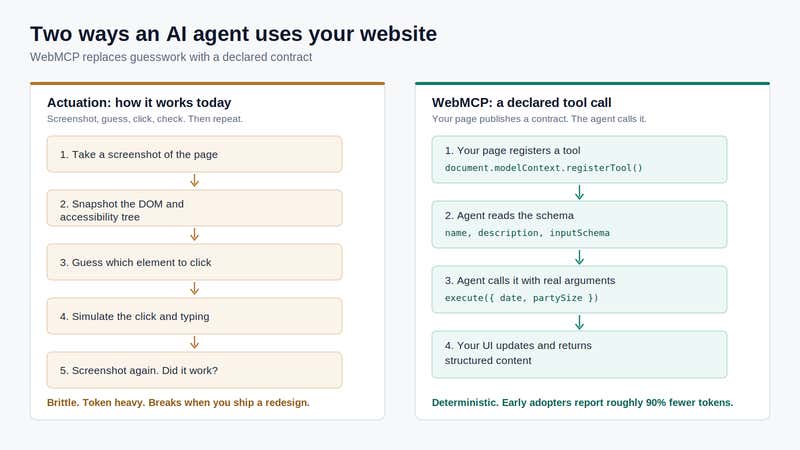
WebMCP takes off the blindfold. A WebMCP tool has nearly the same shape as a server-side MCP tool: a name, a description, an input schema, an implementation. What changes is where it lives. A WebMCP tool runs in the visitor's own tab, already signed in as them, and the browser handles the protocol and transport.
The explainer lists headless browsing, fully autonomous workflows, replacing server-side MCP, and replacing human interfaces as non-goals. This is a human-in-the-loop design on purpose. The tab is open, the person is watching, and your UI updates while the agent works.
What Running Two MCP Servers Actually Taught Us
I want to talk about this part from experience rather than from the spec, because we have been living with MCP for a while now and it has gone somewhere I did not predict.
We shipped the Agility CMS MCP server with 18 tools covering read and write operations. Reads run on their own. Writes wait for you to approve them. You install it by pasting a URL into Claude or Cursor or VS Code, with no terminal and no code.
The demos were fine. What surprised me was how it changed who touches the CMS, and when. Developers started generating content models straight from their frontend code without leaving the editor. Marketers started handing it a messy draft and getting structured, staged content items back. There is a tax you pay to get content published, and that tax got smaller for people who never wanted to think about content modelling in the first place.
Then we shipped a second one, for our documentation, and I expected it to matter much less than it does.
The Agility Knowledgebase MCP server is read-only and needs no authentication, because the docs are public. It has two tools: one searches the documentation, one fetches a full article. Under the hood it queries the same Algolia index that powers the search bar on the docs site, which is to say we built almost nothing new. It works with Claude, ChatGPT, Gemini, Cursor and Windsurf.
That little read-only server changed how people learn Agility. Our own team uses it constantly, and so do partners and customers. Instead of somebody opening three doc pages, half-reading them, and guessing at the fourth, their assistant reads the documentation and answers in the editor where they were already working. I did not have "the docs server is the one people fall in love with" on my list.
Both of those are backend MCP servers. They expose our APIs to any agent, anywhere, with or without a browser open. And neither of them has the faintest idea what page you happen to be looking at right now.
WebMCP Is an MCP Server for the Person on Your Site
The clearest way I can describe WebMCP is that it is like an MCP server for you, scoped to the website you are actually on.
It does not replace a real MCP server, and I would not want it to. A backend MCP server is your AI communication layer, the way you expose your APIs to agents in general: headless, at scale, on a schedule, on behalf of a system rather than a person. That job does not go away.
WebMCP is narrower, which is the interesting part. It runs in your tab and your session, already signed in as you, on the page in front of you, and your UI updates as it works. Nobody had to replicate your authentication anywhere. Nobody had to stand up a service. The tools can change depending on what you are looking at, because they are registered by the page you are looking at.
| Backend MCP server | WebMCP | |
|---|---|---|
| Where it runs | Your infrastructure | The user's open tab |
| Auth | You replicate it | Existing browser session |
| Headless use | Yes | No, by design |
| User sees the result | Only if you build a UI | In your real UI, live |
| Discovery | Registry or config | The page the user is on |
| Ops burden | A service to run | Code you already ship |
You will eventually want both halves. Most teams have one.
A Tool Can Only Answer What Your Content Model Already Knows
This is the part that should concern content people more than developers, and it is why I think a lot of sites will struggle here for reasons that predate WebMCP by a decade.
A tool is a promise that your site can answer a question. If your content is one rich text field per page, you can register all the tools you like and the agent still gets a wall of HTML and a guess. Registering find_customer_stories takes an afternoon. Having customer stories that exist as retrievable items with real fields, instead of paragraphs buried inside five different page layouts, is the actual work, and it is work most teams have been deferring for years.
The failure mode already showing up in early experiments is tools bolted onto content that cannot answer a question. I would not call that a WebMCP problem. It is a content modelling bill that WebMCP happens to make visible from outside the building.
Two Ways to Declare a Tool
There is an imperative JavaScript API and a declarative HTML one, and most sites will want both.
const controller = new AbortController();

await document.modelContext.registerTool({
  name: 'add-todo',
  description: "Add a new item to the user's active todo list",
  inputSchema: {
    type: 'object',
    properties: {
      text: { type: 'string', description: 'The text content of the todo item' }
    },
    required: ['text']
  },
  async execute({ text }) {
    await addTodoItemToCollection(text);
    return {
      content: [{ type: 'text', text: `Added todo item: "${text}" successfully.` }]
    };
  }
}, { signal: controller.signal });
The AbortSignal is your lifecycle hook. Abort it when the component unmounts and the tool drops off the agent's menu, which is how you keep the tool list matched to what is on screen.
The other thing I would flag is execute. It should call the same function your button calls. Write a separate code path for agents and you have quietly shipped a second product, and the two will drift. You also get getTools() to see what is currently registered, and a toolchange event for when that set changes.
The declarative API builds a tool out of a form, with no JavaScript at all:
<form toolname="book_table"
      tooldescription="Reserve a table at the restaurant"
      toolautosubmit>
  <input name="date" type="date" toolparamdescription="Reservation date" />
  <input name="partySize" type="number" toolparamdescription="Number of guests" />
  <button type="submit">Book</button>
</form>
Leave toolautosubmit off and the agent fills the fields, then the browser focuses the submit button and waits for a person to click it. For anything that spends money or sends a message on someone's behalf, that seems like the right default to me. On the receiving end, SubmitEvent picks up an agentInvoked property so you can tell who filled the form, and a respondWith() method so you can hand back structured data instead of triggering a page load.
Scoping is opt-in and fairly strict. Secure context only, gated by a tools Permissions Policy that defaults to self, so a cross-origin iframe needs allow="tools", and an exposedTo array narrows visibility to specific origins. The API also switches off in documents that are not origin isolated, so if you are still setting document.domain, it simply will not be there.
The API Has Moved Three Times in Five Months
If you take one implementation detail from this post, take this one. It is document.modelContext, not navigator.modelContext. The API moved onto document on July 21, 2026, and most tutorials still say navigator, which is a decent way to spot an author who copied an older tutorial instead of reading the current draft.
The rest of the churn, with dates, because it tells you how to build:
provideContext()andclearContext()removed, March 5, 2026.unregisterTool()removed, April 23, 2026. Unregistration is now anAbortSignal.- Namespace moved onto
document, July 21, 2026.
Three breaking changes in five months, on a Draft Community Group Report from the W3C Web Machine Learning Community Group rather than a standard on the W3C standards track. So I would treat this as an architecture problem rather than a coding one: put every call to the platform API behind a single adapter file, pin that file to a dated draft, and go in expecting to rewrite it. Your application code should not mention modelContext anywhere.
There is a second trap that no amount of adapter discipline saves you from. The Chrome origin trial runs from version 149 through 156, and when it expires it fails quietly. Tools stop registering and nothing throws. If you ship this, ship a scheduled check that asserts your tools are still there, or you will find out from a customer.
Your Rich Text Is Now Something an AI Reads as Instructions
That is a strange sentence to write, and it is the part of this standard nobody selling you an AI feature is going to mention.
Tool output does not arrive at an agent as data in a sandbox. It arrives as tokens in the model's context, sitting right next to the model's own instructions. That is indirect prompt injection, and Chrome's security guidance does not hedge about it: it is impossible to guarantee safety inside a large language model. If a blog body on your site contains a line telling an agent to ignore its previous instructions, and you hand that body to an agent through a tool, you have helped attack your own reader.
The specification gives you annotations for this. untrustedContentHint marks output whose provenance you cannot vouch for, and readOnlyHint marks a tool that cannot change state. What took me a minute to appreciate is that untrustedContentHint applies to your own authored content, not just to user comments and reviews. It is a statement about provenance, not about whether you trust your writers. Free text that a human typed into a rich text field is untrusted input to a language model no matter how much you like the human.
None of that is a fix. These are hints to a probabilistic consumer. The mitigations that actually help are the dull ones: leave toolautosubmit off for anything destructive, validate every argument server-side the way you would for a hostile browser, keep scope tight with exposedTo, and stay read-only until you have a good reason not to.
Nobody Is Calling These Tools Yet
WebMCP is available as a Chrome origin trial from version 149 through 156, with local development behind chrome://flags/#enable-webmcp-testing. Edge has an implementation from version 147 behind a flag, which makes sense given that Microsoft engineers co-authored the specification. Firefox and Safari are in the discussions without committing to an implementation. So "browsers support WebMCP" is not really true yet.
Outside of demos, adoption is close to zero, and no mainstream AI agent calls WebMCP tools today. Claude, ChatGPT, Gemini and Perplexity all still drive websites by scraping and screenshotting. Google announced pilot participants at I/O 2026, though none of those deployments have been confirmed publicly. My favourite signal of where this really stands: there are currently more WebMCP checker tools than WebMCP implementations.
I am not going to give you an adoption date. Nobody credible has one, and a post that predicts one ages badly. I will say the incentives point one way, because a JSON function call costs a fraction of a screenshot loop and whoever pays for inference tends to notice. There is also plenty left to settle in the spec, which is fair reason to hold off on the ambitious parts. Output schemas, tool-triggered navigation, user confirmation flows, progress reporting and service worker integration are all still open.
What We Are Doing About It
We have a plan and no code, so let me be precise about which is which. Nothing described here is live on this site today.
Phase one is read-only, and deliberately boring: a site search tool over the Algolia index we already run, and a page sections tool built from the Nav Point components already sitting on our pages. If that sounds familiar, it should. It is the same trick as the docs MCP server, pointed at a different surface. Every platform call goes behind one adapter file pinned to a dated draft, and a scheduled check confirms our tools are still registered.
Phase two is the form write path, and we are not building it yet, on purpose. No mainstream agent calls these tools, so an agent-submittable contact form would buy us a novel spam surface and zero users. When we do get to it, the tool will fill the form and hand it to the person. It will not submit, and it will not tick a consent box on anybody's behalf.
The part I keep coming back to is that the work making any of this possible was not done for AI. Someone pointed out in a component review that we were retyping the same customer quote into five different components, and pushed for shared content lists instead. That decision, made for completely ordinary content management reasons, is what makes a "find customer stories" tool possible now.
Tool Descriptions Are Copy, Not Code
Look at what Chrome's guidance asks you to write. Roughly 30 characters for a tool name. 500 for a tool description. 150 for a parameter description. 1,500 for a tool's output.
Those are not engineering constraints. They are copywriting briefs. Somebody has to decide the tool is called find_flights rather than search, and that its description reads "Search available flights between two airports on a given date. Returns times, prices and stop counts" instead of "Searches flights."
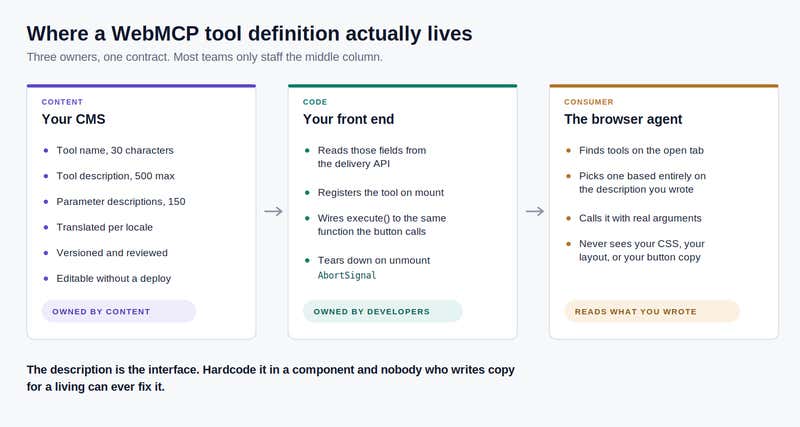
That string is the whole interface between your business and the agent. It is the only thing the agent has to go on when it decides whether to call you, and it never sees your layout, your CSS, or the button copy you tested for a month. Write it badly and the agent either skips you or calls your tool wrong. This is microcopy with unusually high stakes, and right now it is mostly being written by whoever happened to have the component file open.
Some questions worth asking early, while you still only have three of these:
- Who writes them? If the answer is the developer who built the component, you have recreated the problem you had when developers hardcoded button labels.
- Who reviews them? A tool description is a public promise about what your product does, and your other public promises get reviewed.
- How do they get translated? A description hardcoded in a React component is invisible to your localization workflow. A French speaking visitor with a French speaking agent needs a French description.
- Can they change without a deploy? If fixing awkward wording means waiting for a release, it probably will not get fixed.
- Are they versioned? When tool success rates drop, the first question is what changed in the wording.
My honest answer to all of those is that tool definitions belong in the same governed, versioned, localized, editable place as the rest of your content. Your front end reads them from the delivery API and hands them to registerTool. Your developers own the execute function. Your content team owns the words.
What to Do, In Order
Three steps. Only the third one is really about WebMCP, and that ordering is the actual recommendation.
1. Structure the content you already have. Real fields, reusable items, relationships that mean something, question and answer pairs where you have them. This pays off no matter what happens to WebMCP, which is exactly the kind of work I would want to be doing while a specification is still moving around. Teams that already built a clean model for multichannel delivery, or for feeding a working AI content pipeline, have done most of it already.
2. Give long-form content something a machine can filter on. A summary field. A topic. Anything that lets a tool narrow 700 articles down to the three that answer a question. A retrieval tool pointed at unstructured bodies returns noise, and noise is worse than no tool.
3. Then look at tools, read-only first. Search and filter before anything that writes. Pick three high-intent journeys rather than thirty, because tool sprawl makes agents worse at choosing in the same way a hundred nav links make people worse at choosing. Adapter file, feature detection, and the non-agent path stays the only path you promise works.
A lot of vendors are going to point you straight at step three. Steps one and two are where the value is, and they rest on the same groundwork as how sitemap lastmod and IndexNow affect indexing speed. If agents cannot reliably discover your pages, tools on those pages are academic.
Frequently Asked Questions
What is WebMCP?
WebMCP is a proposed web standard that lets a website expose its own functionality as tools, either JavaScript functions or annotated HTML forms, with natural language descriptions and JSON Schema definitions that an in-browser AI agent can discover and call. It replaces DOM scraping and simulated clicks with a declared contract, while keeping the human-facing interface primary.
How is WebMCP different from an MCP server?
A backend MCP server exposes your APIs to any agent, anywhere, headless and at scale, and you host and authenticate it. WebMCP is closer to an MCP server scoped to one person on one site: it runs in the visitor's open tab, reuses the session they are already signed in with, and renders results in your real UI. Replacing server-side MCP is an explicit non-goal of the proposal, and in practice you will want both.
Is it navigator.modelContext or document.modelContext?
It is document.modelContext. The API moved from navigator.modelContext on July 21, 2026. Any tutorial still using navigator predates that change, which is a quick way to check how current a WebMCP article is before trusting the rest of it.
Can I use WebMCP in production today?
Not as a load-bearing feature. WebMCP is a W3C Community Group draft rather than a standard, it is in a Chrome origin trial from version 149 through 156, and the API has had three breaking changes in five months. I would ship it as a progressive enhancement behind feature detection, keep the platform calls in one adapter file, and never let it become the only path to any function.
Which AI agents actually call WebMCP tools?
As of August 2026, effectively none of the mainstream agents do. Claude, ChatGPT, Gemini and Perplexity still interact with websites through screenshots and DOM snapshots. Edge has an experimental implementation behind a flag and Chrome's origin trial is open, but no widely used agent consumes these tools yet.
Does WebMCP work without a browser tab open?
No. Headless operation is an explicit non-goal. WebMCP is built for human-in-the-loop situations where the person has the page open and can see what the agent is doing. Service worker based background discovery is listed as an open question rather than a feature.
WebMCP is a small API sitting on top of a much larger organizational question. The code is an afternoon. Working out who owns a 500 character string that tells machines what your business does, and getting your content into a shape that can answer a question at all, is the part that takes a quarter.
That is the part I would start on now. It is the only part that pays off whether or not a single agent ever calls a single tool.

About the Author
Joel is CTO at Agility. His first job, though, is as a father to 2 amazing humans.
Joining Agility in 2005, he has over 20 years of experience in software development and product management. He embraced cloud technology as a groundbreaking concept over a decade ago, and he continues to help customers adopt new technology with hybrid frameworks and the Jamstack. He holds a degree from The University of Guelph in English and Computer Science. He's led Agility CMS to many awards and accolades during his tenure such as being named the Best Cloud CMS by CMS Critic, as a leader on G2.com for Headless CMS, and a leader in Customer Experience on Gartner Peer Insights.
As CTO, Joel oversees the Product team, as well as working closely with the Growth and Customer Success teams. When he's not kicking butt with Agility, Joel coaches high-school football and directs musical theatre.


