

Everything you need for asset management in a headless CMS
Agility provides asset management built into the headless CMS, keeping images, documents, and video next to the content they support so your team finds and reuses them without a separate system.

If every CMS can do the job, the platform isn't the decision. The company is.
When the feature lists all match, and they mostly do, buyers fall back on whichever name they recognize. We lose that game on purpose. What separates one CMS from another is the part that never shows up in a comparison grid: whether the price holds at renewal, whether support is a real person, whether someone told you the truth about fit before you signed. Picture two gas stations on the same highway, same fuel at the same price, where the only difference is how it feels to stop there. The CMS is a commodity, but being our customer isn't.
Keep your digital assets close to your content
Agility brings asset management into your content management workflow, so marketers can manage the files behind their website without switching between systems.
- 01
Less searching, more publishing
Find images, documents, and video alongside your website content. Reuse them across pages and keep them up to date as your content changes.
- 02
One CMS for content and assets
Manage the digital assets your website uses within Agility instead of creating a separate process for your marketing team.
Asset management in Agility
Manage assets across websites and brands
Agility helps your team reuse digital assets across the websites and brands you manage, while keeping them connected to your content.
One place for all your team's assets
Keep images, documents, and video in the same place as your content, so your team can find, reuse, and manage them without another system.
Find your digital assets
Keep images, documents, and video together with the rest of your content.
Reuse assets across your site
Use the same image, document, or video on multiple pages without uploading another copy.
Update assets in one place
Replace an image or document once and keep the current version wherever it is used.
Manage images for every placement
Resize and deliver images in the dimensions and formats different pages and devices require, without a developer handling every version.
Control who can manage assets
Use roles and permissions to control who can upload, edit, and publish digital assets.
Keep your content and assets together
Manage the files your team uses alongside the pages and content they're used with.
Trusted by teams managing content at scale























































































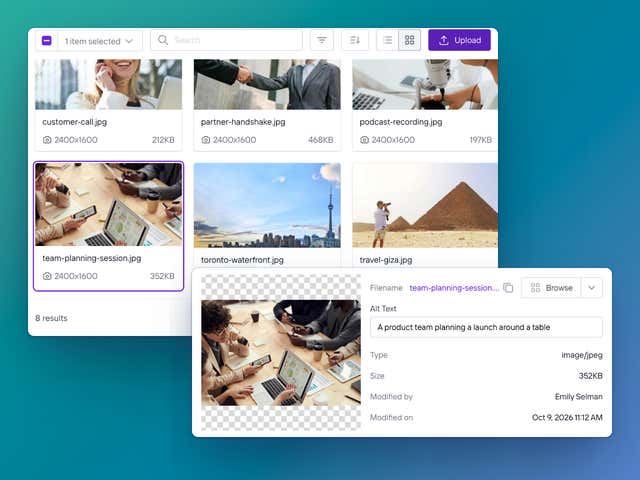
Make asset management part of publishing
A marketer finds the image they need in Agility, adds it to their page, and keeps working. When the image changes, they update it once instead of replacing it everywhere.
Bring your digital assets and content together
Give your team one place to find, reuse, update, and manage the files behind your website.
Answers about asset management
Do we need a separate DAM if we use Agility?
Not always. For most marketing sites, the media library in Agility covers it: images, documents and video sit next to the content that uses them, and every file is served from a global CDN. If your organization already runs a dedicated DAM like Bynder or Cloudinary, keep it. Our marketplace apps let editors pick those assets from inside Agility, so nobody has to move everything over.
Do we have to upload a new version of an image for every size we need?
No. Upload the image once. Your developers request the size, crop or format they need by adding a query string to the image URL, and the CDN builds that version on the fly and caches it. The original file never changes, so your team looks after one image instead of five copies of it.
Can we organize assets for more than one site or brand?
Yes. Folders and galleries let each team find its own files quickly, while the assets everyone uses stay in one place. If you're running several sites, talk to us about the setup before you build it. The right structure depends on how separate your brands really are, and that's easier to get right at the start than to untangle later.