

GEO Fields in Agility CMS: Describe Every Page Once
Write validated structured data in the CMS, and get your pages ready for AI search without the guesswork.

Joel Varty
CTO
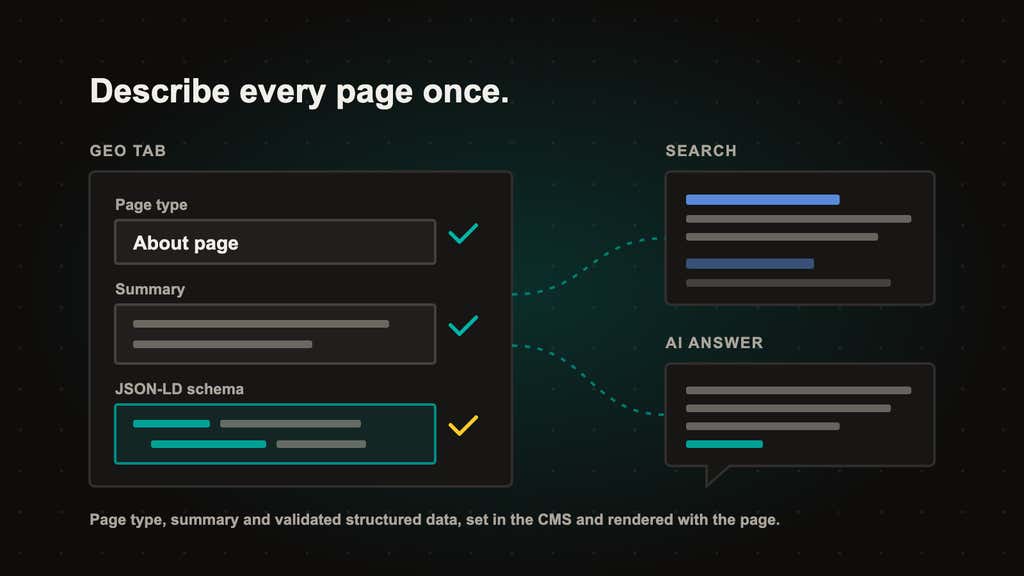
Starting today, everyone using Agility CMS has a new GEO tab (for AI search and structured data) on pages, dynamic pages and the items a dynamic page shows, such as blog posts and products. It's where you tell search engines and AI assistants what a page is and what it answers: a page type, a short summary, and any structured data the page needs, checked as you type. Your live pages pick it up once your developer adds our open source rendering packages to the site, and our Next.js starter already includes them.
Why we built it this way
Until now, structured data in Agility meant pasting a block of code into a page's Additional Header Markup. It worked on some sites and quietly vanished on others, because our App Router starters used to drop that field. Nothing checked the code, so a missing comma broke it without anyone noticing, and the same organization often got described twice on one page.
That's the kind of thing your SEO audit picks up. Tools like Semrush Site Audit flag invalid structured data as an error, and duplicate or missing titles and meta descriptions as errors and warnings, and those issues feed the Site Health score your team reports on. Titles and meta descriptions already have their own fields in the editor. Invalid structured data used to mean a ticket to a developer. Now an editor can write it in the CMS, on the page, and see straight away whether what they typed is valid.
How the GEO tab works
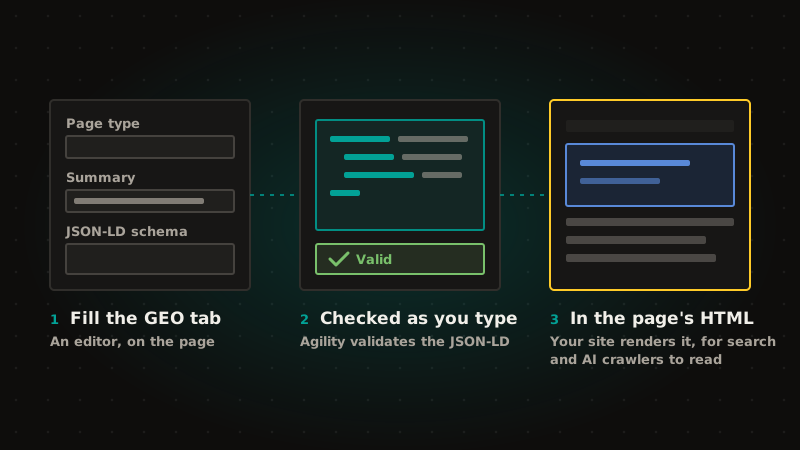
- Pick the page type. About page, contact page, FAQ page, listing, item page or profile. Most pages can stay on Inherit, and a dynamic page sets the type for every item it shows, so every item on it gets the same type without anyone touching it.
- Write the summary. One or two plain sentences that answer the question the page exists to answer. On sites that use
generateAgilityMetadata()from@agility/nextjs, the summary also stands in when a page has no meta description, so it does double duty. - Add JSON-LD schema only for what the content doesn't already say. An award, a profile link, a one-off offer. Agility checks it as you type, a Format button tidies it, and two links open Google's Rich Results Test and the Schema Markup Validator.
- Publish. Your site combines what you entered with what it already knows from the content (a post's title, date, author and image) into one description of the page, in the HTML that search and AI crawlers read.
You don't retype a headline or a price as code. If your site builds those from the content, they stay right when the content changes.
What it won't do (yet)
We'd rather tell you now than have you find out in a quarterly report.
- Nobody can promise you more AI citations. The best controlled study we found, from Ahrefs in May 2026, saw no clear lift in AI citations from adding structured data. Google says its AI features don't need special markup. Microsoft has said structured data helps its AI understand content. What we can say is that every page will describe itself once, accurately and in the same way, and that part is in your control.
- An FAQ page type won't bring back FAQ rich results. Google limited those to a small set of government and health sites in 2023. The markup still describes the page.
- Include in llms.txt and AI Crawlers are saved but don't do anything on their own yet. They take effect once your site's robots.txt and llms.txt read them. Generating those files for you is planned.
- Your site has to render the fields. Nothing changes on a live page until your developer adopts the helpers. Ask them what your site already builds from content, so you don't enter it twice.
What you need
- Access to edit pages or content in Agility.
- A developer to add
@agility/geo(or the updated Next.js starter) to your site once. Our developer post is the one to forward them. - If you already pasted JSON-LD into Additional Header Markup, move it to the JSON-LD schema field and clear the old one, so the page isn't described twice.
Learn more
- Using the GEO tab
- Rendering SEO and GEO metadata on your site, for your developer
- What's new in this release: changelog
- For your developer: Rendering Agility's GEO fields with @agility/geo
Frequently asked questions
Will this get our brand cited by ChatGPT or Google's AI Overviews?
We can't promise that, and we'd be wary of anyone who does. The evidence that structured data raises AI citations is weak. What the fields give you is a clean, validated description of every page, in the server-rendered HTML, which is how you clear the structured-data audit errors you can see today, and it leaves you ready for however AI search reads pages next.
Do I need a developer?
Once. Your developer adds the helpers to the site, and from then on editors manage everything in the tab.
Which content gets the tab?
Pages, dynamic pages, and the items in a list that backs a dynamic page. Other content items don't have it.
Does this replace our SEO fields?
No. Your page title, meta description and keywords stay where they are. The summary fills in for a missing meta description, and the structured data replaces code you'd otherwise paste into Additional Header Markup.


