

Next.js 16 broke my preview!
It was a chore ticket... rename a file, run the codemod, ship it. And then an editor clicked Preview... oops.

Joel Varty
CTO
The Next.js 16 upgrade sat on our maintenance list for a while before anyone picked it up. If it ain't broke, don't fix it! It was not a project that had any real oomph behind it, it was a chore ticket, the kind you grab on a slow afternoon because it has been sitting there long enough to feel embarrassing. Also, I think some curiosity was involved: is Next 16 any better? Let's find out!
And for most of the codebase that is exactly what it was. Run the codemod, read the diff, fix the couple of things it could not work out on its own. Build passed, tests passed, every page came up.
This is about the one thing that did not come up, and why it took us so long to notice.
Short version, in case that is all you came for. In Next.js 16, middleware.ts becomes proxy.ts and it runs on Node instead of the edge. That puts it behind your CDN cache instead of in front of it. If you were doing anything with query strings in there, and the URL happens to point at a page that can be cached, your code does not run any more. Ours did not. Preview broke.
What a broken preview looks like in Web Studio
You open Web Studio, click Preview, and the page comes up. Looks right. Loads fast. Then you click a heading to change the wording and nothing happens.
No outlines around the components, no pencil icons. The little Agility badge that normally sits on the edge of the frame is not there either. What you are actually looking at is our live website, loaded inside the editing tool, with no idea it is supposed to be editable.
Kevin Tran on our engineering team is the one who chased this down. He has been living in Web Studio live editing for months, so he had a much better instinct than I did for what "preview loads but does nothing" was likely to mean.
The hard part was that there was nothing to look at. No error anywhere. Nothing failing in the network tab. Nothing in the logs either, because as far as the server was concerned it had served a perfectly good page and been thanked for it. Status 200, valid HTML, quick. It was just the wrong page, and nothing in the stack had an opinion about that.
And the only people who could see it were editors, which means the bug report you get is "preview is broken." Fair enough, but that is not much to work with when the cause could be anything from the SDK to a permissions problem to the deploy itself.
Why preview mode matters so much in a headless CMS
I want to sit on this for a second, because it is easy to read "preview broke" as a cosmetic problem and it really is not. We build a headless CMS. The entire idea is that content is decoupled from the thing that renders it, which is excellent for developers and a bit unnerving for whoever is actually writing the content. They are not editing a page. They are editing structured fields, and preview is the only place they ever get to see what those fields turn into.
So when preview goes down, editors are not mildly inconvenienced. They are working blind. Some will stop and file a ticket. Others will publish and then go look at the live site to check their work, which means any mistake gets a public airing first. I would put preview and live editing in the top two or three things that decide whether a team actually likes the CMS they are stuck with all day. Nobody ever renewed because the content API was tidy.
It is worth spelling out what actually has to happen for preview to work, because in a headless setup it is more moving parts than people expect. The CMS is holding a draft version of the content that is not published anywhere yet. The front end is a separate application, deployed on its own, and normally it only ever asks for published content. So preview means handing that application a signed key, having it recognize the key and put itself into draft mode for that one request, having it fetch the unpublished version of the content instead of the live one, and then injecting the Web Studio SDK so the rendered page can talk back to the CMS and light up the editable regions.
Five things in a row, and if any single one of them does not happen you get a page that looks perfect and does nothing. In our case it was the very first one. The key never got recognized, so everything downstream of it was fine and simply never got asked.
What our middleware.ts was doing before Next.js 16
You need to know what used to be there to see why it went missing. Our old middleware.ts sat in front of every request and looked for three things in the query string:
-
Enter preview:
?agilitypreviewkey=rewrites to/api/preview, which turns on draft mode and injects the Web Studio SDK. -
Exit preview:
?AgilityPreview=0redirects to/api/preview/exit. -
Dynamic page deep link: a bare
?ContentID=rewrites to/api/dynamic-redirect, which resolves the content item to its real URL.
// original middleware.ts (trimmed)
if (request.nextUrl.searchParams.has("agilitypreviewkey")) {
  return NextResponse.rewrite(`.../api/preview?...&agilitypreviewkey=${key}`)
} else if (previewQ === "0") {
  return NextResponse.redirect(`.../api/preview/exit?...`)
} else if (contentIDStr) {
  return NextResponse.rewrite(`.../api/dynamic-redirect?ContentID=${contentID}`)
}
That file had been quietly doing its job for years. It worked because Edge Middleware ran ahead of the CDN, so it saw every request before the platform decided whether to answer from cache. Nobody on the team knew that detail was load bearing, because nobody had ever needed to know it.
What the middleware-to-proxy codemod does not migrate
proxy.ts is the Next.js 16 replacement for middleware.ts. Almost everything about it is the same. Same NextRequest and NextResponse, same config.matcher. The export is called proxy now, it runs on the Node runtime, and there is a codemod for the mechanical part, npx @next/codemod@canary middleware-to-proxy. The config flags got renamed to match, so skipMiddlewareUrlNormalize became skipProxyUrlNormalize.
So we ran it and reviewed the diff. A rename and some flags, which is what the release notes said it would be.
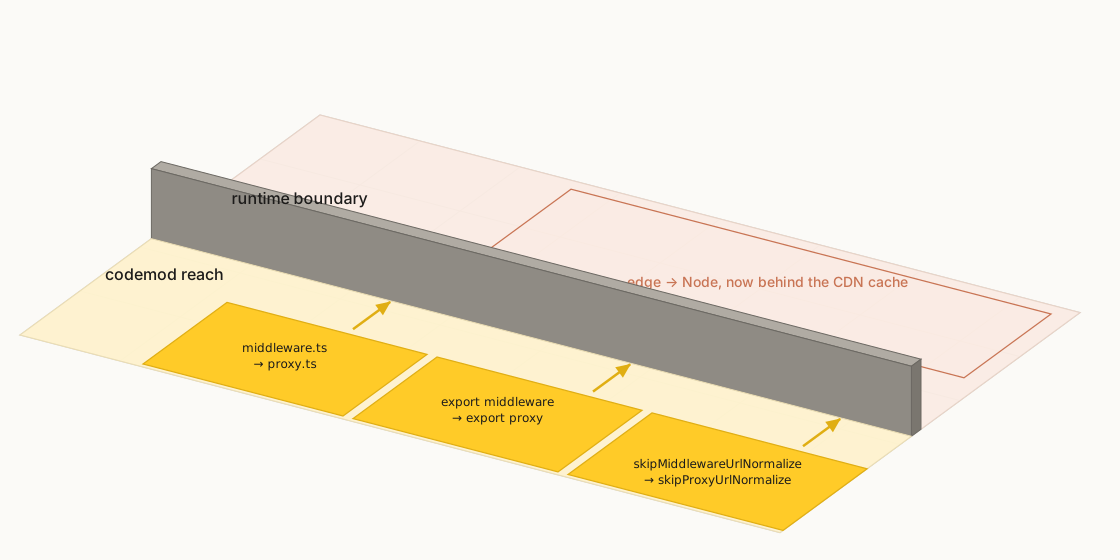
Preview worked locally. Tests passed. I want to be clear that I do not think anybody dropped the ball here, because every check we had came back clean and this failure needs a CDN in front of it before it will show itself at all.
Why a cached page never reaches proxy.ts
The thing that unlocked it turned out to be fairly obvious once somebody said it out loud. A preview link does not point at some special preview route. It points at a real page on the real site, /blog/whatever, the same URL any visitor would hit. And that page is prerendered and sitting in the cache.
So the request turns up with ?agilitypreviewkey= on the end, and the CDN does its job. Route matches, cache entry is warm, here you go, straight from the edge. The Node proxy never gets woken up. Which means the key never reached /api/preview, draftMode() never got called, the Web Studio SDK never got injected, and the editor got a beautiful page with nothing behind it.
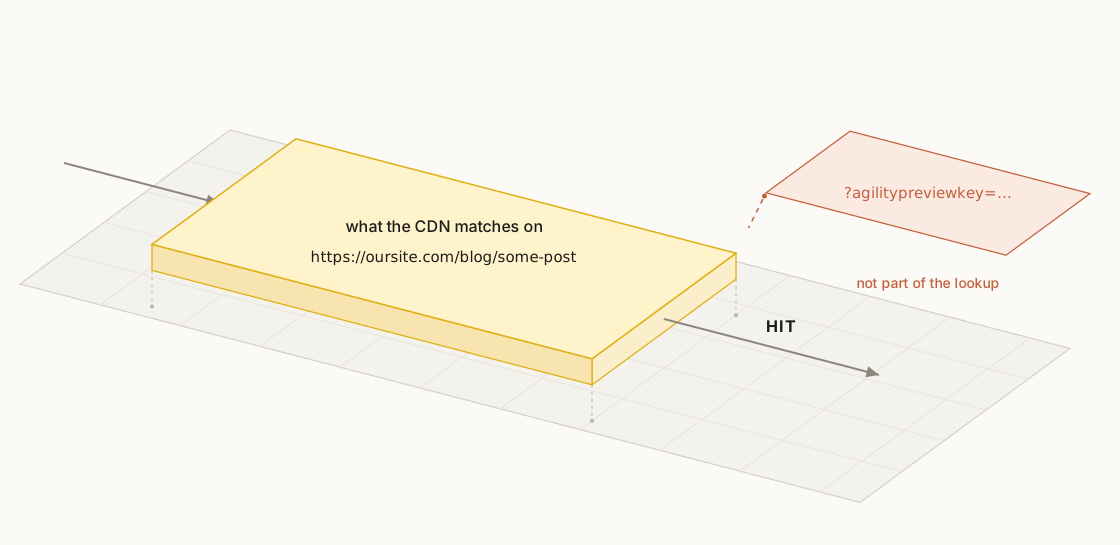
Edge Middleware ran in front of the cache. The Node proxy runs behind it. That is the whole thing.
Is this a Vercel problem? We saw it on Netlify too
My first assumption was that this was something about the way Vercel handles ISR, and that somewhere there would be a setting for it. There was not, and then we saw the same behaviour on Netlify, which killed that theory and honestly made me a lot more confident in the diagnosis.
It makes sense looking back. If you put a CDN in front of an origin, the CDN answering first is not a bug, it is the entire product. Nothing about our hosting changed here. We moved our own code to the other side of a line we did not know was there.
That mattered in a practical way, not just a philosophical one. For as long as we thought it was a platform quirk, we were looking for a platform setting.
The same cache bug hit our ContentID deep links
Preview was fixed. Not long after, a complaint came in that looked completely unrelated: clicking a Dynamic Page item in the Web Studio sidebar was dumping editors on the home page.
Worth a word on why that link exists at all, because it is something a lot of content-only headless systems simply do not have. Agility keeps a real page tree and sitemap alongside the content, so pages have URLs that we own and manage, and a Dynamic Page can resolve a content item to the specific URL it renders at. That is what lets an editor click a blog post in the sidebar and land on the actual rendered page for it, rather than on a form or a JSON payload. The ?ContentID= link is the mechanism that turns a content item into a location.
Those sidebar links use a bare ?ContentID= URL. Same story as preview. Parameter ignored, cached page served, and because the manager app syncs its state to whatever page actually loaded, Web Studio helpfully followed the editor to the wrong place and updated the sidebar to match. Kevin's branch for that one was named fix-web-studio-contentid-cache, which tells you he recognized the shape of it immediately the second time around.
If your query string routing broke in one place, it broke everywhere at once. You just have not received all the tickets yet. Go through the rest of it in one sitting.
How to fix Next.js 16 preview with next.config.ts rewrites
Two things we could have done and did not. We could have forced the proxy back onto the edge runtime, which fights where the framework is clearly heading. Or we could have turned off caching on those routes, which makes the site slower for everybody in order to fix something only a handful of editors ever see.
What works is the routes manifest that Next.js builds out of next.config.ts. A rewrites() or redirects() entry with a has condition ends up in that manifest, and the host's router checks it before it looks in the cache. The same fix works on Vercel and on Netlify, because it is not a runtime trick. It is just routing declared somewhere earlier in the chain.
// next.config.ts
async rewrites() {
  return {
    beforeFiles: [
      // Enter preview, even for a cached page
      {
        source: "/:path((?!api).*)",
        has: [{ type: "query", key: "agilitypreviewkey" }],
        destination: "/api/preview?slug=/:path",
      },
      // Bare ?ContentID= deep links, same pre-cache treatment
      {
        source: "/:path((?!api).*)",
        has: [{ type: "query", key: "ContentID" }],
        destination: "/api/dynamic-redirect",
      },
    ],
  }
},

async redirects() {
  return [
    // Exit preview
    {
      source: "/:path((?!api).*)",
      has: [{ type: "query", key: "AgilityPreview", value: "0" }],
      destination: "/api/preview/exit?slug=/:path",
      permanent: false,
    },
  ]
}
Kevin shipped it in two pull requests, preview first and the deep links after. Then he deleted the dead code out of proxy.ts, which left it looking like this:
// proxy.ts after the fix, the preview and ContentID logic is gone
export default async function proxy(_request: NextRequest) {
  // redirect table + bloom filter, fast path, zero I/O
  return NextResponse.next()
}
Preview works again. Draft mode turns on, the overlay loads. Normal traffic is still coming out of the cache, which we checked on the cache headers on both hosts, because the has condition only matches requests that actually carry those keys.
If you are migrating to proxy.ts, check these four things
Four things, and the first one is the only one that would have saved us real time.
-
Before you rename the file, go through every query string branch inside it and ask whether the page it targets could come out of a cache. Anything that could is already broken.
-
Do not trust local dev on this. Nothing is edge cached in
next dev, so your proxy runs on every request and it all looks great. Test preview against a real deployment. -
Do not start with the host. We lost time there.
-
The codemod handles the rename. It cannot tell you where your logic needs to live relative to a CDN. That part is still your job.
None of this makes me sour on the release, incidentally. I wrote about the Next.js 16.2 Adapter API a few months back and I still think it is the right direction for CMS powered sites. This is just what the other side of a major version looks like.
What I keep coming back to is that nothing here was actually broken. Every line of code did what it said it would. The site just answered "can I serve this from cache" before it got anywhere near the code that would have said "hold on, not this one." Routine upgrades are where that kind of thing lives, because a routine upgrade is one you do not stop to think very hard about. The rename really was a five minute job. It was everything downstream of the rename that cost us.


