
Why AI Agents Keep Nuking Your Next.js Dev Server
Why your dev server explodes when you code with an AI agent, and the one-line config that stops it

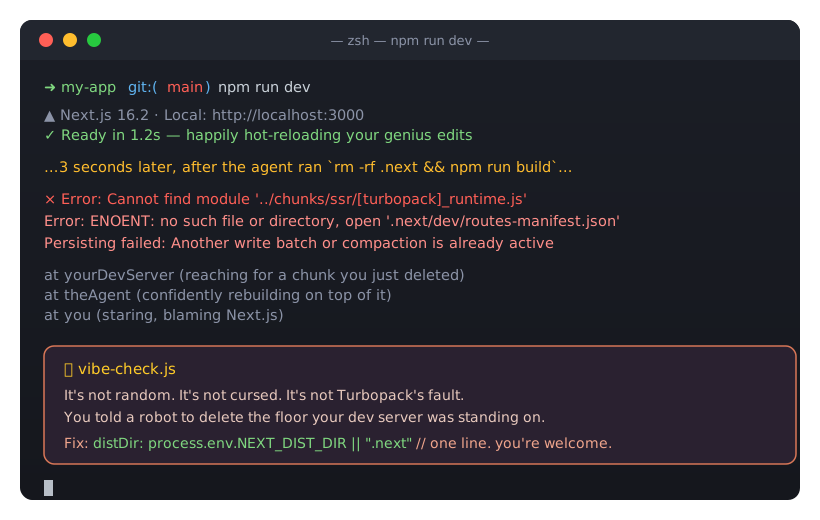
If you're like me, you're not only coding a lot more lately, you're getting an AI agent to do a good chunk of it for you. It's great. But it comes with a few new headaches I never used to have. This is one of them, and it turned out to be really easy to fix, so I figured I'd share.
If you pair with an AI coding agent on a Next.js app, your dev server crashes because the agent runs a production build against the same .next directory your dev server is actively using. The one-line fix is to make the build output directory env-driven with distDir, so verification builds write somewhere the dev server never touches.
You have probably seen it happen mid-session:
⨯ Error: Cannot find module '../chunks/ssr/[turbopack]_runtime.js'
Error: ENOENT: no such file or directory, open '.next/dev/routes-manifest.json'
Persisting failed: Another write batch or compaction is already active
One second HMR is happily hot-reloading your edits. The next, every route 500s and the only cure seems to be killing the server and nuking .next. It feels random. It isn't.
The root cause: two processes, one .next
Next.js keeps all of its build output in the .next directory: compiled chunks, route manifests, and Turbopack's persistent cache. Both next dev and next build use it, and they are not designed to run against the same .next at the same time.
Here is the part that makes it an AI-dev problem specifically. When you work with an agent, the loop looks like this:
- You have
npm run devrunning so you can see changes live. - The agent makes an edit.
- The agent wants to verify the change, so it runs something like
rm -rf .next && npm run build.
That third step is the killer. The agent deletes the directory your dev server is reading from, then a production build starts rewriting it with a different layout. Your still-running dev server reaches for a chunk that just got deleted, giving you Cannot find module '…/[turbopack]_runtime.js'. Turbopack's cache tries to compact a database another process is also writing, giving you Another write batch or compaction is already active. The manifest it expects is gone, giving you ENOENT: routes-manifest.json.
A human developer rarely hits this because we don't run next build every 30 seconds while next dev is up. An agent, eager to confirm its own work, does. So it breaks all the time.
The fix: give verification builds their own directory
The clean fix is to stop the two processes from ever touching the same output folder. Next.js lets you set the output directory with distDir, so make it env-driven:
// next.config.ts
const nextConfig: NextConfig = {
  // Verification/CI builds set NEXT_DIST_DIR so `next build` writes elsewhere
  // and never deletes or overwrites the dev server's own `.next`.
  distDir: process.env.NEXT_DIST_DIR || ".next",
  // ...
}
Now the agent, your CI, or you can build without going anywhere near the dev server's directory:
NEXT_DIST_DIR=.next-verify npm run buildnext dev keeps using .next. The build writes to .next-verify. They never collide. Add the new folder to .gitignore and you're done:
/.next/
/.next-verify/
Two habits that help even more
The distDir split is the seatbelt. A couple of workflow rules keep you out of the crash entirely:
- Don't full-build to check types. A production build is a heavy way to answer "did this compile?"
npx tsc --noEmittypechecks the whole project, writes nothing, and finishes in a fraction of the time, with no.nextinvolved at all. - Verify rendering against the dev server you already have. If you want to confirm a page actually renders,
curlthe running dev server or open it in the browser. You don't need a second build to look at output. - Never
rm -rf .nextwhile dev is running. If you truly need a clean build, clean your isolated dir (rm -rf .next-verify), never the one the dev server owns.
Didn't Next.js 16 already fix this?
Partly. Next.js 16 moved development artifacts into a separate .next/dev folder so a production build no longer overwrites the files a running dev server reads. Next.js 16.2 went further and added a dev server lock file at .next/dev/lock that stores the running server's PID, port, and URL, then prints an actionable error when a second next dev tries to start. That same lock also stops two next build processes from running at once and corrupting each other's artifacts.
Those changes close two real gaps, and if you are on 16.2 or later you should absolutely rely on them. But neither one covers the exact case that bites AI-agent workflows. The lock file guards against a second next dev and against two concurrent next build runs. It does not stop a single next build from writing into the same .next your dev server is live-reading. And the .next/dev split is irrelevant the moment an agent runs rm -rf .next, because that deletes .next/dev right along with everything else.
The framework moved in the right direction. It just hasn't closed the gap where the agent points a build, or a delete, at the directory the dev server owns. The distDir split does, because the two processes never share a folder in the first place.
If you're configuring an AI agent
Bake these into the agent's instructions: a CLAUDE.md or AGENTS.md file, a rule, or a saved memory. Next.js documents the recommended agent setup, including the AGENTS.md convention, if you want the official baseline to build on.
Never run
rm -rf .nextor a plainnext buildwhile a dev server may be running. Typecheck withtsc --noEmit. When a real build is needed, isolate it withNEXT_DIST_DIR=.next-verify.
That one guardrail turns "my dev server breaks every few minutes" into a non-issue, and it costs you a single line of config.

About the Author
Joel is CTO at Agility. His first job, though, is as a father to 2 amazing humans.
Joining Agility in 2005, he has over 20 years of experience in software development and product management. He embraced cloud technology as a groundbreaking concept over a decade ago, and he continues to help customers adopt new technology with hybrid frameworks and the Jamstack. He holds a degree from The University of Guelph in English and Computer Science. He's led Agility CMS to many awards and accolades during his tenure such as being named the Best Cloud CMS by CMS Critic, as a leader on G2.com for Headless CMS, and a leader in Customer Experience on Gartner Peer Insights.
As CTO, Joel oversees the Product team, as well as working closely with the Growth and Customer Success teams. When he's not kicking butt with Agility, Joel coaches high-school football and directs musical theatre.


