

Rendering Agility's GEO Fields with @agility/geo
From the editor's tab to server-rendered JSON-LD: the data shape, the minimal Next.js and plain JavaScript code, and how the graph merges.

Joel Varty
CTO
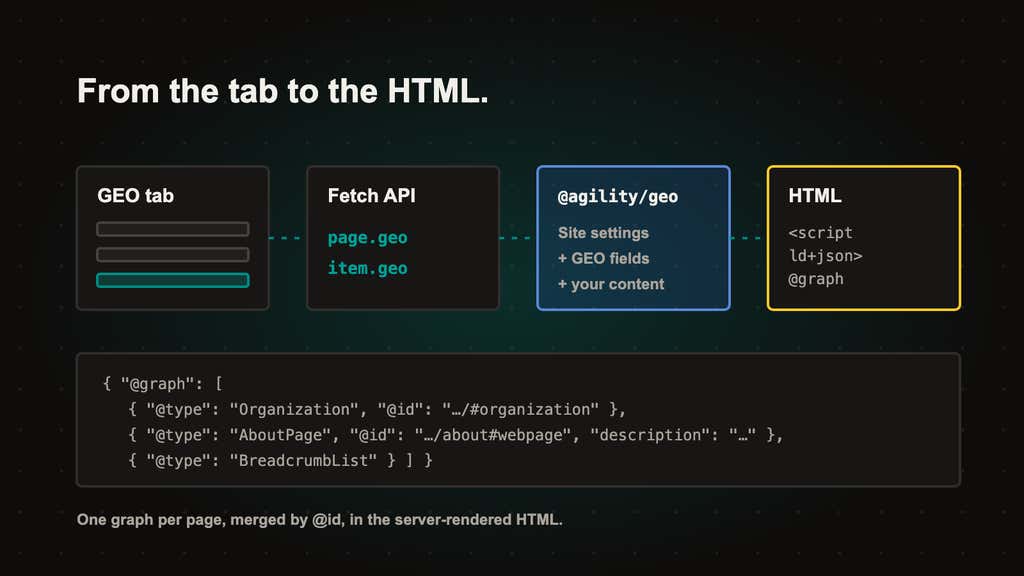
Starting today, every page, dynamic page and dynamic-page item in Agility CMS has a GEO tab, and its fields reach your site through the Fetch API. Two open source packages render them: @agility/geo 0.1.2 builds one schema.org JSON-LD graph per page in any JavaScript runtime, and @agility/nextjs 16.1.0 adds <AgilityJsonLd /> and generateAgilityMetadata() for the App Router. The Agility Next.js starter already uses both.
Why this replaces Additional Header Markup
Structured data used to mean editors pasting a <script type="application/ld+json"> block into Additional Header Markup. Nothing validated it, nothing merged it with what the site generated, and our App Router starters used to drop it. The new fields are typed data instead of an HTML string, so your code owns the markup and editors own the facts.
How it works, end to end
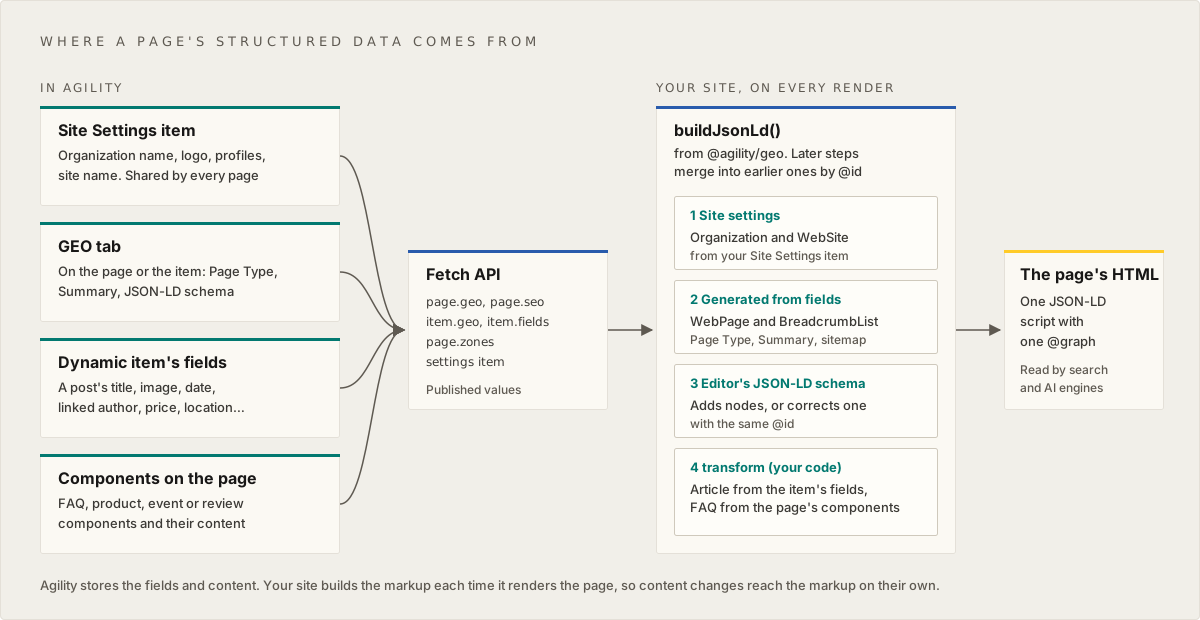
- An editor fills the tab: a Page Type (schema.org), a Summary, and JSON-LD schema that's validated as they type. Two AI settings sit beside them.
- Agility stores it and serves it on the page and on the item: Fetch API (REST and GraphQL), Management API, the MCP server and the CLI all carry it. Nothing is generated inside Agility.
- Your site builds the graph when it renders the page, from those fields, the content itself and your site settings.
- The JSON-LD is in the server-rendered HTML, so crawlers that don't run JavaScript see it, and audit tools read it without JavaScript rendering on.
The data looks like this (each property is omitted when it isn't set):
page.geo = {
	schemaType: "AboutPage", // WebPage, AboutPage, ContactPage, CollectionPage, FAQPage, ItemPage, ProfilePage
	summary: "An answer-first, plain-text summary.",
	structuredData: { /* the editor's JSON-LD: a node, an array, or an @graph */ },
	ai: { llmsInclude: "inherit", crawl: "inherit" },
}
A dynamic item has its own item.geo with the same shape. Page Type and the AI settings inherit from the dynamic page; Summary and JSON-LD schema never do, so posts don't all share one summary.
Next.js: the minimal code
If your site started from the Next.js starter, its latest version already renders both. On your own App Router site:
npm install @agility/nextjs@16.1.0 @agility/geo
// app/[...slug]/page.tsx
import { AgilityJsonLd, generateAgilityMetadata } from "@agility/nextjs/geo"

export async function generateMetadata(props: PageProps): Promise<Metadata> {
	const agilityData = await getAgilityPage(props)
	return generateAgilityMetadata({
		page: agilityData.page,
		item: agilityData.dynamicPageItem,
		url: pageUrl,
		locale,
		title: agilityData.sitemapNode?.title,
		titleTemplate: "%s | Example",
	})
}

// inside the page component
<AgilityJsonLd
	page={agilityData.page}
	item={agilityData.dynamicPageItem}
	url={pageUrl}
	path={agilityData.sitemapNode?.path}
	locale={locale}
	sitemap={sitemapFlat}
	siteSettings={siteSettings}
/>
generateAgilityMetadata() returns only what the page sets (title, description with Summary as the fallback, canonical, robots, hreflang alternates), so merge it over your defaults. Canonical, robots, SEO title and share image come from seo.canonicalUrl, seo.robots, seo.title and seo.ogImage. In this release those are API-only: the Manager App has no field for them, so editors can't set them, and you or an agent set them through the Management API, MCP or the CLI. <AgilityJsonLd /> is a component because Next.js metadata can't emit <script> tags, and it renders on the server.
Any other JavaScript framework
@agility/geo has no dependencies and runs in Node.js, edge functions or the browser. Build the graph where you render the page on the server, and put the tag in the head:
import { buildJsonLd, jsonLdScriptTag } from "@agility/geo"

const graph = buildJsonLd({ page, item, url, locale, sitemap, siteSettings })
const tag = jsonLdScriptTag(graph) // <script type="application/ld+json">…</script>
Always use jsonLdScriptTag or serializeJsonLd, never JSON.stringify. Editors write the Summary and JSON-LD schema, and escaping stops text such as </script> breaking out of the tag.
The graph merges by @id
buildJsonLd() builds one @graph in this order: Organization and WebSite from your site settings; the WebPage (typed by Page Type, described by Summary) and a BreadcrumbList from the sitemap; then the editor's JSON-LD schema; then your transform, which runs last.
- A node whose
@idis already in the graph is merged into it. Its properties win, and arrays are replaced. - A node with a new
@id, or none, is added.
So an editor can correct a generated value by reusing its @id (<page URL>#webpage, https://www.example.com/#organization). Use transform to build nodes from content you already have, such as a BlogPosting from a post's title, date and author, or questions from an FAQ Component on an FAQPage. Build from fields, not pasted copies, and the markup follows the content when it changes. The docs have transform helpers for both.
What's stored but inert
- AI Crawlers (
geo.ai.crawl) and Include in llms.txt (geo.ai.llmsInclude) are saved and served, but block and list nothing until your ownrobots.txtandllms.txtroutes read them. Builders for both are planned. - Site settings aren't in the product yet. Pass
siteSettingsfrom your own Site Settings item or from config. - There's no preview of the final JSON-LD in Agility. Check the rendered page with the Rich Results Test, or run
validateJsonLd()on the built graph in your tests. - Only items in a list that backs a dynamic page get the tab.
Learn more
- Rendering SEO and GEO metadata on your site
- Adding structured data and AI-crawler rules
- Using the GEO tab, to send your editors
- What's new: changelog
- For your marketing team: GEO fields in Agility CMS: describe every page once
Frequently asked questions
Does anything change on my site when the tab appears?
No. Existing Additional Header Markup keeps rendering, and nothing new reaches a page until you adopt the packages. When you do, move pasted JSON-LD into the JSON-LD schema field and clear the old one, or the page describes the same thing twice.
Do I need @agility/content-fetch to use @agility/geo?
No. The package reads plain objects, so any Fetch API client works. With @agility/content-fetch, use 2.0.14 or later for the geo types.
Will FAQPage markup get me FAQ rich results?
Probably not. Google limited those to a few government and health sites in 2023. The markup still describes the page accurately.


