What is your developer-dependent CMS actually costing you? Calculate your costs and get a full report


Going Live
Rendering SEO & GEO Metadata on Your Site
How a page's SEO and GEO fields, its content, and your site settings become one JSON-LD graph and the page's <head> metadata, with @agility/geo and @agility/nextjs.
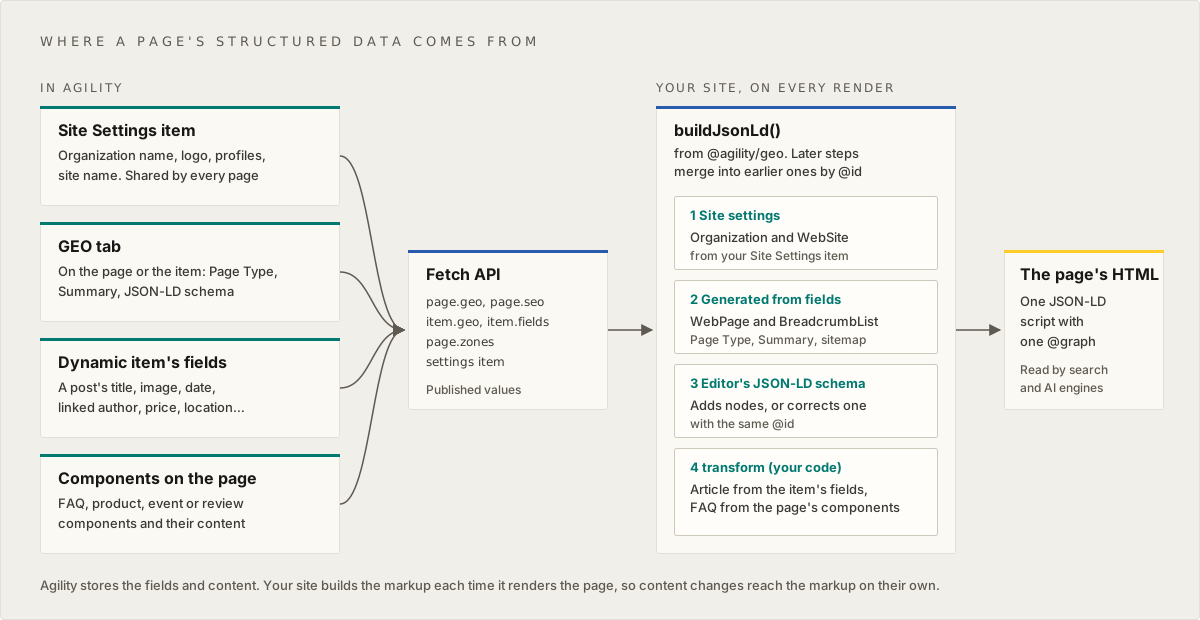
Agility stores your pages' SEO and GEO fields and returns them from the Fetch API. It doesn't write markup into your site. Your site builds the structured data (JSON-LD) and the <head> metadata each time it renders a page. It builds them from those fields and from the content itself.
This article covers where that markup comes from, how the pieces combine, and how to build it with @agility/geo and @agility/nextjs.
The short version
- Nothing is generated inside Agility. Saving or publishing a page doesn't create JSON-LD. Your site creates it when it renders the page.
- Most of it is built automatically by
buildJsonLd()from@agility/geo, or<AgilityJsonLd />in Next.js: an Organization and WebSite, the page's WebPage, and a breadcrumb. - Content you already have becomes structured data in your code. A blog post's title, image, date and author can become a BlogPosting. An FAQ component's questions can become an FAQ. Nobody retypes them as JSON-LD.
- Editors fill the gaps with the JSON-LD schema field on the GEO tab: anything the site can't work out from content. They can also correct a generated value.
- Everything ends up in one
@graph, in one<script type="application/ld+json">, merged by@id.
The fields
Editors set these on the GEO tab of a page's or item's SEO panel. The Fetch API returns them as page.geo (and item.geo for a content item that a dynamic page renders), and leaves out anything that isn't set:
| Field on the GEO tab | Fetch API property | Values |
|---|---|---|
| Page Type (schema.org) | geo.schemaType | WebPage, AboutPage, ContactPage, CollectionPage, FAQPage, ItemPage, ProfilePage; not set means inherit |
| Summary | geo.summary | Plain text, up to 2,000 characters (300 recommended) |
| JSON-LD schema | geo.structuredData | A JSON-LD object or array, validated when it's saved |
| Include in llms.txt | geo.ai.llmsInclude | inherit, include, exclude |
| AI Crawlers | geo.ai.crawl | inherit, block |
@agility/content-fetch 2.0.14 and later types them on Page and ContentItem (GeoProperties).
Where a page's structured data comes from
A real page usually combines four sources:
| Source | What it holds | Who maintains it | How it gets into the graph |
|---|---|---|---|
| A Site Settings item | Your organization's name, logo and social profiles, and the site's name and search URL | Whoever owns the brand, once | You load it and pass it as siteSettings. It becomes the Organization and WebSite nodes every page references |
| The GEO fields on the page, or on a dynamic page's item | Page Type (schema.org), Summary, JSON-LD schema | Editors, per page or item | Read automatically from page.geo / item.geo. Page Type and Summary shape the WebPage node; JSON-LD schema is merged in |
| A dynamic item's own fields | A post's title, image, publish date and linked author; a product's price; an event's dates and venue | Editors, as normal content | Your transform code builds a node from them, such as a BlogPosting |
| Components on the page | An FAQ component's questions, a product component, reviews, an event listing | Editors, as normal content | Your transform code reads them from page.zones, such as an FAQ's questions |
Plus the sitemap, which gives every page its BreadcrumbList.
The rule of thumb: if a fact already lives in a field, build the markup from that field in code. The markup then follows the content when it changes. Keep the JSON-LD schema field for what isn't anywhere else: an award, a sameAs link for one person, a special offer.
How the pieces combine
buildJsonLd() builds one graph, in this order:
- Site settings: Organization and WebSite.
- Generated from the fields: the WebPage (its
@typefrom Page Type, its name from the page title, its description from Summary or the meta description, its language from the locale), and a BreadcrumbList from the sitemap. - The editor's JSON-LD schema, merged by
@id. - Your
transform, which runs last and can add, change or remove anything.
Merging by @id works like this:
- A node with an
@idthat's already in the graph is merged into that node. Its properties replace the earlier ones; arrays are replaced, not added to. - A node with a new
@id, or with none, is added.
So an editor can correct anything the site generates by using the same @id. Use stable @ids so the sources line up:
| Node | @id |
|---|---|
| Organization | https://www.example.com/#organization (your organization URL + /#organization) |
| WebSite | https://www.example.com/#website |
| The page's WebPage | <page URL>#webpage |
| The page's breadcrumb | <page URL>#breadcrumb |
| Your own nodes | <page URL>#article, <page URL>#product, …: pick one per type and document it for editors |
Who wins when code and an editor describe the same thing
Your transform runs after the editor's JSON-LD, so by default your code wins. That's usually backwards: the editor is the one correcting the page. The addOrFill helper below adds a node, or fills in only the properties the editor hasn't set. An editor who pastes { "@id": "https://www.example.com/blog/hello-world#article", "headline": "Hello, world!" } then corrects the headline, and your code still supplies the image, dates and author.
Set up: Next.js
@agility/nextjs/geo (in @agility/nextjs 16.1.0 and later) has two pieces:
generateAgilityMetadata()forgenerateMetadata: the<title>, description, canonical URL, robots,hreflangalternates and share image.<AgilityJsonLd />for the page: the JSON-LD<script>. Next.js metadata can't output<script>tags, so it's a component. It renders on the server, so AI crawlers that don't run JavaScript still see it, and it escapes editor text safely.
npm install @agility/nextjs@latest @agility/geo @agility/content-fetch@latest
@agility/geo is a peer dependency of @agility/nextjs, needed only for the /geo entry point.
With the Next.js starter
The Agility Next.js starter already renders both, from the page's fields, the dynamic item's GEO fields and the sitemap: <AgilityJsonLd /> in app/[...slug]/page.tsx, and generateAgilityMetadata() in lib/cms-content/resolveAgilityMetaData.ts. To add your site settings and content-built nodes, pass two more props to <AgilityJsonLd /> in the page route. The page already imports AgilityJsonLd, getAgilityContext, getSitemapFlat and getPageUrl; add these imports:
// app/[...slug]/page.tsx
import getAgilitySDK from "lib/cms/getAgilitySDK"
import { blogPostingFromItem, combineTransforms, faqFromComponents, type PostItem } from "lib/cms-content/jsonld"
import { getFaqEntries, getSiteSettings } from "lib/cms-content/jsonldSources"

export default async function Page({ params }: PageProps) {
	const agilityData = await getAgilityPage({ params })
	if (!agilityData.page) notFound()
	// …the starter's page template and getPageScripts() code

	const { locale, sitemap } = await getAgilityContext()
	const sitemapFlat = await getSitemapFlat({ channelName: sitemap, languageCode: locale })

	// added: your site settings, and nodes built from the page's content
	const languageCode = agilityData.languageCode || locale
	const api = await getAgilitySDK()
	const siteSettings = await getSiteSettings(api, languageCode)
	const faqs = await getFaqEntries(api, agilityData.page, languageCode)
	const item = agilityData.dynamicPageItem
	const post: PostItem | undefined = item?.properties?.definitionName === "Post" ? item : undefined

	return (
		<>
			<AgilityJsonLd
				page={agilityData.page}
				item={item}
				url={getPageUrl(getPagePath((await params).slug))}
				path={agilityData.sitemapNode?.path}
				locale={languageCode}
				sitemap={sitemapFlat}
				siteSettings={siteSettings}
				transform={combineTransforms(blogPostingFromItem(post), faqFromComponents(faqs))}
			/>
			{/* …the rest of the starter's page */}
		</>
	)
}
getPagePath is the helper at the bottom of the starter's page.tsx. Set SITE_URL in production: the starter builds every canonical URL and @id from it. The helpers are below. Rename the reference names and fields to match your content models.
1. Site settings from a content item
Most sites already keep the organization's name, logo and social links in a Site Settings item, for the header and footer. Map it once, and every page gets the same Organization and WebSite:
// lib/cms-content/jsonld.ts
import type { ContentItem } from "@agility/content-fetch"
import type { GeoSiteSettings, JsonLdNode, JsonLdTransform } from "@agility/geo"

/** The fields of your Site Settings item (rename to match your model). */
export interface SiteSettingsFields {
	siteName?: string
	siteUrl?: string
	organizationName?: string
	logo?: { url: string }
	socialProfiles?: string // one URL per line
	searchUrl?: string
}

/** Map a Site Settings item to the Organization and WebSite every page shares. */
export function toGeoSiteSettings(fields: SiteSettingsFields | undefined): GeoSiteSettings | undefined {
	if (!fields) return undefined
	return {
		organization: {
			name: fields.organizationName || fields.siteName,
			url: fields.siteUrl,
			logo: fields.logo?.url,
			sameAs: (fields.socialProfiles || "").split(/\s+/).filter(Boolean),
		},
		website: { name: fields.siteName, url: fields.siteUrl, searchUrl: fields.searchUrl },
	}
}
// lib/cms-content/jsonldSources.ts
import type { ApiClientInstance, ContentItem, ContentList, Page } from "@agility/content-fetch"
import { toGeoSiteSettings, type FaqEntry, type SiteSettingsFields } from "./jsonld"

/** Your Site Settings item: the first item in the list with this reference name. */
export async function getSiteSettings(api: ApiClientInstance, locale: string) {
	const list: ContentList = await api.getContentList({ referenceName: "sitesettings", locale, take: 1 })
	return toGeoSiteSettings(list.items[0]?.fields as SiteSettingsFields | undefined)
}
Anything else about the organization (legalName, foundingDate, address) can go in organization.properties, as an object or as a JSON string from a text field on the same item. A searchUrl with {query} in it, such as https://www.example.com/search?q={query}, becomes a SearchAction.
A built-in settings model for this is planned. Until then, use your own item, or pass the settings from configuration.
2. Content from a dynamic page's item
On a dynamic page (a blog post, a product, an event), the item's own fields are the best source of structured data. This builds a BlogPosting from a post, links it to the page and the organization, and leaves anything the editor set alone:
// lib/cms-content/jsonld.ts (continued)

/**
 * Add a node, or fill in the properties a node with the same @id doesn't have yet.
 * Properties already in the graph (from an editor's JSON-LD schema) are kept.
 */
export function addOrFill(graph: JsonLdNode[], node: JsonLdNode): JsonLdNode[] {
	const existing = graph.find((n) => n["@id"] && n["@id"] === node["@id"])
	if (!existing) return [...graph, node]
	for (const [key, value] of Object.entries(node)) {
		if (existing[key] === undefined && value !== undefined) existing[key] = value
	}
	return graph
}

/** Run several transforms in order. */
export function combineTransforms(...transforms: (JsonLdTransform | undefined)[]): JsonLdTransform {
	return (graph, ctx) =>
		transforms.reduce<JsonLdNode[]>((current, transform) => (transform ? transform(current, ctx) ?? current : current), graph)
}

/** A blog post's fields (rename them to match your model). */
export interface PostFields {
	title: string
	date?: string
	image?: { url: string; label?: string }
	author?: { fields?: { name?: string; url?: string } }
}

/** A blog post as the Fetch API returns it. */
export type PostItem = ContentItem<PostFields>

/** A BlogPosting built from the post's own fields. */
export function blogPostingFromItem(post: PostItem | undefined): JsonLdTransform {
	return (graph, { url, siteSettings }) => {
		if (!post) return graph
		const { title, date, image, author } = post.fields
		const orgUrl = siteSettings?.organization?.url
		return addOrFill(graph, {
			"@id": `${url}#article`,
			"@type": "BlogPosting",
			headline: title,
			image: image?.url,
			datePublished: date,
			dateModified: post.properties.modified,
			author: author?.fields?.name
				? { "@type": "Person", name: author.fields.name, url: author.fields.url }
				: undefined,
			publisher: orgUrl ? { "@id": `${orgUrl.replace(/\/$/, "")}/#organization` } : undefined,
			mainEntityOfPage: { "@id": `${url}#webpage` },
		})
	}
}
The linked author arrives with its fields when the item is fetched with contentLinkDepth of 1 or more. Otherwise fetch the author item yourself.
The same pattern works for any type: a Product from a product item's name, image and price, an Event from its dates and venue, a Person from a team-member item.
3. Content from the components on the page
Components are content too. When an editor sets a page's Page Type (schema.org) to FAQPage, this adds the questions from the page's FAQ components to that page's WebPage node:
// lib/cms-content/jsonld.ts (continued)

/** One question from an FAQ component (rename the fields to match your model). */
export interface FaqEntry {
	question: string
	answer: string
}

/** When the page type is FAQPage, add the page's questions to its WebPage node. */
export function faqFromComponents(entries: FaqEntry[]): JsonLdTransform {
	return (graph, { url, geo }) => {
		if (geo.schemaType !== "FAQPage" || entries.length === 0) return graph
		return addOrFill(graph, {
			"@id": `${url}#webpage`,
			mainEntity: entries.map((entry) => ({
				"@type": "Question",
				name: entry.question,
				acceptedAnswer: { "@type": "Answer", text: entry.answer },
			})),
		})
	}
}
// lib/cms-content/jsonldSources.ts (continued)

/** An FAQ component's fields: a linked list of question items (rename to match your model). */
interface FaqFields {
	questions?: ContentItem<{ question: string; answer: string }>[]
}

/** The questions from every FAQ component on the page, in page order. */
export async function getFaqEntries(api: ApiClientInstance, page: Page, locale: string): Promise<FaqEntry[]> {
	const components = Object.values(page.zones ?? {})
		.flat()
		.filter((component) => component.module === "FAQ")

	const lists = await Promise.all(
		components.map(async (component) => {
			// fetched with contentLinkDepth 0, a component is a reference ({ contentid }); deeper, the item itself
			const ref = component.item as { contentID?: number; contentid?: number }
			const contentID = ref.contentID ?? ref.contentid
			if (!contentID) return []
			const faq: ContentItem<FaqFields> = await api.getContentItem({ contentID, locale, contentLinkDepth: 1 })
			const questions = Array.isArray(faq.fields.questions) ? faq.fields.questions : []
			return questions.map((q) => ({ question: q.fields.question, answer: q.fields.answer }))
		}),
	)
	return lists.flat()
}
Two things to know:
- The editor's Page Type decides. The code only adds the questions when the page is an FAQPage, so editors control which pages claim to be FAQs.
- Structured data must match what's visible on the page. Build it from the same content the component renders, never from a separate copy. Google now shows FAQ rich results for very few sites, but the markup still describes the page to search and AI engines.
Dynamic pages
When your site renders an item on a dynamic page, both have GEO fields. They combine like this:
| Field | Comes from |
|---|---|
| Page Type (schema.org) | The item's, else the dynamic page's, else your site settings' defaultSchemaType, else WebPage |
| AI Crawlers, Include in llms.txt, robots | The item's, else the dynamic page's |
| Summary, JSON-LD schema | The item's own only |
| The WebPage's name | The item's sitemap title (pass sitemap) |
| Description | The item's Summary, else the item's meta description |
So the dynamic page sets the defaults for all its items (for example, every post is an ItemPage that AI crawlers may read). It never copies its own summary or JSON-LD onto every item. Pass the item to <AgilityJsonLd item={…} /> or buildJsonLd({ item }) and these rules are applied for you.
<head> metadata
generateAgilityMetadata() returns only what the page sets, so merge it over your site's defaults:
| Output | From |
|---|---|
<title> | The page title (or, on a dynamic page, the title you pass, such as the sitemap node's) through your titleTemplate. An SEO title, when the page has one, is used as the whole title, with no template |
| Description | The meta description, else the Summary |
| Keywords | The meta keywords |
| Canonical URL | The page's URL without its query string or fragment, unless the page has a canonical override |
| Robots | The page's (or item's) robots setting, when it has one |
hreflang alternates | The page's URL in each locale, with x-default, when you pass alternates (from resolveAgilityAlternates()) and the page exists in two or more locales |
| Share image | The page's share image, when it has one |
The SEO title, canonical override, robots setting and share image aren't on the SEO panel in this release, so on most pages these come from the page title, the meta description or Summary, and the page's URL.
On a dynamic page, every value comes from the item's own fields, never the dynamic page's, except robots, which falls back to the dynamic page's.
The starter already calls it in lib/cms-content/resolveAgilityMetaData.ts and merges the result with the tags in Additional Header Markup. In your own App Router site, call it from generateMetadata:
// app/[...slug]/page.tsx
import type { Metadata } from "next"
import { generateAgilityMetadata } from "@agility/nextjs/geo"
import { getAgilityPage, type PageProps } from "lib/cms/getAgilityPage"
import { getPageUrl } from "lib/cms-content/getSiteUrl"

export async function generateMetadata(props: PageProps): Promise<Metadata> {
	const agilityData = await getAgilityPage(props)
	return generateAgilityMetadata({
		page: agilityData.page,
		item: agilityData.dynamicPageItem,
		url: getPageUrl(agilityData.sitemapNode?.path),
		locale: agilityData.languageCode,
		title: agilityData.sitemapNode?.title,
		titleTemplate: "%s | Example",
	})
}
When the markup changes
- Applying changes on the GEO tab saves the fields in Staging. Your preview site shows them.
- Publishing makes them live in the Fetch API.
- The markup on your live site changes the next time your site renders the page: on its next build, or when its revalidation or publish webhook runs. That depends on your site, not Agility. The starter, for example, revalidates pages every 60 seconds.
- Search and AI engines see the change when they next crawl the page.
Everything built from fields and content follows the content automatically. JSON-LD pasted into JSON-LD schema doesn't. If an editor types a product's price into it, the markup is wrong the day the price changes. That's the main reason to build from content.
When a Site Settings item changes, every page's markup changes. Make sure publishing that item revalidates all pages, not just one (for example, with a cache tag every page uses).
Sites that don't use Next.js
@agility/geo has no dependencies and runs in any JavaScript runtime: Node.js, edge functions, the browser.
import { buildJsonLd, serializeJsonLd, type BuildJsonLdOptions } from "@agility/geo"

declare const options: BuildJsonLdOptions // { page, item, url, locale, sitemap, siteSettings, transform }

const jsonLd = buildJsonLd(options)
const tag = `<script type="application/ld+json">${serializeJsonLd(jsonLd)}</script>`
Always serialize with serializeJsonLd (or jsonLdScriptTag, which returns the whole tag), never JSON.stringify. Editors write the Summary and JSON-LD, and plain JSON lets text such as </script> break out of the tag.
On other stacks, read page.geo and page.seo (and item.geo / item.seo for a dynamic item) from the Fetch API and build the graph the same way. If your site renders none of these, the fields are stored and served, but nothing appears on your pages.
The AI settings
AI Crawlers and Include in llms.txt are stored and returned by the Fetch API (geo.ai.crawl, geo.ai.llmsInclude), but they don't block or list anything by themselves. They take effect only when your site's robots.txt and llms.txt routes read them. See Controlling Which Crawlers and AI Bots Can Read Your Site for a robots.txt route, and Making Your Agility-Powered Site Readable by AI for an llms.txt route. Builders for both files are planned for @agility/geo.
Check the result
Agility doesn't preview the final JSON-LD: the JSON-LD schema field validates only what the editor typed. Check the page your site renders:
- Open it in Google's Rich Results Test or the Schema Markup Validator. The GEO tab links to both.
- In code or tests, run
validateJsonLd()on the built graph. It flags broken JSON, misspelled types, and the same organization described twice under different@ids:
import { buildJsonLd, validateJsonLd, type BuildJsonLdOptions } from "@agility/geo"

declare const options: BuildJsonLdOptions

const { valid, errors, warnings } = validateJsonLd(buildJsonLd(options))
Moving from Additional Header Markup
Before these fields, JSON-LD went into Additional Header Markup. That still renders, but as a separate block: it isn't validated, escaped or merged, so the same organization can end up described twice. Move it into JSON-LD schema or, better, into site settings and code. Then clear the old field. Sites not yet on these packages can keep using Additional Header Markup as before.
On this page