


PostHog (Beta)
Beta: see page and content analytics inside Agility, and create and read PostHog A/B tests without switching tools. It needs a specific content model and event tracking on your site, so talk to us first.
- Analytics
- A/B Testing
Analytics and A/B tests where the content is written
Content teams usually find out how a page performed from someone else, later. The PostHog app is a beta that puts PostHog's numbers and experiment results in the Agility editor. It does need a specific setup, so we'd rather say that up front.
What you can do
- Dashboard: site-wide page views, unique visitors, scroll depth, time on page, top pages, referrers and locale breakdown.
- Page sidebar: views, unique visitors, scroll and time distributions, referrers and UTM sources for the page you're editing.
- Content item sidebar: impressions, scroll, clicks and the pages that use a piece of content.
- A/B testing: see experiment status, variant performance and statistical significance, with live results from PostHog.
- Create experiments in Agility: a three-step modal with templates for CTA, engagement and conversion tests.
Who it's for
Teams already on PostHog who have a developer to add event tracking and set up the A/B test content model. It reads data from PostHog US Cloud, so EU Cloud and self-hosted setups don't work yet. If that isn't you, another analytics app may fit better.
It's a beta with a real setup step. The docs cover the model and the tracking events, and support@agilitycms.com can help.
Get started
- Create a PostHog API key In PostHog, create a personal API key with experiment and feature flag write access and query read access, scoped to your project.
- Install the app Open Settings → Apps in Agility, install PostHog and enter the API key and project ID.
- Track events on your site Send pageview, scroll, time and link-click events with your Agility page and content IDs, as the docs describe.
- Set up your A/B test model For A/B tests, add an experiment key and a variants list to your component model.
- Open the sidebars Use the dashboard, page sidebar and content item sidebar to view results.
Setting it up
Screenshots
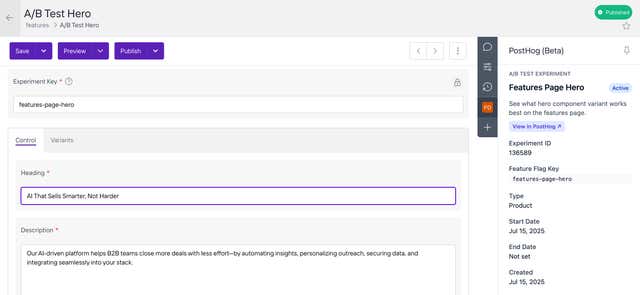
Experiment Details
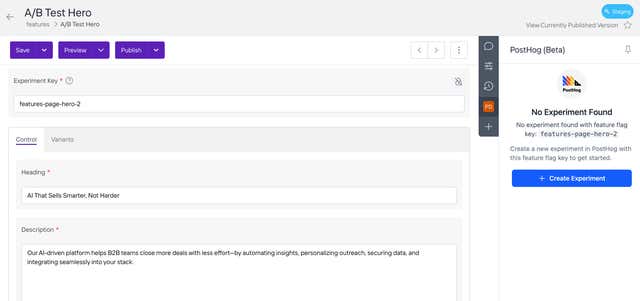
Creating an Experiment