



PostHog
Run experiments and product analytics with PostHog, and create and read them from inside the content item you're testing.
- Analytics
Integration Overview
PostHog brings product analytics, session replay, feature flags and experiments together in one tool. The Agility app puts the experiment part inside the CMS, so the people writing the variants can create an experiment and read its result without opening another tab.
What is PostHog?
PostHog is an open-source product analytics platform. It tracks how people move through your product, records sessions, and runs feature flags and A/B tests off the same event data. It can also run in your own infrastructure, which is usually the deciding factor for teams with data residency requirements.
We run PostHog on this website. That isn't a claim that it's the best analytics tool for you, because plenty of teams are better served by something else. It's the one we use, and the app exists because we needed it ourselves first.
A note on the beta
The app is in beta and expects a particular content model: an experiment key on the item, with control and variant content beneath it. Email support@agilitycms.com before you start and we'll set the model up with your team rather than leave you guessing at it.
Why use this integration?
The experiment sits beside the content
Open the content item and the sidebar shows the live experiment, its feature flag key, its status and when it started, with a link straight through to PostHog.
One set of events behind everything
Analytics, session replay, feature flags and experiments all read the same event data, so a funnel report and an experiment result can't quietly disagree with each other.
Editors can start an experiment
If no experiment matches the key on the item, the sidebar offers to create one. Writing the variants and running the test stop being two jobs in two tools.
Self-hosting is on the table
PostHog can run in your own infrastructure. If data residency is what's holding up your analytics decision, that's often what settles it.
Steps for Implementation
- 1
Create a PostHog project
Sign in to PostHog and create the project your experiments will live in. You'll need its project API key and a personal API key with write access.
- 2
Talk to us about the content model
While the app is in beta the model isn't self-serve. Email support@agilitycms.com and we'll set up the experiment key and variant structure with you.
- 3
Install the app in your instance
Go to Settings, then Apps, and install PostHog. Paste in the keys from step one.
- 4
Add the experiment field to a model
Add the PostHog field to the content model you want to test. Editors get the sidebar as soon as they open an item built on it.
Documentation
Setting up the PostHog app
Our own documentation for installing and configuring the app.
PostHog experiments
PostHog's guide to running A/B tests and reading the results.
Screenshots
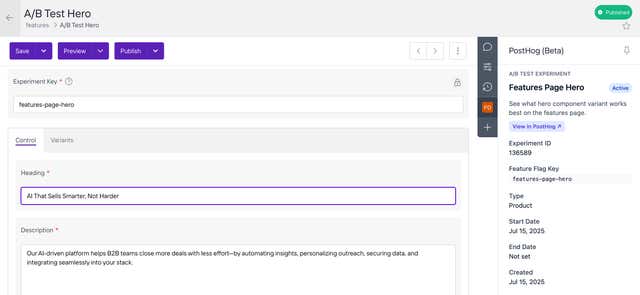
A live experiment shown beside the content it's testing
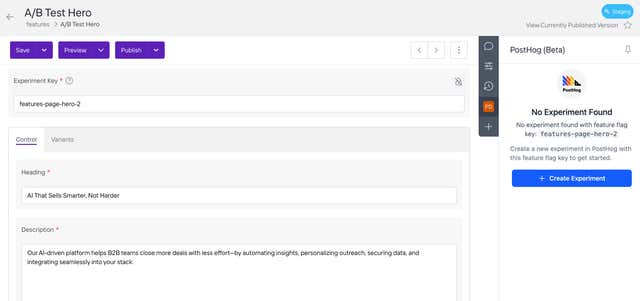
Creating an experiment without leaving the content item