
What Is an AI Content Pipeline?
How to stop copying and pasting, and start reviewing and approving.

TL;DR
- What it is: An AI content pipeline takes raw, unstructured input (drafts, transcripts, notes) and produces a fully structured, staged CMS item — metadata mapped, images uploaded, ready for human review
- The problem it solves: The copy-paste workflow between a doc and a CMS is structural busywork (slugs, excerpts, categories, alt text) — exactly the kind of work AI handles well
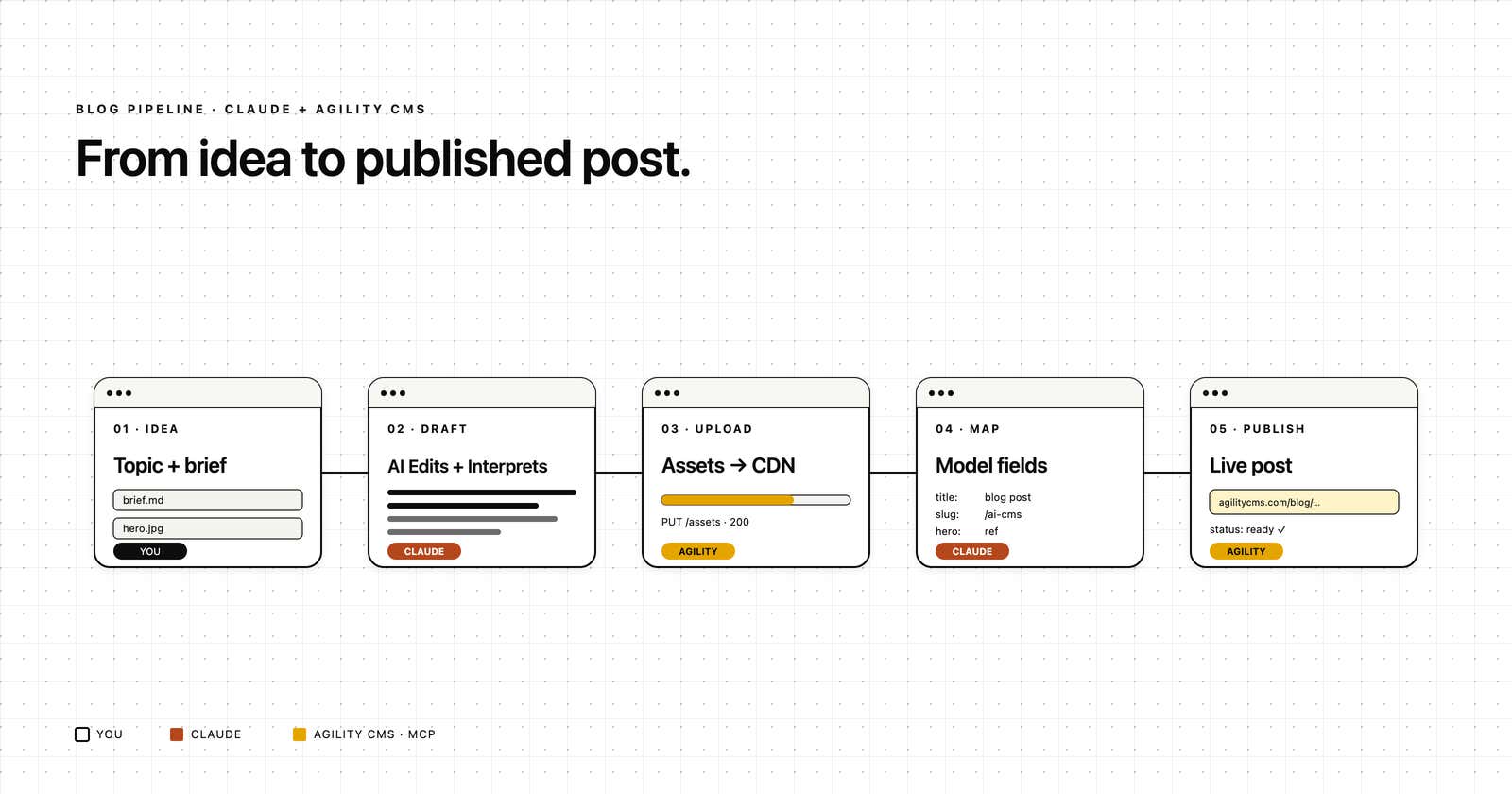
- How it works: Five stages — gather inputs, plan/draft in Claude, upload images via MCP, draft full content object, save to staging and return a preview link
- Three things you need: A skill file (your content model + voice rules), brand guidelines (any doc format), and the Agility CMS MCP connector
- Same pattern, multiple use cases: Blog posts, generating component models from front-end code, or querying your CMS in plain English — all run the same input → Claude → MCP shape
- Quality caveat: This is not an AI slop machine — output quality tracks with input quality; a thin brief gets thin content, a real draft gets something worth publishing
- The editor's job shifts, not disappears: Compose-and-populate work gets handed off to the pipeline; judgment, review, and publish stay with the human
Nobody types content directly into a CMS. They write in Word or Google Docs, then copy and paste into the CMS and try to figure out which field is the slug, which is the meta description, and what categories are available. An AI content pipeline removes all of that. You give it unstructured content, and it lands a fully structured item in your CMS: metadata mapped, images uploaded, alt text written, translations handled, ready for review.
FYI: For our AI Agent, we're using Claude (since it's the best out there current, imo), but this works for any AI Agent that supports MCP.
What Is an AI Content Pipeline?
An AI content pipeline is a defined sequence of AI-powered steps that takes raw, unstructured input and produces a finished item in your CMS. The pipeline knows your content model, your brand voice, your locales, and anything else that's important to your workflow. It even knows who YOU are. You provide the source material, and AI handles the mapping, formatting, translation, and save.
Note that this is NOT an AI slop pipeline (although it COULD be). If you've worked with AI agents and LLMs at all, you know that, like all systems, garbage in begets garbage out. If you provide good creative and copy, the AI is only helping convert that into the fields that your content models require, formatting, and validating brand voice.
The word that matters is "pipeline." It's not a one-and-done prompt, although it might appear as a single process step to the user. It's a series of steps that runs every time, in the same order, to produce the same shape of output. Draft; apply brand guidelines; map metadata; upload assets; save to staging; translate. Save translations. Return preview links.
The Copy-Paste Problem
Watch how a blog post actually gets published at most companies:
- Someone writes a draft in a document.
- They hand it to a marketer.
- The marketer opens the CMS and starts filling in fields. Title goes here. Subtitle here. Slug, what's the convention? Excerpt, but how many characters? Which category is this under? Are we using the new taxonomy or the legacy one? Does the hero image need resizing? What's the alt text? Has this been translated yet?
None of that work is creative. It's actually structural, and structural work is exactly the kind of thing AI does well when you give it the right instructions.
What a Pipeline Actually Does
A blog post pipeline has multiple stages. Two of them are your inputs and Claude's drafting work. Two of them are Claude talking to the CMS through an MCP connector. The fifth closes the loop with a preview link.

- Gather is where you hand in a topic, any source material like a transcript or a rough draft, and any images. This is the only stage with human work, and it's the kind of work humans want to do: having an idea and providing context.
- Plan is where Claude reads your brand guidelines, picks the voice, identifies the primary keyword, and generates a URL slug. Nothing has touched the CMS yet.
- Upload is the first stage that reaches the CMS. Claude calls the MCP server to upload images to the media library, writes alt text for each one, and gets back the CDN URLs.
- Draft happens back in Claude's context. The excerpt gets written. The body gets written. Categories get mapped. Tags get mapped. Author and date get set. The post is now a complete, structured object ready to save.
- Save is the second stage that reaches the CMS. The full payload goes to the MCP server. The item lands in staging. Back comes a preview URL for reading the post in context, and an editor URL for making tweaks.
The Pieces That Make a Pipeline Work
Three things need to exist before a pipeline can run.
- A skill file. This is where your content model lives. Required fields, voice guidelines, slug rules, image handling, locales. It's a plain-text document that Claude reads every time the pipeline runs. One skill file per content type. Build it once, version it with your code, use it forever.
- Brand guidelines. A PDF, a Word doc, whatever you have. Attach it to the project. One line in the skill file tells Claude to use it as a guardrail on every draft. Every post goes through the same brand filter.
- An MCP connector. This is what actually writes to your CMS. MCP (Model Context Protocol) is the standard that lets AI tools talk to external systems safely. The Agility CMS MCP connector exposes the CMS API as a set of tools Claude can use with your permission on every call.
One useful shortcut on the skill file: you don't have to write it by hand. If you have the code that renders your content on the front end, give that to Claude and ask it to generate a skill for creating the same thing. The code already knows what fields exist, what they mean, and how they're used. Claude reads it and writes the instructions.
The Same Pattern Works in Other Directions
A blog post is the obvious example because every team has one, but the pipeline shape is the interesting part, not the output, per se. Input on the left, Claude stages in the middle, MCP calls to the CMS at the end. That shape works anywhere you interact with your CMS.
From Code to Component Model

Point Claude Code at the folder where your front-end components live, or even your ideas for new components (design artifacts, code, prototype URLs, Figma etc). It reads all that, figures out what props each component takes and how they're used visually, checks your Agility instance for existing models it can extend, proposes field types for anything new, and saves the models as needed. A developer who used to spend an afternoon hand-building content types in the CMS gets a draft model in a few minutes. Then they review it, same as an editor reviews a draft post.
Ask Your Agility Instance

This one runs in reverse. You ask a question in plain English. Claude picks the right MCP tool to answer it, fetches the data from your CMS, and explains what came back. "How many blog posts did we publish last quarter?" "Which posts are tagged with both AI and Enterprise?" "What's the content model for our case studies?" No clicking through screens. No knowing where things live. Just an answer.
Three pipelines. Three directions. Same pattern.
What the Editor's Job Becomes
The CMS user's role is shifting. Most marketers and editors I talk to are already spending the bulk of their time reviewing content, previewing it in context, and making small tweaks. A pipeline makes that shift explicit. The compose-and-populate work gets handed off. The judgment work stays with the human.
You get a preview URL, open it, read it. You fix what needs fixing. You click publish. BOOM. Done.
Remember, the quality of pipeline output tracks with the quality of the input you give it. Feed it a thin brief and you get AI slop. Feed it a transcript, a research doc, a customer interview, notes from a real conversation, or at best a full draft, and you get something worth publishing. The pipeline does structural work, not magic.
Frequently Asked Questions
What is the difference between an AI content pipeline and just asking ChatGPT to write a blog post?
ChatGPT (and other LLMs) gives you text. A pipeline gives you a structured CMS item: metadata mapped to your taxonomy, images uploaded, alt text written, translations saved, fields populated. The pipeline knows your content model. A generic chatbot doesn't.
Do I need Claude specifically, or can I use another AI?
The pattern works with any AI system that supports structured instructions and can call MCP tools. Claude is a good fit because Claude Projects let you package a skill file, attached guardrails, and a tool connection into something a whole team can share. The Agility CMS MCP connector works with any MCP-compatible client.
What happens if the draft needs major changes?
In my experiences, the AI agent will prompt you if it needs you to answer major structural questions. After that, you can edit it in the CMS like any other staged item. Pipelines save to staging, not published. In this workflow, nothing goes live until a human clicks publish.
Can a pipeline translate into languages other than French?
Yes. The target locales are defined in the skill file or pulled dynamically from the CMS. Change them, and the pipeline handles them. Agility CMS supports any locale you configure on the instance.
Who should own the skill file, developers or marketers?
Both. Developers get it started because it's tied to the content model and the front-end code. Marketers own the voice guidelines, brand rules, and the list of required locales. The skill file is the shared artifact where those two views meet. The project itself can have memory turned on to gain knowledge over time.

About the Author
Joel is CTO at Agility. His first job, though, is as a father to 2 amazing humans.
Joining Agility in 2005, he has over 20 years of experience in software development and product management. He embraced cloud technology as a groundbreaking concept over a decade ago, and he continues to help customers adopt new technology with hybrid frameworks and the Jamstack. He holds a degree from The University of Guelph in English and Computer Science. He's led Agility CMS to many awards and accolades during his tenure such as being named the Best Cloud CMS by CMS Critic, as a leader on G2.com for Headless CMS, and a leader in Customer Experience on Gartner Peer Insights.
As CTO, Joel oversees the Product team, as well as working closely with the Growth and Customer Success teams. When he's not kicking butt with Agility, Joel coaches high-school football and directs musical theatre.


