
Seven Websites, One Deadline, Zero Migration Scripts: AI-Assisted Migration with Agility's MCP Server
How we migrated the first site with an AI agent and the Agility MCP server, packaged it as a reusable skill, and handed the rest to the customer's team.


We migrated seven legacy WordPress websites into a single Agility CMS multi-site instance without writing one migration script. Instead of custom import code, we pointed an AI agent at the Agility MCP server, migrated the first site together with the customer, packaged everything we learned into a reusable skill, and handed it over so their own team could run the remaining six. Here is how it worked, and why MCP changes the math on CMS migration.
The situation: seven legacy sites, almost no time
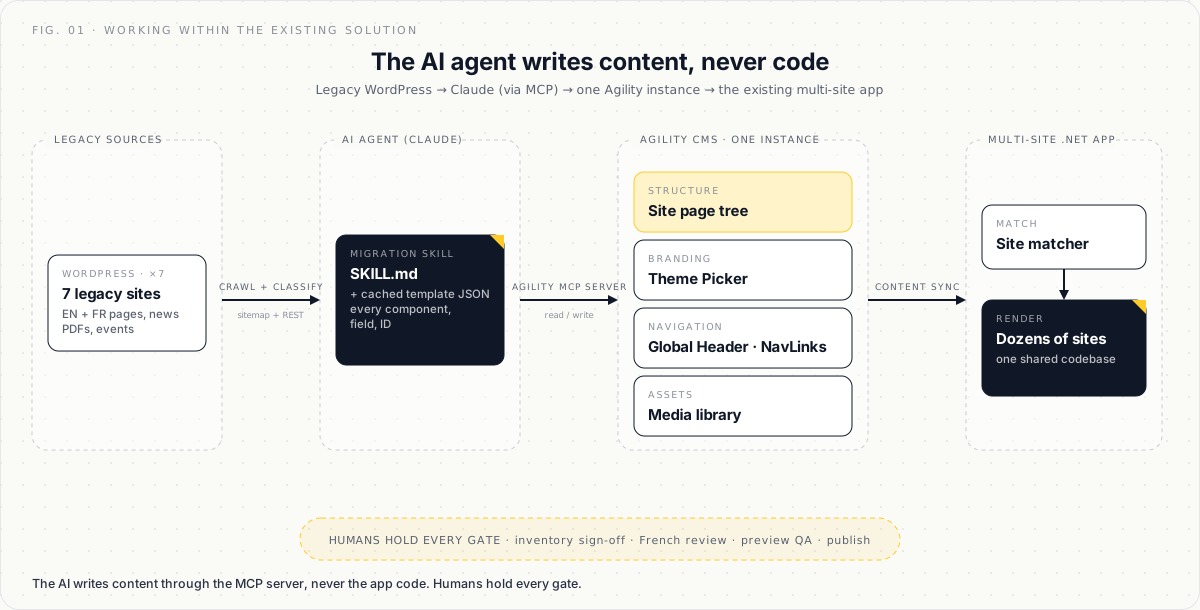
One of our long-standing customers runs dozens of websites out of a single Agility CMS instance. Each site gets its own page tree, its own branding (colours, fonts, logo, custom CSS), its own navigation, news, events and document library, all served by one shared web application codebase built on Agility's Content API. It is a classic multi-site setup, and it has quietly served millions of pageviews for years.
Not everything was on it. Seven of their websites still lived on standalone legacy WordPress installs: bilingual English and French, full of PDFs, with years of accumulated content. And the clock was running. They needed all seven moved into the multi-site solution in very little time, with a small team and no budget (or the time!) for a traditional migration project.
The traditional answer is exactly that project. Developers write import scripts against both APIs, someone builds a field-mapping spreadsheet, a QA team clicks through everything, and the whole thing takes weeks per site. Multiply by seven.
We tried a different answer: an AI agent, the Agility MCP server, and zero custom code, with a plan from day one that the customer's own team would run most of the migrations themselves.

The constraint that made it interesting: a mature multi-site app
Nobody got to design a greenfield system for this. The multi-site application already existed, with all the accumulated conventions of a mature codebase.
Per-site branding is driven by a "Theme Picker" component on each site's home page: colours, fonts, override CSS, header and footer content, banner slides.
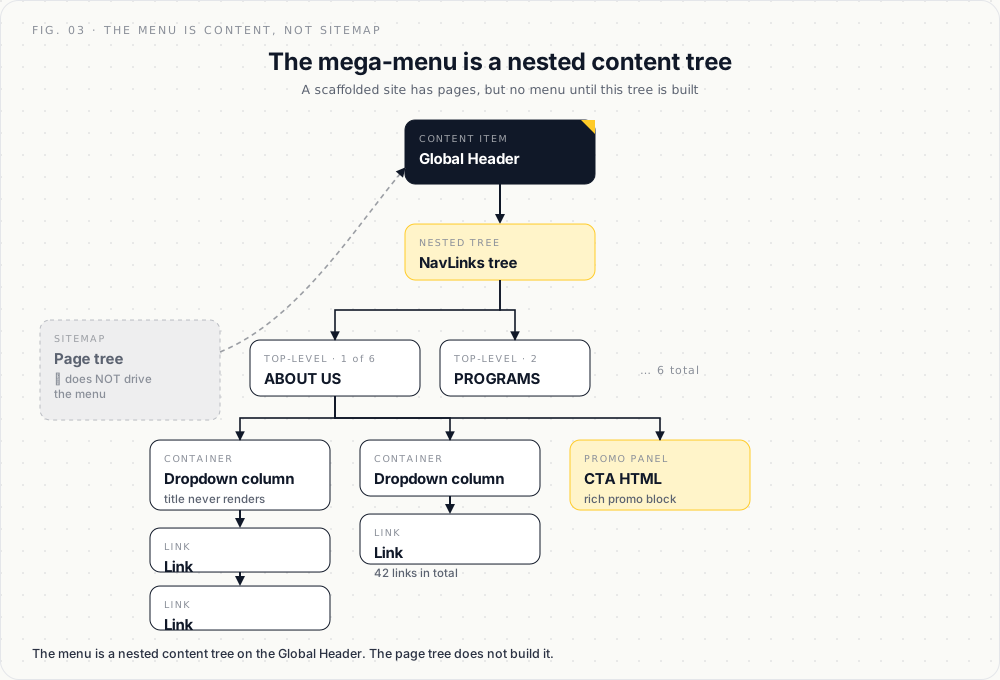
Each site's entire mega-menu is content, not sitemap. The navigation bar, the dropdown columns and the promo panels are all a nested tree of "Nav Link" items hanging off a Global Header content item. A freshly scaffolded site has pages, but no menu until that tree is built.
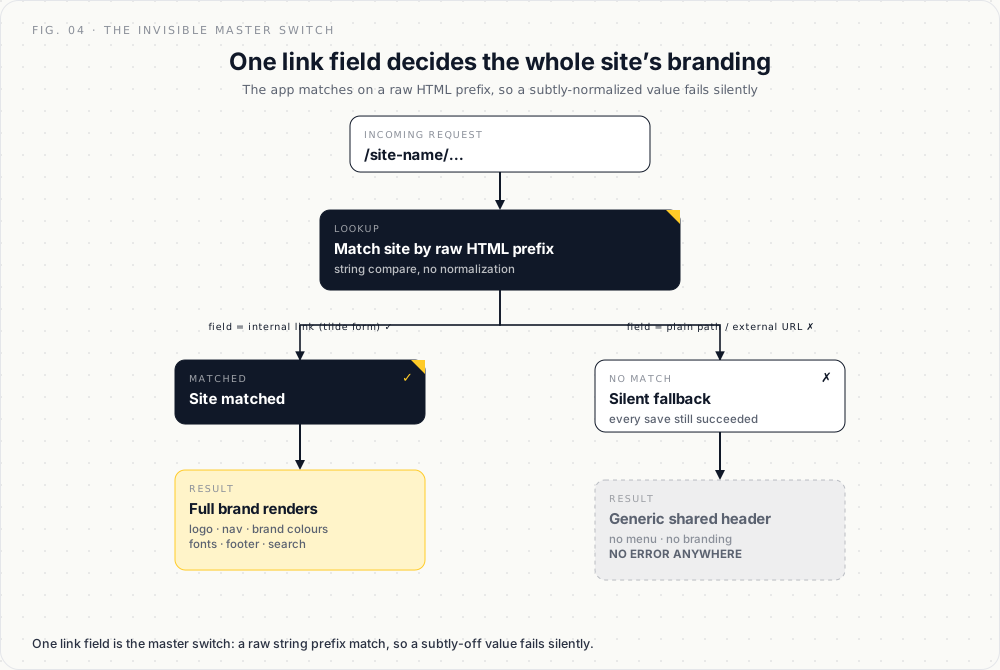
Whether a site renders with its own branding at all hinges on a single link field on a central directory record, and the application matches it by raw HTML prefix, so the value has to be in exactly the right internal-link format. Get it subtly wrong and the site silently falls back to the generic shared header: no logo, no menu, no brand colours, and no error message anywhere.
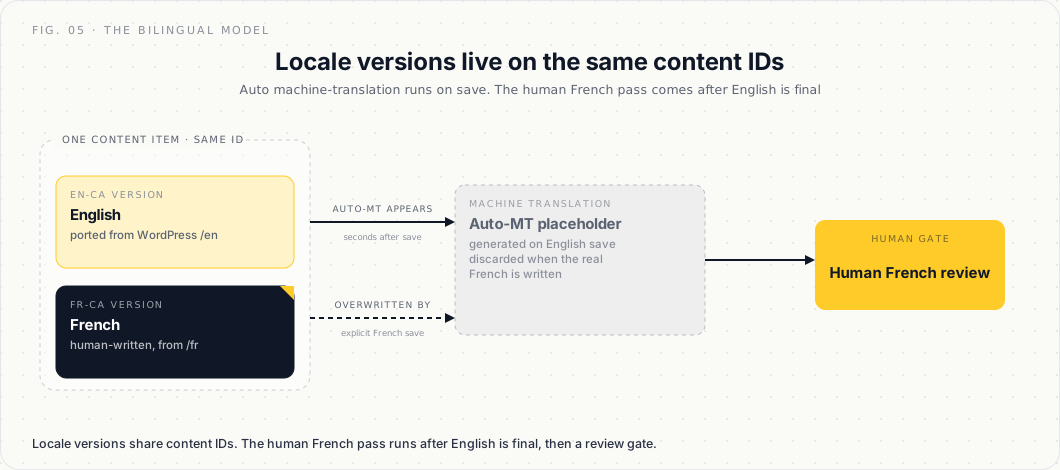
The instance runs automatic machine translation. Save an English item and a French version appears seconds later, which is great until your carefully human-written French gets pre-empted by MT because you sequenced your saves wrong.
None of this is documented in a README. It lives in the application source, in a template site set up years ago, and in the heads of the people who built it. That is precisely the kind of environment where "just write a migration script" goes to die, and where an AI agent that can read the source code, inspect the CMS, and reason about both turns out to shine.
How the pilot migration worked: seven steps
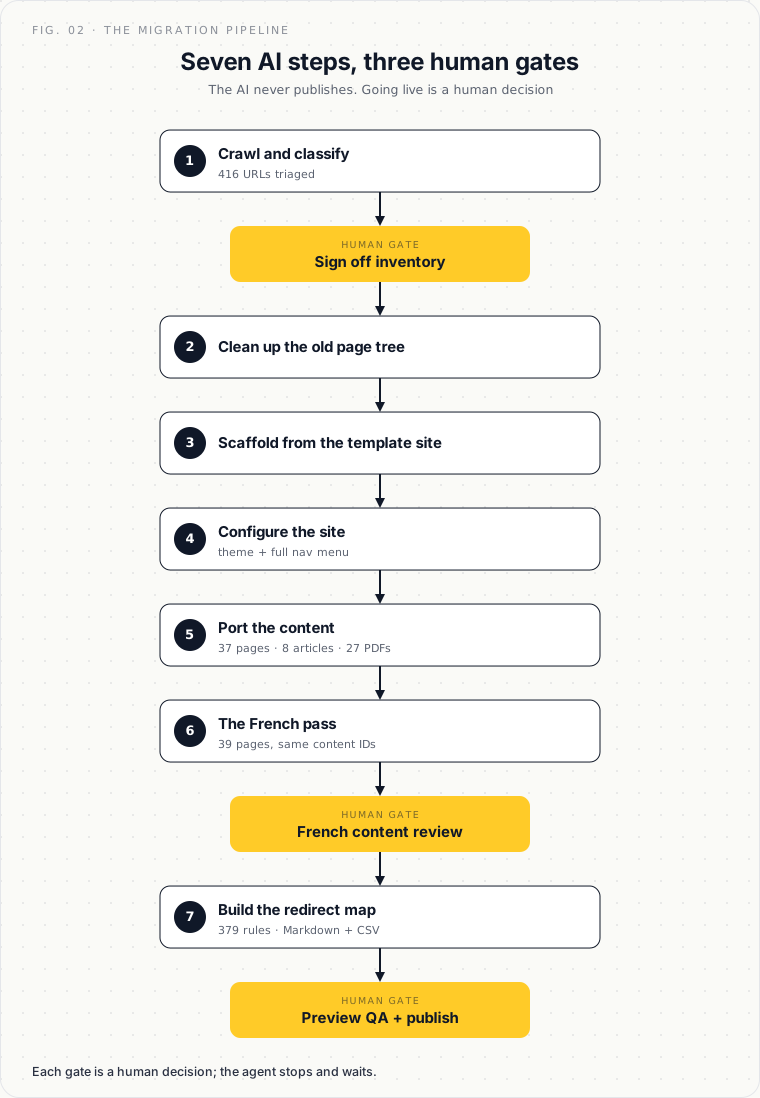
We ran the first site with Claude connected to the Agility MCP server. The Agility MCP server is a Model Context Protocol server that exposes the same content operations a developer would use, reading sitemaps, reading and saving content items, managing pages and uploading media, as tools the AI can call directly. No custom middleware, no import scripts. The process settled into seven steps.
1. Crawl and classify
The agent crawled the live WordPress site, sitemap plus REST API, and classified all 416 URLs: which pages migrate, which are shared content already served centrally (skip), which are theme fragments (discard). The output is a content inventory a human can review and sign off in ten minutes.
2. Clean up the old
The site already had an abandoned, half-built page tree in Agility from a previous attempt. The agent renamed it out of the way with a "-bak" suffix, unpublished nothing that was live, and left the one record it must never touch, the central directory entry that acts as the tagging key for shared news and events, exactly as it was.
3. Scaffold from the template site
Rather than inventing structure, the agent cloned the shape of the customer's best existing site: same page templates, same component order on the home page, same folder conventions. We cached that template site's full structure, every component, every field and every ID, as a JSON reference file, so the agent did not have to rediscover it each time. Remember that file. It becomes the hero of this story.
4. Configure the site
Theme Picker with the real brand (fonts, accent colour, override CSS), header and footer, banner slides, quick links, and the full navigation menu built as content: 6 top-level items, 11 dropdown columns, 42 links and 5 promo panels, mapped one-to-one from the live WordPress nav.
5. Port the content
37 pages of cleaned-up WordPress content, 8 news articles with their original dates and slugs, and 27 PDFs uploaded into Agility's media library with every in-page link rewritten. Along the way the agent eliminated a retired CDN hostname from all content and fixed contact data that had quietly drifted from reality years ago.
6. The French pass
This is where the bilingual architecture paid off. Agility stores locale versions on the same content IDs, so the agent scraped the real, human-written French from the WordPress /fr/ pages and saved it as the fr-ca version of each item: 39 French pages, 59 French items, no duplication of structure. Only interface labels needed machine translation, and those were flagged for a human French reviewer.
7. The redirect map
Every crawled URL, English and French, mapped to its new home: 379 redirect rules, generated as both Markdown for humans and CSV for the web layer, ready for go-live.
Elapsed time for site one was about two days, including finding and fixing the two problems below.
The two bugs that would have sunk a script

The invisible master switch
With everything migrated, the new site still rendered with the generic shared header: no logo, no menu, no branding. A migration script would have reported success, because every save had worked. The agent instead read the application source, traced the site-matching logic, and found that the lookup does a raw prefix match on the stored HTML of a link field, and the value it had saved was normalized just differently enough to miss. One character's worth of difference, zero error messages. It was fixed in both locales, verified live in a staging preview, and written back into the process docs so it can never surprise anyone again.
The hover you cannot read
First human review: "the menu hover makes the text almost invisible." The theme's default hover colour was the site's own brand colour, sitting on a bar of the same colour. The fix was three lines of override CSS on the Theme Picker. Small, human-caught, and again folded straight back into the checklist.
That's a good lesson! The agent did not get everything right the first time, but every miss became a permanent improvement to the process, in the same session.
The handoff: one pilot in, six migrations out

Here is where this story differs from a normal services engagement. We did not book seven migrations. We did one, together with the customer, and spent the pilot deliberately capturing everything into a package their team could run without us.
A team runbook: the human-readable process, seven steps, the exact prompts to use, the review gates, and a "what we learned" note on every step.
An AI skill: the machine-executable version, a SKILL.md procedure plus the cached template-site JSON with every content ID, field convention and gotcha. Drop it into a project and say "migrate <site> following the skill."
A tool setup guide: how to run it in Claude Code (what the pilot used), claude.ai and Claude Desktop, Claude Cowork, and adaptation notes for other AI stacks their team might standardize on.
Then they took it over. The remaining six sites are theirs to run. Their team connects the MCP server, invokes the skill, and works through the same seven steps, with us on call rather than on the critical path.
Three rules travel with the package and never bend, no matter which tool runs it:
Everything stays in staging. The AI never publishes. Going live is a human decision.
Humans hold the gates: the inventory sign-off, the French content review, preview QA, and the publish button.
MCP credentials are treated like passwords.
That governance is the same thinking behind our AI data security policy: let the agent do the work, keep humans on the decisions that matter.
Why MCP changes the migration math
Every CMS migration used to start the same way: write code against two APIs. That code is throwaway, it is brittle, and it encodes exactly one person's understanding of the content model on one particular day.
With the Agility MCP server, the integration is already done. The AI can read and write content the same way an editor can, but at script speed and with the source code open in the other hand. The things that used to make migrations expensive, the undocumented conventions, the legacy quirks, the bilingual content and the thousand small judgment calls, are the things a reasoning agent handles well, as long as you keep a human at the gates.
The economics flip in the way that matters most when you have seven sites and no time. The first migration costs you the learning, and everything you learn compounds into a skill file instead of evaporating when a contractor rolls off. The second site is cheaper than the first. The seventh is a prompt, and it is the customer typing it.
Frequently Asked Questions
What is the Agility MCP server?
The Agility MCP server is a Model Context Protocol server that exposes Agility CMS content operations, reading sitemaps, reading and saving content items, managing pages and uploading media, as tools an AI agent can call directly. It lets an AI read and write CMS content the same way an editor would, with no custom integration code.
Can AI migrate a website without custom scripts?
Yes. In this project an AI agent migrated a full bilingual WordPress site into Agility CMS with no import scripts, by calling the Agility MCP server's content tools directly. It crawled and classified 416 URLs, scaffolded the site, ported 37 pages and 27 PDFs, built the navigation as content, and generated 379 redirects.
Is it safe to let an AI agent run a CMS migration?
It is safe when humans hold the gates. In this process the agent never publishes: all content stays in staging, and a person signs off on the content inventory, reviews the French translation, checks the preview, and presses publish. MCP credentials are handled like passwords.
How long does an AI-assisted migration take?
The first site took about two days, including discovering and fixing two application-specific bugs. Because the process was captured as a reusable skill, each later site is faster, and the customer's own team runs them.

About the Author
Joel is CTO at Agility. His first job, though, is as a father to 2 amazing humans.
Joining Agility in 2005, he has over 20 years of experience in software development and product management. He embraced cloud technology as a groundbreaking concept over a decade ago, and he continues to help customers adopt new technology with hybrid frameworks and the Jamstack. He holds a degree from The University of Guelph in English and Computer Science. He's led Agility CMS to many awards and accolades during his tenure such as being named the Best Cloud CMS by CMS Critic, as a leader on G2.com for Headless CMS, and a leader in Customer Experience on Gartner Peer Insights.
As CTO, Joel oversees the Product team, as well as working closely with the Growth and Customer Success teams. When he's not kicking butt with Agility, Joel coaches high-school football and directs musical theatre.


