

7 CMS Features for Omnichannel Teams

Bryna Dilman
Director of Marketing

An omnichannel CMS is a content management system that lets marketing and digital teams create content once and deliver it consistently across every channel, including websites, apps, email, commerce, and in-store displays. Unlike a traditional CMS, which is built mainly to publish web pages, an omnichannel CMS is built around reusable content, APIs, localization, and governance, so teams can support new channels without rebuilding their content operation each time.
TL;DR: Look for these seven features when evaluating a CMS for omnichannel marketing:
-
Flexible content modeling – reusable content that's separate from how it's displayed
-
Built-in page management – marketers can build and manage pages without a developer
-
API-first delivery – content reaches every channel from one source
-
Localization and multi-site support – global and regional teams work without duplicating effort
-
Workflow, roles, and approvals – governance that protects quality without slowing teams down
-
Extensibility – webhooks and integrations that connect the CMS to the rest of the marketing stack
-
Enterprise usability – a platform teams will actually adopt and scale with
Why omnichannel content teams need more than a content repository
Content today must work everywhere: websites, apps, campaign pages, online stores, partner portals, email, digital signage, and whatever comes next. Because of this, choosing a headless CMS isn't just an IT decision anymore. It's a decision about how your whole marketing team operates.
A traditional CMS helps a team publish web pages. An omnichannel CMS needs to do a lot more. It must help teams plan, structure, govern, reuse, translate, personalize, preview, and deliver content across every channel, without rebuilding every campaign from scratch. Headless architecture keeps content management separate from how it's displayed. That means developers can build the frameworks they like, while content teams manage everything from one place and send it out through APIs.

If you're comparing CMS platforms for a large-scale replatform, look for features that help both sides of your team:
-
Marketer autonomy: Can teams create and update content without waiting on developers every time?
-
Structured reuse: Can content be built once and reused across channels?
-
Governance: Can global, regional, legal, and brand teams work together safely?
-
Speed to market: Can teams launch campaigns faster without losing consistency?
-
Readiness for growth: Can the CMS fit into a bigger, more flexible tech stack?
Here are seven features every omnichannel team should look for.
1. Flexible content modeling that separates content from presentation
Strong content modeling is the foundation of good omnichannel marketing. Without it, teams end up copying and pasting the same web content into app cards, emails, product pages, and regional sites by hand. That creates inconsistency, wastes translation budget, adds risk, and creates extra work.
A good headless CMS lets your team define content by what it means, not by how it looks on a page. For example, a “customer story” should have reusable fields like industry, challenge, solution, results, quote, logo, region, related products, and a call to action. That one story can then show up as:
-
A full case study page
-
A homepage proof point
-
A sales card
-
A product page module
-
An email snippet
-
An in-app message
-
A localized regional campaign asset
This is often called content modeling, and it's the difference between a team that reuses content easily and one that rebuilds it from scratch for every channel.
Questions to ask when evaluating this feature:
-
Can teams build reusable content types without needing a developer for every small change?
-
Can fields be grouped, marked as required, checked for accuracy, and documented for editors?
-
Can content be linked together, like products to authors, or authors to articles?
-
Can the model support both structured content and free-form editorial writing?
-
Can the model grow over time without causing migration headaches?
2. Built-in page management for campaign speed and editorial control
Headless CMS platforms are great at sending content to any front end. But marketing teams still need to build and manage actual web pages. Product launches, campaign microsites, landing pages, event hubs, and regional pages all need layout control, metadata, previews, approvals, and a clear map of the site.
That's where built-in page management matters. A good CMS should let marketers create pages, manage URLs, pick approved templates, arrange reusable pieces, preview changes, and handle page-level SEO, all without turning every request into a dev ticket.
Some platforms handle this through what's known as page management, where pages are built directly into the CMS, and editors can manage page names, URLs, SEO, and which components show up on a page through pre-defined “zones.”
Scenario: A demand generation team needs to launch a healthcare campaign in three regions. With strong page management, developers set up approved page layouts and components once. Marketers then build the different regional versions using pre-approved hero sections, proof points, forms, FAQs, and calls to action. Brand stays consistent, legal can review everything, and the team skips one-off templates entirely.
Questions to ask:
-
Can editors create and manage pages inside a visual site map?
-
Can developers control which components are available in each part of a page?
-
Can marketers manage SEO fields in one consistent place?
-
Can teams preview pages before they go live?
-
Can the CMS give marketers freedom without letting brand consistency slip?
3. API-first delivery for true multi-channel content
An omnichannel strategy breaks down fast if content can only go to one website. Teams need content available everywhere their customers are: websites, apps, online stores, customer portals, support tools, sales tools, and new AI-driven experiences.
That's why API-first delivery matters so much. The CMS should send content through reliable APIs, support both preview and live versions, connect to your deployment workflows, and give developers the control they need to keep things fast.
Look for a REST or content fetch API with SDKs for the frameworks your team already uses (JavaScript, .NET, Gatsby, Next.js, Nuxt.js, Python, and so on), along with the option to sync content and pages for static generation, and a GraphQL option for teams that want to pick specific fields or filter related content in a single query.
Questions to ask:
-
Does the CMS support the APIs your developers already prefer?
-
Can content go out to web, app, online stores, and custom channels from one single source?
-
Are preview and live content easy to manage separately?
-
Does the CMS support webhooks for automation and rebuilding your site when content changes?
-
Can developers pull content efficiently, without extra middleware or slow requests?
Example: SCENE, the entertainment rewards program with more than eight million members across Canada, used to run separate systems for its desktop site, mobile site, mobile app, and in-store kiosks. Every content update had to be entered channel by channel. After moving to a headless CMS with API-first delivery, SCENE brought all of it under one content hub. Now a single update goes out across the website, mobile site, app, and kiosks at once. Read the full SCENE omnichannel case study to see how it worked.
4. Localization, multi-site, and regional content governance
Global marketing needs more than a translation field. Teams need a CMS that supports multiple languages, regional differences, country-specific rules, local URLs, and local publishing workflows.
A strong CMS should support localization at every level: the model, the content, the page, and the URL structure. It should also help teams avoid duplicating work while still giving local teams room to adjust their messaging.
Look for locale support that handles different languages and regions through locale codes in URLs, separate domains per locale, or cookie-based settings, along with connected copies so teams can link matching content across languages while still allowing local edits. Sitemaps that can represent more than one destination, like a website, a mobile app, or digital signage, are another sign a CMS was actually built for multi-site, multi-region teams.
Questions to ask:
-
Can the CMS manage locale-specific content without duplicating your entire operation?
-
Can pages have localized URLs and region-specific metadata?
-
Can global teams lock in required brand elements while regional teams localize the rest?
-
Can permissions limit who can edit, approve, and publish by region?
-
Can the CMS support multiple sites or brands without forcing each one into its own silo?
Scenario: A global software company needs one product launch across the U.S., Canada, France, Germany, and Australia. The core product facts and positioning should stay the same everywhere. The quotes, disclaimers, and calls to action might change by region. A localization-ready CMS helps the team reuse what should stay the same and adapt what needs to change. 5. Workflow, roles, approvals, preview, and publishing controls 5. Workflow, roles, approvals, preview, and publishing controls
5. Workflow, roles, approvals, preview, and publishing controls
Enterprise content is a team effort. A single product launch might involve marketing, product, legal, compliance, regional leads, SEO, design, and developers. Without clear workflow controls, teams either move too slowly or publish content that hasn't been properly checked.
A CMS built for larger teams needs clear roles, permissions, approvals, previews, and publishing stages. These features protect quality while still letting more people contribute.
Look for an approval workflow where editors can submit content for review, approvers can approve it or send it back with notes, and publishers push approved changes live, backed by built-in roles (contributor, editor, publisher, approver, and so on) with control down to the individual item. Being able to preview a page exactly as it will look before it's published is another must-have, not a nice-to-have.
Questions to ask:
-
Can the CMS separate who creates content, who approves it, and who publishes it?
-
Can legal or compliance teams review only the content they're responsible for?
-
Can teams preview content in context before it goes live?
-
Can editors easily see whether something is a draft, staged, approved, published, or declined?
-
Can permissions scale across brands, regions, and content types?
Scenario: A financial services team wants regional marketers to build their own campaign pages, but every page needs to pass brand and compliance review first. With role-based workflows, regional teams can move quickly while the organization still keeps its publishing standards intact.
6. Extensibility for a connected marketing stack
No CMS works alone. Your content platform likely needs to connect with a digital asset manager, a product information system, an online store, a CRM, a customer data platform, analytics, translation tools, and your deployment pipeline.
That's why extensibility matters so much. The CMS shouldn't be another closed system. It should act as a content hub that fits into everything else your team already uses.
Webhooks are usually the key to this: they notify outside systems whenever content changes, so a single update can clear a cache, sync with a third-party tool, or kick off a deployment automatically.
Questions to ask:
-
Can the CMS connect with your existing tools for assets, product data, CRM, and online stores?
-
Does it support webhooks, APIs, SDKs, and automation-friendly workflows?
-
Can content changes trigger a cache clear or a site rebuild automatically?
-
Can teams connect translation, personalization, and analytics tools without duplicating content?
-
Does the CMS fit where your team is headed, or will it become a bottleneck later?
Example: A B2B company wants product data from one system, campaign copy from the CMS, customer segments from another platform, gated asset info from a digital asset manager, and personalized calls to action from a marketing automation tool. A well-connected CMS should help pull all of that together without forcing editors to copy data by hand between systems.
7. Enterprise usability, scalability, and long-term adoption
A CMS can check every technical box and still fail if teams don't actually use it. Enterprise content operations depend on how easy the tool is to learn, how well it's documented, how much support is available, and whether it can grow without adding a second layer of manual work.
For omnichannel teams, adoption isn't just a nice-to-have. It affects how fast you launch campaigns, how consistent your content stays, how much translation costs, how much engineering time you need, and how well your SEO performs.
Questions to ask:
-
Can marketers, editors, and regional contributors learn the CMS without heavy technical training?
-
Can developers build clean content models without over-customizing the editing experience?
-
Can the CMS support more sites, content types, locales, roles, and workflows as your team grows?
-
Does the provider offer documentation, support, and onboarding that fits a larger team?
-
Does the platform actually reduce complexity, or does it just move complexity somewhere else?
Scenario: A global brand moves off its old CMS as part of a bigger modernization effort. The goal isn't just a newer tech stack. The goal is faster campaign production, more controlled autonomy for regional teams, better SEO oversight, and content that's ready for whatever new channel comes next. The platform has to be usable enough for daily content work and flexible enough for a larger architecture.
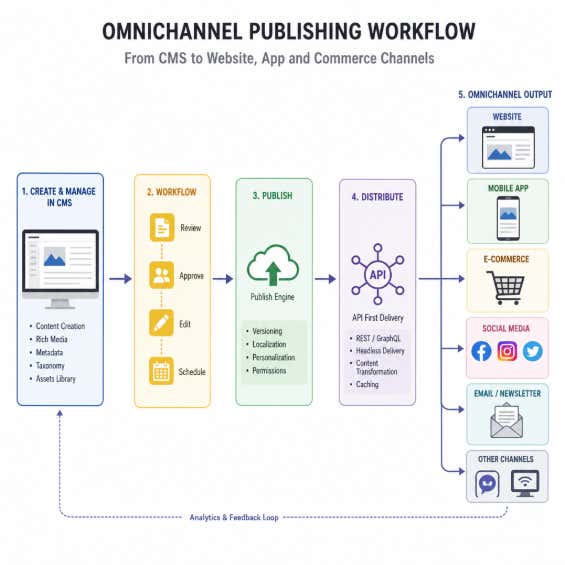
A quick CMS checklist for omnichannel teams
Use this shortlist when you're evaluating any CMS platform, including Agility CMS:
-
Content modeling: Can we model reusable content once and deliver it everywhere?
-
Page management: Can marketers create and manage campaign pages safely?
-
Multi-channel delivery: Can our APIs support every customer touchpoint we care about?
-
Localization: Can global and regional teams work without duplicating effort?
-
Governance: Can roles, approvals, and previews protect quality?
-
Extensibility: Can the CMS connect to the rest of our tech stack?
-
Adoption: Will marketers, developers, and leaders actually use it well?
If someone on your team searches for an “omnichannel CMS,” this is usually what they mean: a CMS that helps teams manage content once, adapt it where needed, and deliver it across every channel that matters.
Want to go beyond CMS features and think through the bigger omnichannel strategy? The Ultimate Omnichannel Strategy ebook covers how to deliver personalized experiences across channels, what's driving organizations toward headless CMS platforms, and where omnichannel strategy is headed next.
Where Agility CMS fits into this checklist
Run Agility CMS against the seven features above and here's what you'll find:
-
Content modeling: structured content models that are reusable and decoupled from presentation, so a piece of content built once can show up as a case study, a homepage module, and an email snippet without being rebuilt each time.
-
Page management: pages are built directly into the CMS, with Page Models and zones that let marketers assemble pages from developer-approved components, no blank-slate template work required.
-
API-first delivery: a Content Fetch API and GraphQL option, with SDKs for the major frameworks and a sync API for static generation.
-
Localization: native multi-locale support, connected copies across languages, and sitemaps that can represent more than one channel or destination.
-
Governance: built-in approval workflows, granular roles and permissions, and page-level preview before anything goes live.
-
Extensibility: webhooks that connect content changes to caches, third-party systems, and deployment pipelines.
-
Adoption: an editorial experience built for marketers first, so teams don't need heavy technical training to manage pages, content, and campaigns day to day.
That combination is the reason Agility is worth a serious look for teams that want the flexibility of a headless CMS without giving up the practical, everyday workflows marketers rely on. Structured content modeling and built-in page management usually force a tradeoff between developer control and marketer speed. Agility is built to give teams both at once.
If your team is planning a CMS evaluation or a bigger modernization roadmap, book a demo with Agility CMS and see how quickly your marketers and developers can move from content modeling to omnichannel publishing.


