

Preview is the hardest part of going headless
Decoupling the front end is great for developers. It quietly takes the editor's map away. Preview is how you hand it back.

Joel Varty
CTO
The pitch for headless is that your content stops being trapped inside one website. Model it once, serve it anywhere, let the front end be whatever your team is actually good at. I have been selling that idea for years and I still believe it.
Here is the part the pitch skips. The moment you decouple content from rendering, the person writing the content loses the ability to see what they are making. They are filling in fields. Somewhere else, on infrastructure they do not have access to, those fields become a page. In between is a network boundary, a build step, and usually a CDN.
Preview is the bridge across all of that. It is also, in my experience, the single most underestimated piece of a headless implementation. Teams budget weeks for content modelling and an afternoon for preview, and then spend the next two years apologising to their marketing department.
What going headless takes away from an editor
In an old-school monolithic CMS, editing and rendering are the same system. You are literally typing into the page. It is limited and it does not scale to more than one channel, but nobody was ever confused about what they were looking at.
Structured content is better in almost every way that matters, and it costs you that. An editor working in a well-modelled headless CMS sees a Title, an Eyebrow, an Intro, and a list of Items. They do not see a hero section. Whether that Title is going to wrap onto three lines and shove the call to action below the fold is not something the form can tell them.
The workaround people fall back on is publishing and then looking at the live site. I want to be blunt about that: if your preview is bad enough that your team does this, your CMS is broken, whatever the feature matrix says. Every typo gets an audience. Every layout mistake ships. And your editors slowly learn to be timid, which is a much more expensive problem than a broken preview button.
Why preview mode is harder in a headless CMS than a monolith
In a monolith, preview is nearly free. The CMS already has the draft content in memory and it already owns the rendering code, so showing you an unpublished page is the same code path as showing a published one with a different flag set.
In a headless setup, almost none of that is true. The front end is a separate application. It was built and deployed on its own schedule, it probably runs on a different provider, and its normal job is to ask an API for published content and cache the result as aggressively as it can. It has no idea who you are, no access to your CMS session, and every incentive to serve something it already has lying around.
So preview is not a flag. It is a negotiation between two systems that were deliberately designed not to depend on each other.
The five things that have to happen for preview to work
Worth spelling this out, because when preview breaks it is almost always one specific link in this chain, and knowing the chain is most of the debugging.
-
A signed preview key reaches the front end. The CMS generates it, and it rides along on the URL of the page you want to look at.
-
The front end recognizes the key and enters draft mode for that request. Per request, not globally. Your visitors must not end up in draft mode because an editor clicked something.
-
The content fetch switches to unpublished data. Same components, same layout code, different source. If preview renders through a separate code path, it is not preview. It is a second website that will drift.
-
The visual editing SDK gets injected into the response. This is what turns a rendered page into something the CMS can talk to.
-
The rendered output maps back to content fields. Every editable region on screen has to know which field in which content item it came from, or you can look but not touch.
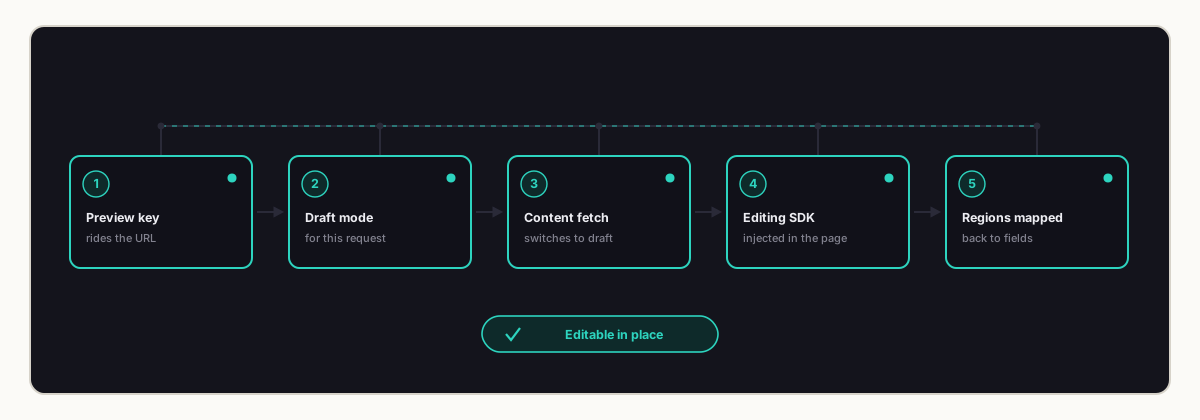
Five links, and a break in any one of them produces the same symptom: a page that loads perfectly and does nothing. That is the cruel part. It never fails loudly.
We got bitten by exactly this on our own site a few weeks ago, at step one, when a Next.js 16 upgrade moved our request handling behind the CDN cache and the preview key stopped arriving. Everything downstream was fine and simply never got asked.
What Web Studio adds on top of preview
Preview by itself is read-only. You see the draft, you find the problem, and then you go back to the form to fix it. Better than nothing, and still a bit silly, because you have to hold the page in your head while you edit the fields.
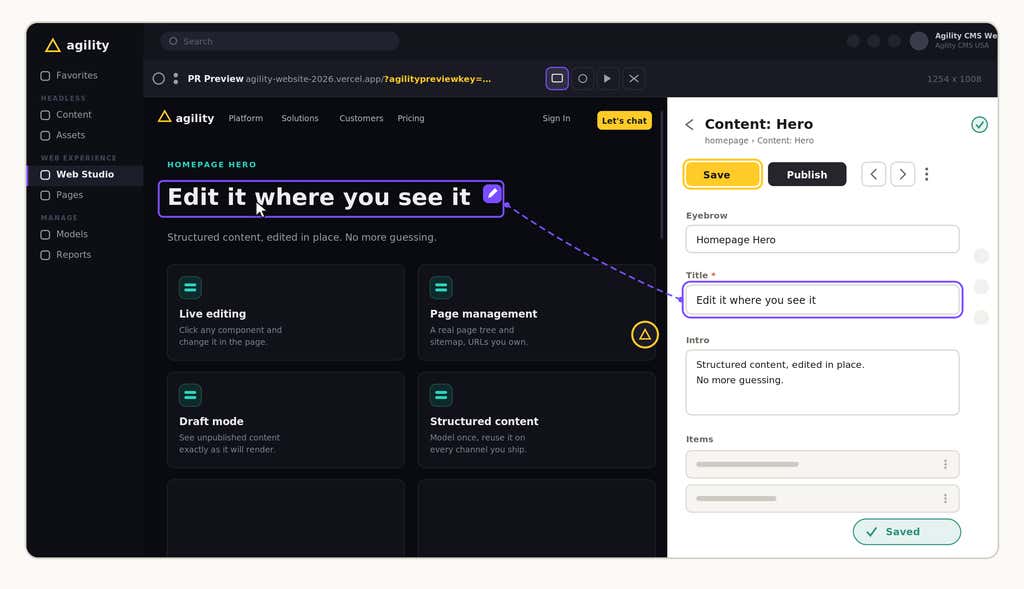
Web Studio closes that loop. The page is framed inside the CMS, every component in it is selectable, and clicking one opens the fields behind it. You change the field, the page changes. Not on save, not on refresh. While you type.
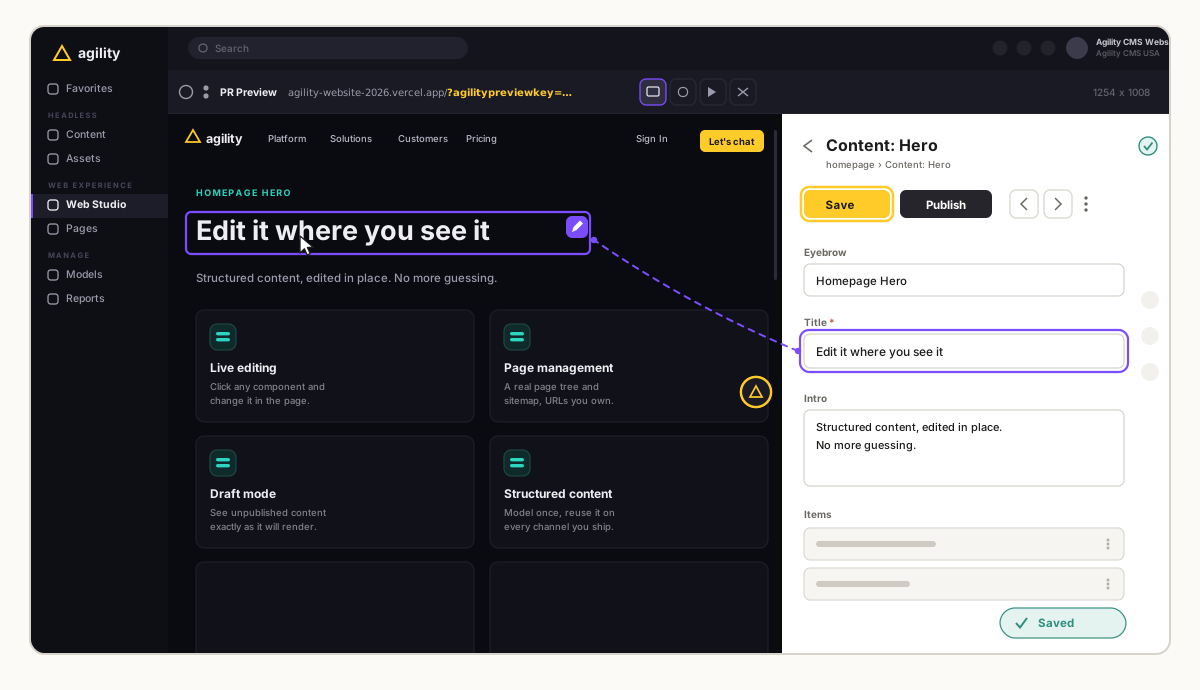
That two-way binding is the whole trick, and it is why step five in the list above matters so much. The SDK has to know that this heading on screen is the Title field of that content item. Once it does, the page becomes the interface and the form becomes a detail.
The thing I did not expect, watching customers use it, is how much it changes who does the work. When editing means finding the right entry in a content list, it stays with whoever knows the CMS. When it means clicking the words you want to change, it goes back to the person who actually owns the message. If you want the full tour, we wrote up how Web Studio visual editing works separately.
Page management is what makes in-place editing possible
Here is something that gets glossed over in headless comparisons. A lot of content-only systems have no concept of a page at all. They hold content items and hand them to you over an API. Routing, URLs, and site structure are entirely your front end's problem.
That is a defensible design, and it makes real preview much harder than it needs to be. If the CMS does not know what pages exist, it cannot tell you which URL to frame. You end up hand-configuring preview paths per content type and maintaining that mapping forever.
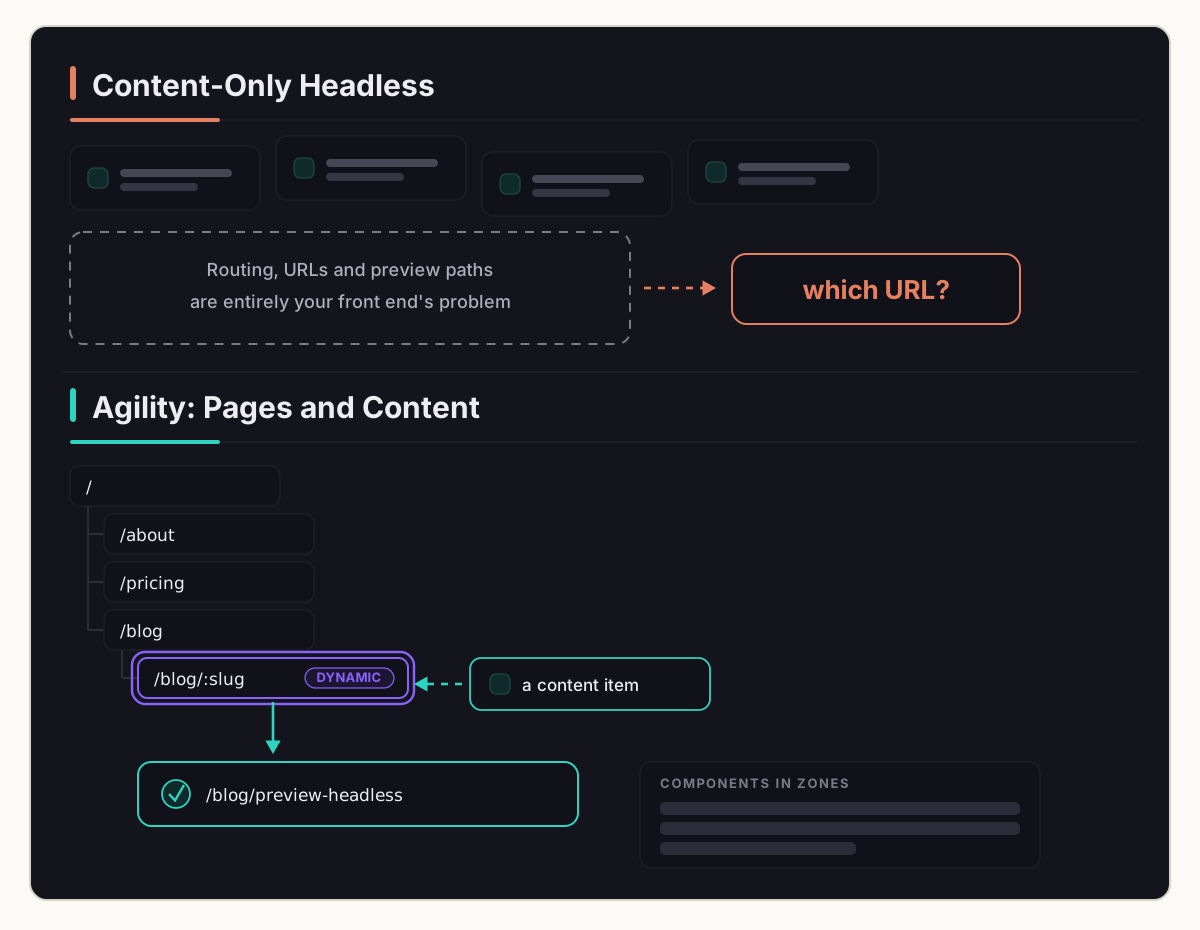
Agility keeps a real page tree and sitemap next to the content. Pages have URLs that you manage in the CMS, components sit in defined zones on those pages, and a Dynamic Page can resolve an individual content item to the specific URL where it renders. That is what lets an editor click a blog post in a sidebar and land on the actual rendered page for it instead of a form. It is unglamorous plumbing and it is the reason the in-place editing works at all.
Preview is a caching problem before it is a CMS problem
If I could get one idea across to teams building on any headless CMS, it would be this one. A preview URL points at a real, publicly routable page. That page is almost certainly cacheable, and on a modern host it is probably sitting warm at an edge location right now.
Which means your preview logic has to run somewhere ahead of that cache. If it runs behind the cache, a cache hit answers the request and your carefully written preview code never executes. It will work perfectly in local development, because nothing is edge cached there, and then it will fail silently the moment it hits a real deployment.
This is not a hypothetical. It is the most common way I see preview break, and it usually gets diagnosed as a CMS problem or a permissions problem for a day or two first.
What good preview looks like in a headless CMS
If you are evaluating platforms, or auditing what you already have, this is roughly my list.
-
Draft mode is scoped to a single request, so an editor previewing something cannot leak unpublished content to the public.
-
Preview renders through the same components as production. No parallel preview build.
-
It works against your real deployed site, including whatever CDN sits in front of it.
-
Editable regions, not just a read-only render. Seeing the problem and fixing the problem should be one motion.
-
The CMS knows your page structure well enough to deep link an editor to the right URL without a hand-maintained mapping.
-
It survives your framework upgrades, or at least fails loudly when it does not.
That last one is there because of the bug I mentioned. We had five of the six and still shipped a broken preview, because nothing in our test suite knew to check whether a preview key survived a trip through a CDN. It does now.
None of this is the exciting part of a CMS evaluation. Content modelling is more fun to argue about and the API benchmarks make better slides. But the preview experience is what your team touches every single day, and it is the thing they will judge the whole platform by.
Preview, and the Web Studio experience is worth really deeply about. It's also worth keeping an eye on over time to make sure that experience STAYS optimized as new things get implemented on your website.


