

We Built Two CMS Proof of Concept Sites in Five Hours
Field notes on what a prospect POC costs now, and what it used to cost

Joel Varty
CTO
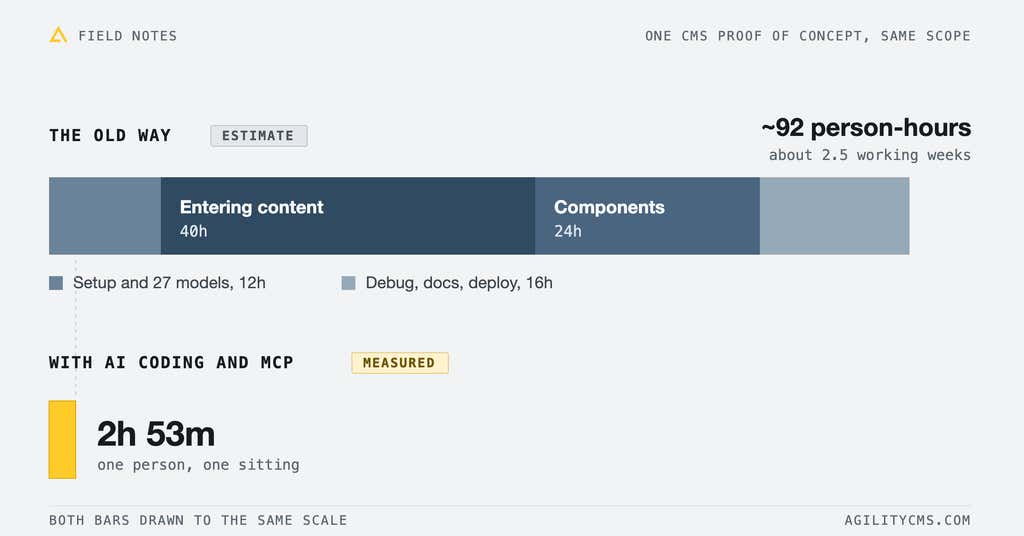
We built two prospects' websites as full CMS proof-of-concept demos in a combined five hours and twenty-two minutes of hands-on work. Not a cookie-cutter, pre-built template with their logo dropped in, no! Their own content, their branding, their locales, and a phased plan for getting off WordPress for one of them. The nonprofit POC took 2h 29m. The learning-technology POC took 2h 53m, in two connected locales. Both numbers come out of session timestamps with any idle gap over 20 minutes discarded, so it is hands-on time, not elapsed calendar time.
What a real CMS proof of concept contains
When a prospect asks to see a CMS, what they usually get is a sandbox. Heck, we even have one (https://demo.agilitycms.com) - generic template, sample content, somebody else's brand, a login. That proves the product exists, but it doesn't answer the question they're asking, which is what their own site would look like (feel like?) inside it.
Both of these answer that question directly. The learning-tech POC runs on that company's own copy, lifted from their live site and from the Spanish sister site they acquired: eleven platform partner pages, ten services, twelve client case studies, ten testimonials, their federal contract vehicle, their published brand palette, their brand typeface. The nonprofit POC models their real partner portal, including the enrolment flyer in five languages, the family invitation letter in eleven, the grade-level curriculum hierarchy, and a microsite for each partner district.
Nobody looking at these has to imagine anything, and that's the part that used to be unaffordable.
Education nonprofit | Learning-technology firm | |
|---|---|---|
Their problem | Ageing partner portal: microsites, tagged asset library, adaptive curricula | Two WordPress sites after acquiring a Spanish company, mirrored by hand |
Requirements source | 32 must-haves scored by 8 reviewers | 7 prioritised outcomes in a written brief |
Active build time | 2h 29m | 2h 53m |
Content models | 10 | 11 |
Components built | 10 | 16 |
Locales | 1 | 2, connected |
Live routes | Not counted | 62, every one verified 200 |
Left out on purpose | Social, payments, SMS delivery, all dropped by their own scoring | Personalization, considered and deprioritised in their brief |
Reusing the engine across three builds
Neither build started from scratch, and the numbers would be meaningless if I pretended otherwise. The data layer, the routing, the preview and revalidation plumbing, the page template and the module registry all came out of an earlier POC for a medical association. The nonprofit build inherited that lot, and the learning-tech build inherited it again.
So each one only pays for its own customer layer. In the learning-tech repo, 3,606 of the 7,513 lines under src/ were written for that customer. The rest is engine that has been through three customers now without anyone needing to re-open it. Boring infrastructure is the best kind.
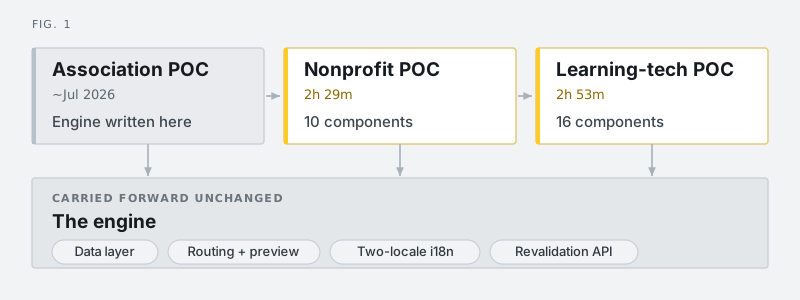
Fig. 1. One engine, three customer layers. The association POC is where the plumbing got written. Every build since has inherited it and paid only for what is specific to that customer.
The expensive part of a CMS POC is the content, not the components
Ask a developer what's slow about building a CMS demo and they'll say learning all the custom crap a CMS puts in front of them. I can't argue with that, I'm a dev myself! Now, the front end is the easy part. It's well understood, developers enjoy it, and it's what an AI is best at.
The expensive part of a CMS proof of concept is the content.
Around 155 content items went into that instance. Seventy-six editorial items in English, covering every platform, service, industry, case study, testimonial, highlight and migration phase. Another dozen or so in Spanish, some of which only exist in Spanish. Then sixty-six page-component items, because in Agility every module you drop into a page zone is its own content item with its own fields and its own publish state.
Each of those needs real copy: found on their live site, read, judged for whether it belongs, then typed into a field. That's the job.
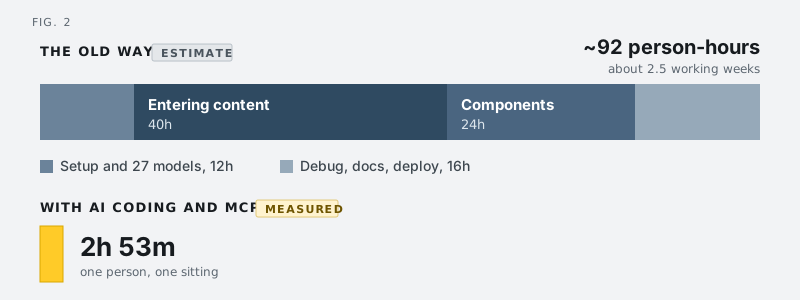
Fig. 2. Both bars are at the same scale. Content entry on its own is 43% of the estimated effort. The 92 hours is a judgement call, not a measurement, and it assumes the friendliest case: one senior developer who already has the engine and already knows the CMS.
An AI that writes code gets you halfway
Ya ya ya AI can write code REALLY fast. Who cares? What it can't do on its own is put anything into your CMS. It will hand you a typed, accessible component library, a routing layer and a working language switcher, then leave you with a site that renders sixty-two pages of nothing and a cheerful suggestion that you open the CMS and start typing.
That halfway point is where these projects have almost always died.
The Agility AI tooling closes that gap. An MCP connector is a server that exposes an application's API to an AI agent as a set of callable tools, so the agent can act inside that application instead of only writing code about it. Ours gives the agent the same API surface a developer gets: create a content model, define its fields, create a container, create a page, save a content item, publish it, read the sitemap back.
So the same session that writes the component rendering a platform card also creates the Platform model, defines its eleven fields, enters all eleven platform partners, wires them into a dynamic page list and publishes them. One brief, two arms, one verification loop.
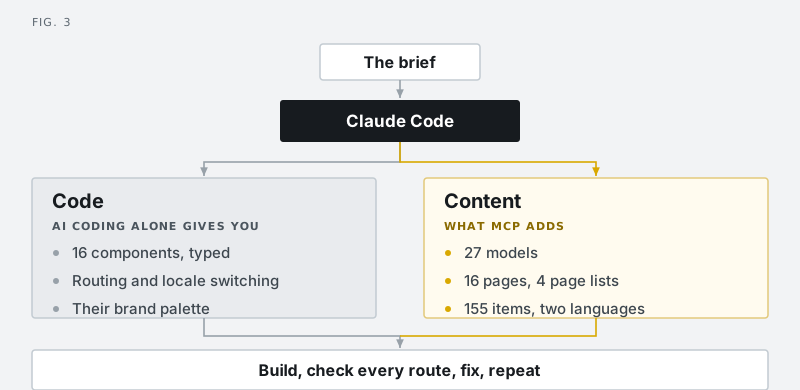
Fig. 3. Both arms run off the same brief in the same session, which is why the content and the components fit each other. Take the right-hand arm away and the loop still runs, it just builds a site with nothing in it.
Where it bites
None of this is magic, and the failure modes are worth naming because they look like success.
publish_page publishes the page, not the component items sitting in its zones. Each of those lives in its own container with its own publish state, so the first deploy rendered sixty-two page shells with nothing in them. It was invisible locally, because a dev server reads with the preview key and shows unpublished content quite happily. Sixty-six items later, the site filled in.
Then a publish lied to me. A Spanish page reported Published in the CMS and showed up in the live sitemap, while GET /fetch/es-es/page/9 still returned a 404. The build prerendered a 404 for that path while the seven other pages in the same batch came out fine. Re-publishing that one page fixed it straight away.
The lesson there is about what counts as evidence. A 200 back from the API isn't evidence of anything, which is why the loop in figure 3 ends by curling all sixty-two routes, and why the number in this post is 62 instead of an assumption.
Would this POC ever have been approved?
How long would this have taken before? That's the wrong question. The real one is whether it would ever have been approved.
Ninety-two person-hours is about two and a half working weeks. A prospect POC is speculative work, because the deal might not close, and in a services business that same senior developer week can be billed to a client instead. The learning-tech brief made this exact point about their own internal tooling: their developers are on billable client work, so anything internal costs real money. Everyone in this business has that constraint, us included.
So before, you didn't get a slower version of this POC. You got one of two things. Either a generic sandbox demo that took two hours and convinced nobody, or a proper custom POC that got scoped, estimated at two or three weeks, weighed against billable work, and quietly never happened.
What changed: it got cheap enough that nobody has to approve it first.
Five hours across two customers sits under the threshold where anyone asks for a business case. That's why there are two of these in one week instead of none.
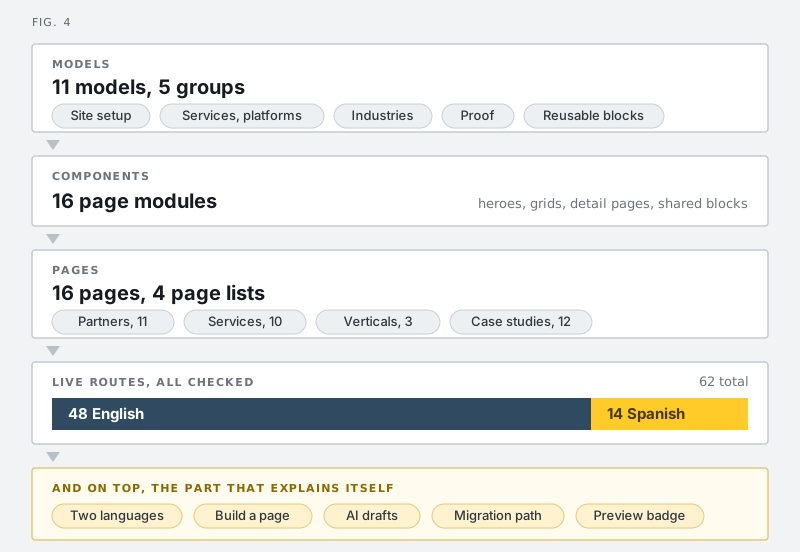
Fig. 4. What's in the learning-tech instance. Four dynamic page lists turn 36 content items into 36 pages off four templates, which is priority two of their brief: a new partner page without a developer.
The demo has to teach, because somebody re-presents it without you
One line in the learning-tech brief changed how I built the whole thing. Their marketing director isn't technical, and he has to sell this internally after our call ends. Keep the narrative plain, the brief said, and avoid headless-versus-traditional jargon.
As a design constraint that says something sharper than "be friendly". It says the demo has to survive being re-presented by somebody who can't answer follow-up questions.
So four pages in that POC aren't marketing pages at all. They sit under /how-this-works and they explain the machine using the customer's own site as the example.
two-languages-one-site shows the language switcher working, plus a live coverage table naming exactly which pages have a Spanish counterpart and which don't. The gaps are on the page, where anyone can see them.
build-a-page shows the actual click path for assembling a page out of existing components, and a plain list of what still does need a developer. On the call we build a new vertical page live off the template.
ai-drafts reads the same content list twice, once with the editorial key and once with the public key, and shows the difference. A case study drafted through MCP sits in Awaiting Approval, present in one column and missing from the other. You can see the approval step working instead of taking my word for it.
migration-path stores four phases as content, each naming what stays on WordPress and what's already moved, including the awkward questions.
On every page there's a floating indicator answering the one question the whole approval story rests on: am I looking at staging or live? Amber for an editorial view, green for the public site, with a sentence about what that means for unpublished content.
The last thing I built was that panel admitting what it is. In live mode it says, in the panel, that it wouldn't appear on a production site. The gating behind that is real code rather than a promise: an environment flag is what opts this POC into showing it. Turn the flag off, rebuild, and the panel is gone from the HTML. I checked it both ways against the built output.
Design principle: build the demo so somebody else can present it without you in the room.
Being honest about the gaps
There's an easy version of this that backfires. Once you can generate a hundred and fifty content items in an afternoon, you can also generate a hundred and fifty plausible ones, machine-translate the lot, and show a customer a wall of green checkmarks. Then somebody on their side reads one sentence closely, works out that it isn't theirs, and everything else on the screen loses its credibility. We wrote down how we handle that kind of risk when we built our AI data security policy.
So the soft spots are written down in the repo, where the account team reads them before the call:
The one-line offer summary on each platform page is ours, derived from their own case studies. It's accurate at the capability level, but it's our sentence, so nobody should quote it back to them as if it were theirs.
Two of the three vertical pages are assembled from real case studies to show the template working. Public Sector is their actual page.
The contact form is a placeholder. The brief doesn't name their marketing stack, so the POC doesn't assume one. Where the leads need to land is a discovery question.
The Spanish site covers 14 routes against English's 48, and the coverage table says so, on the page, in the demo.
Their leadership team page isn't reproduced. Named individuals don't go into a prospect demo.
That fourth one is the interesting one. We could have machine-translated everything and shown a full green table. Instead the Spanish site reflects what the Spain practice actually does: two platform partners, not eleven, six services, three testimonials from Spanish clients the US team has never worked with, and one service that only exists in Spanish because it's tied to a national training-credit scheme with no English equivalent.
The best moment in that demo is an absence. A page existing in one language and not the other is the thing you can't do with two separate WordPress sites and a translation plugin, and it answers the problem they described.
A small migration beats a migration plan
Getting off WordPress was priority six in the brief, and the usual answer to that is a slide with four boxes and an arrow. The POC does something more useful, because it already is a migration at small scale. The content in that instance came off their live site, modelled, structured, localised and published. The question in the room stops being whether we could migrate them and becomes why their site isn't this already.
The phased plan is then four content items rendered as a timeline, each naming what stays on WordPress during that phase and what has already moved. Storing the plan as content instead of as a slide makes a small point that lands: the migration plan is itself editable by the marketing team, without a developer. Deployment flexibility helps here too, which is why the Next.js 16.2 adapter system matters for builds like this one.
What we still decided ourselves
Every call that mattered in these builds was a scope call, and none of them were speed problems.
Personalization was priority seven, low, with a note in the brief that the customer hadn't asked for it. It isn't in the build. It gets one line on one page. Showing a customer something they didn't ask for spends credibility for nothing, which is why the earlier nonprofit POC's persona switcher got stripped out of the engine's preview panel.
Somebody still has to decide which of seven priorities gets five minutes of a thirty-minute call and which gets one. Somebody has to decide that the Spanish site should be honestly short when it could have been made to look complete, and that a page of named individuals shouldn't be reproduced at all. Somebody has to read the brief and spot that the sentence about the marketing director being non-technical is the most important sentence in it.
That part didn't get faster. After 21 years of building Agility CMS, judgement is still the part I'd bet on.
Ask a vendor for this before you sign
If you're choosing a CMS, ask the vendor to build a page of your own site in it before you sign anything. Not a sandbox. Your content, your brand, your awkward second language, your worst legacy page.
It's a few hours of work now. A vendor who won't do it is telling you what the next twelve months are going to feel like. A vendor who will is handing you the one thing that settles an internal argument: your own website, working, in the product you're being asked to buy.
Both POCs here are real and deployed, and both were built the week I wrote this. The two numbers at the top are measured. The 92-hour estimate is a judgement call, and I'd defend it, but it's the only figure here I can't show you a timestamp for.
Frequently Asked Questions
What is a CMS proof of concept?
A CMS proof of concept is a working build of a specific customer's own site inside a candidate CMS, using their real content, brand and languages. It is different from a vendor sandbox, which shows a generic template with sample content and answers whether the product exists rather than whether it fits.
How long does a CMS proof of concept take to build?
These two took 2h 29m and 2h 53m of hands-on time, on a shared engine built for an earlier POC. Without an AI agent connected to the CMS, the same scope estimates at roughly 92 person-hours for one senior developer who already knows the engine and the CMS.
Why is content entry the slowest part of a CMS demo?
Components are well-understood work and AI agents are good at them. Content is not: around 155 items went into the learning-tech instance, each needing real copy found on the customer's live site, read, judged for relevance, and entered field by field. That is 43% of the estimated effort.
What does an MCP connector add that a coding AI can't do alone?
A coding AI produces the front end and stops. An MCP connector gives the agent the CMS API surface directly, so the same session that writes a component also creates the content model, defines the fields, enters the items, wires them into pages and publishes them. Without it, you get a site that renders correctly and contains nothing.
Method
Active build time comes from session event timestamps, summing the gaps between consecutive events and discarding anything longer than 20 minutes. It excludes overnight breaks and interruptions, and approximates hands-on time. Nonprofit POC: 1,667 events, 2.49h active across a 27.0h span. Learning-tech POC: 1,906 events, 2.88h active across a 14.3h span. Neither figure includes writing this post.
Engine time isn't counted in either number. The shared engine predates both builds and was written for an earlier POC.
Route verification: 62 URLs read from the deployed sitemap.xml, 48 English and 14 Spanish, each requested and checked for a 200.
Line counts are git ls-files plus wc -l over the learning-tech repository: 7,513 lines under src/, of which 3,606 sit in files written for that customer.
The 92-hour figure is an estimate, broken down in figure 2, assuming one senior developer who already has the engine and already knows the CMS. It's a judgement about work nobody performed.


