


Google Analytics
Easily integrate Google Analytics into your website and apps with Agility CMS.
- Analytics
- SEO
Integration Overview
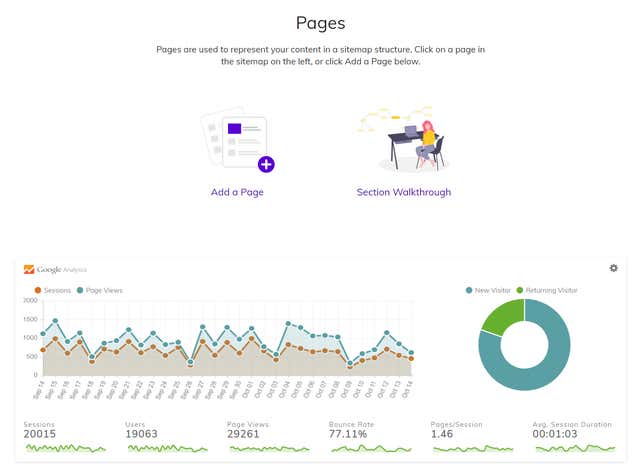
Using Google Analytics with your Agility CMS powered website allows you to analyze your website traffic and optionally display stats within the CMS.
What is Google Analytics?
Google Analytics is a powerful tool used to review how well you're doing online. It allows you to see how users are interacting with your website and web content. These specific metrics measure and monitor different aspects of the user experience, showcasing how people perceive your website and your ads.
How does Google Analytics Work?
Google Analytics works bythe inclusion of a block of JavaScript code on pages in your website. The tracking retrieves data about the page request and sends this information to the Analytics server via a list of parameters attached to a single-pixel image.
Google Analytics is a “freemium” service, meaning that you can use the service without paying a monthly charge, but if you want more advanced features or the ability to do more with the service, there is a recurring fee.
Why use this integration?
Make your data work for you
Process and share your data quickly with an easy-to-use interface and shareable reports.Connect your insights to results
Analytics is built to work with Google’s advertising and publisher products so you can use your analytics insights to reach the right customers.Get insights only Google can give
Access Google’s unique insights and machine learning capabilities to help get the most out of your data.Better visibility
When you connect Agility to your Google Analytics, you can see your latest traffic in your Pages dashboard.Build a complete picture
Understand your site and app users to better evaluate the performance of your marketing, content, products, and more.
Implementation Steps
- 1
Connect Agility CMS with your Google Analytics Property
Set up the integration in Agility CMS so it can pull analytics from your account and display that in your Pages dashboard. - 2
Connect Google Analytics to your Website or App
Add the tracking code provided by Google Analytics and integrate that into your website or app code. - 3
Configure Google Analytics
Create the property you want to track in Google Analytics. T - 4
Sign up for Agility & Google Analytics
You must have an Agility Instance set up and an active Google Analytics account.
Documentation
Integrate Agility CMS with Google Analytics
Screenshots
google-analytics-1