



commercetools
Search your commercetools catalogue from inside a content item and attach products to content, without copying product data into the CMS.
- E-commerce
Integration Overview
commercetools runs the catalogue, the pricing and the checkout. Agility runs the pages, campaigns and copy around them. The app connects the two: an editor searches your commercetools catalogue from inside a content item, picks a product, and the product data stays in commercetools where it belongs.
What is commercetools?
commercetools is an API-first commerce platform built for large catalogues running across several storefronts and regions. It's an enterprise choice, and it expects you to have developers and a reason to need that much flexibility.
If you're running a single store with a small team, Shopify or BigCommerce will get you live faster, and we have integrations for both. We'd rather say that now than after you've built on the wrong thing.
Why use this integration?
Product data has one home
Editors attach a product by reference. Price, SKU, variants, images and categories are read from commercetools, so nothing in the CMS goes stale when the catalogue changes.
Search from the content item
The picker searches by product name and scrolls through large catalogues, so nobody needs to know a SKU before they start writing.
Built for more than one storefront
If commercetools is the right fit, it's usually because you're running several front ends. Agility handles the content for all of them from one place.
Open source, so you can change it
It's a custom field app built on our Apps SDK, and the code is on GitHub. If your catalogue needs a field we didn't think of, add it.
Steps for Implementation
- 1
Create an API client in commercetools
In the Merchant Center go to Settings, then Developer settings, and create an API client with read access to products. Keep the project key, client ID, client secret and region.
- 2
Turn on Storefront Search (optional)
Settings, then Project settings, then Storefront Search. Without it the app still works, and editors browse the catalogue instead of searching it.
- 3
Install the app in your instance
Go to Settings, then Apps, and install commercetools. Paste in the credentials from step one.
- 4
Add the product field to a content model
Add a commercetools product field to any model that references a product. Editors get the picker straight away.
Documentation
Setting up the commercetools app
Our own documentation for installing and configuring the app.
commercetools API documentation
How to create an API client and which scopes the app needs.
Screenshots
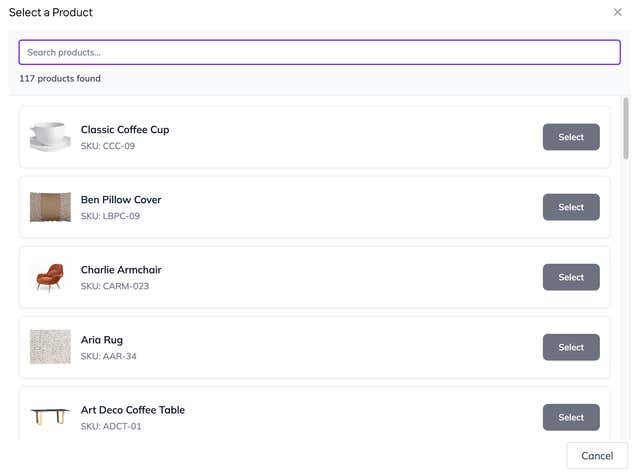
Searching the catalogue from inside a content item
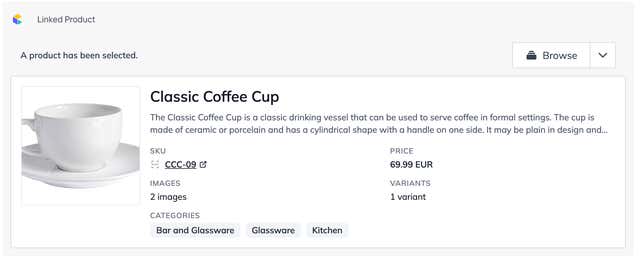
A linked product, with SKU, price, variants and categories read live