



Ahrefs
Improve your ranking on Google, Bing and other search engines with Ahrefs and Agility CMS.
- SEO
Integration Overview
Using Ahrefs with your Agility CMS powered website enables you to optimize your site's SEO, analyze your competitors, understand what your customers are searching for, learn about your industry's top performing content trends, and track your ranking progress.
What is Ahrefs?
Ahrefs is a very popular toolset for SEO analytics. Ahrefs is essential for anyone conducting SEO research and manages content for the website.
It is one of the top three players on the market along with SEMrush and Moz. It offers several tools to help you analyze your website, the market, and your competitors.
According to the Ahrefs website, their tool “…helps you learn why your competitors rank so high and what you need to do to outrank them.”
With Ahrefs you get competitive analysis, keyword research, backlink research, content research, rank tracking, web monitoring and more.
Learn more: Agility CMS and SEO: How Headless CMS helps your SEO
Why use this integration?
Track your progress
Monitor your rankings over time and chart your performance against your competitors’. Get scheduled reports, straight to your inbox.Improve your content
Discover and analyze top-performing content in your niche.Improve your ranking
Discover thousands of great keyword ideas, analyze their ranking difficulty and calculate their traffic potential.One-up your competition
Learn what keywords your competitors are ranking for and which pages bring the most search engine traffic. Find which websites link to your competitors' sites and gauge the quality of their backlink profiles. Determine whether your competitors are dong paid search advertising and where they funnel their paid traffic.Fix SEO issues
Find SEO issues in Ahrefs and then log in to Agility to fix them using built-in SEO fields for your content.
Implementation Steps
- 1
Configure Ahrefs
Set up and configure Ahrefs to track your competitors, and set up site audits on your Agility powered website. - 2
Deploy a Website
Deploy an Agility powered website to a public domain so that Ahrefs can access it. - 3
Sign up for Agility & Ahrefs
You must have an Agility Instance set up for a website and an Ahrefs account so that you can point Ahrefs to your domain that is connected to your Agility instance.
Documentation
From Ahrefs' Docs: How to use Ahrefs
Learn practical ways to use Ahrefs' SEO tools and reports to improve SEO.From Our Docs: Using Ahrefs with Agility CMS
Screenshots

ahrefs
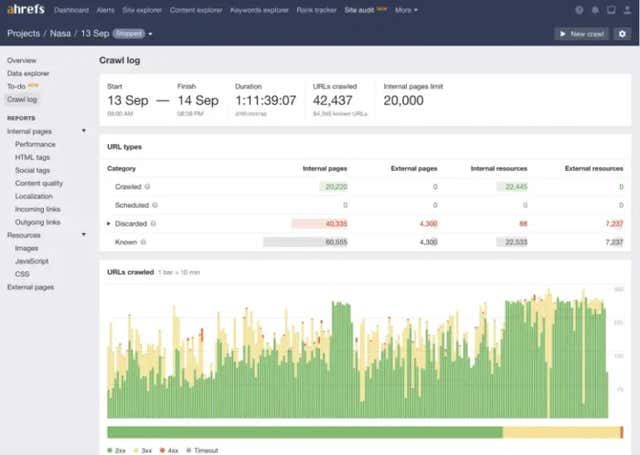
ahrefs-pic2
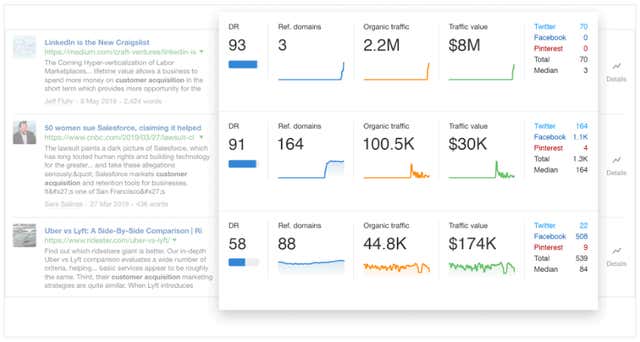
ahrefspic3
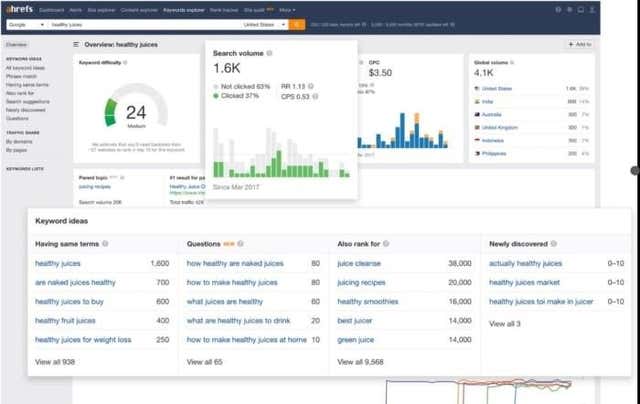
ahrefspic1