What is your developer-dependent CMS actually costing you? Calculate your costs and get a full report


Going Live
Website Deployment Checklist
Everything to check before, during and after launching an Agility-powered site: keys, publish webhooks, preview, editors and access, redirects and 404s, peer, Lighthouse, load and cache testing, SEO, and the first two weeks live.
Every site is different, but the same handful of things decide whether a launch goes smoothly: content updates reach the live site, editors can preview, old links still work, and search engines see the right pages. This checklist covers them in the order you'll meet them, from the weeks before launch to the first two weeks after.
Work through it on a staging copy of your site first. Most of these checks take minutes, and every one is much cheaper to fix before launch day than after.
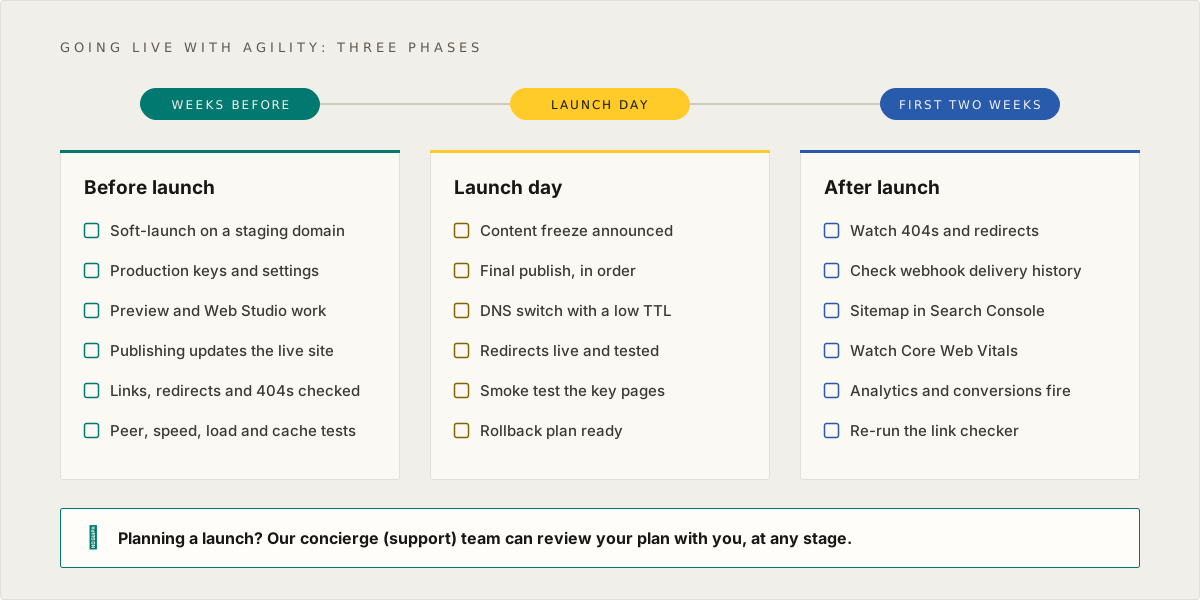
Planning a launch? Our concierge team can walk through this checklist with you, review your preview and webhook setup, and be on hand for launch day. See Talk to our concierge team at the end of this page.
Before launch
1. Soft-launch the site to a temporary domain
You need to check everything on a copy of the site that behaves the way production will.
- Deploy a production build (not a development server) to a temporary domain, with settings as close to production as possible: the same host, the same environment variables, the same build command.
- Turn crawling off on the temporary domain, with a
robots.txtthat disallows everything or anoindexheader. Write down how you did it, because you'll need to undo it on launch day. - Register the deployment in Settings > Sitemaps with an
https://URL, so editors can preview and use Web Studio against it.
2. Keys, environment variables and security
- Use the Fetch API key for published content and the Preview API key only for preview. Keep both on the server. A preview key reads unpublished content, so it must never appear in browser code, a public repository or a screenshot.
- Set the security key your site uses to validate preview links (for example
AGILITY_SECURITY_KEYin the Next.js starter, orAppSettings:SecurityKeyin the .NET starter) to the value from your instance. - Check that every environment variable is set in production, not only in preview or local development. A variable added after the last build may need a new build before the site sees it.
- Serve the site over HTTPS only. Add security headers such as HSTS and a Content Security Policy; start the policy in report-only mode so it can't break anything while you tune it.
See API Key Management for where to find and rotate keys.
3. Make sure publishing updates the live site
When an editor publishes, Agility sends a webhook to your site. Your site checks it, clears the pages that changed, and the next request fetches the new content.
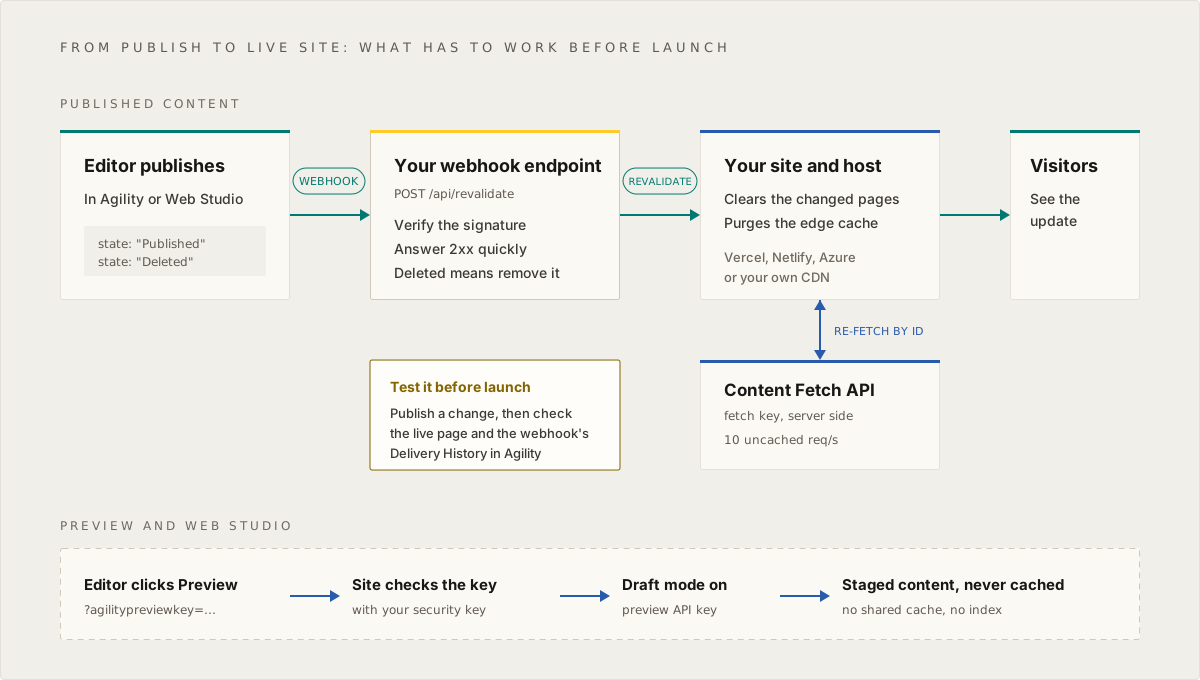
- Add a webhook in Settings > Webhooks that points at your site's revalidation endpoint, with Content Publish Events turned on. See Webhooks.
- Turn on Enable secure delivery and verify the signature on every request. See Verifying Signed Webhooks.
- Handle both states.
Publishedmeans refresh the item.Deletedmeans remove it: there is noUnpublishedstate, and unpublishing arrives asDeleted. If your handler only checks forPublished, it will never remove anything. - Answer with a
2xxquickly. Anything else, including a redirect or a timeout, counts as a failure. Turn on retries for the webhook so a brief outage doesn't lose an update. - If a CDN sits in front of your site, clear it too. Revalidating your app's cache doesn't reach a separate CDN, which will keep serving the old page until its cache expires.
- Test it: publish a small change, then check the live page and the webhook's Delivery History (kept for 90 days). If your site rebuilds on publish instead, time a build and tell your editors how long changes take.
The full payload and header reference is in Webhook Events and Payload Reference.
4. Is preview mode working?
Once you're live, preview is how your content team sees changes before they publish. Confirm it works on the deployment editors will use.
- Preview a content item and a page from Agility. Each should open the right URL and show staged content. See Setting Up Preview.
- Make sure preview responses are never stored in a shared cache. A preview page cached by a CDN would show unpublished content to the public. Send
Cache-Control: private, no-storefor preview requests. - Open the site in Web Studio. If it won't load in the frame, remove any
X-Frame-Optionsheader and sendContent-Security-Policy: frame-ancestors 'self' https://app.agilitycms.com;on every page. See Set Up Web Studio with Any Framework and Troubleshooting Web Studio. - Tell editors what a deployment does to preview. On Next.js, each deployment changes the draft mode secret, so an editor may need to open preview again from Agility after a deploy.
5. Fetch content so nothing goes missing
- Pass
takeon every list request. Fetch API lists return 10 items by default and at most 250 per request, so page withskipwhen a list can be longer. A missingtakeis the most common reason a launched site is missing items. - Cache responses on your side. The Fetch API allows 10 uncached requests per second and answers
429 Too Many Requestsabove that. Retry429with back-off, and wait at least 30 seconds before retrying a408. - Treat a failed or empty response as an error, not as "no content". Fail the build, or keep the last good copy, rather than publishing an empty page or an empty sitemap.
See Fetch API Status Codes and Caching and Handle Rate Limits and Outages Gracefully.
6. Run a link checker, and check redirects and 404s
- Run a link checker against the temporary domain. On macOS, Integrity is a good free tool; any crawler that reports status codes will do.
- Redirect every old URL that changes to its new home with a
301, and avoid chains (one hop, not two). Editors can manage redirects in Agility: see URL Redirections and Testing URL Redirections. - Check that an unknown URL returns a real 404 status, not a
200with a "page not found" message. Search engines index soft 404s. Some streaming frameworks send the200before the page knows it's missing, so check the status itself:
curl -s -o /dev/null -w "%{http_code}\n" https://staging.example.com/this-page-does-not-exist
- Give the site a branded error page for server errors (
500) as well as for404, with a way back to the home page. - Make sure pages your analytics depend on, such as form thank-you pages, are served, not redirected. A conversion tag that matches the thank-you URL never fires if the browser is redirected away from it.
7. Check all the SEO things
-
robots.txtis correct for production, and the temporary block from step 1 is ready to come off. -
sitemap.xmllists every published page you want found, using canonical URLs, and nothing that shouldn't be public. See Faster indexing with XML sitemaps and IndexNow. - Every page has a title, a meta description and a canonical URL, from the SEO fields in Agility. See Managing SEO for Developers.
- Every template has a social share image (Open Graph) and a favicon, and its structured data passes Google's Rich Results Test.
- Your site is readable by AI assistants as well as search engines: structured data, clean HTML, and optionally an
llms.txt. See Making Your Agility-Powered Site Readable by AI.
8. Speed, images and third-party scripts
- Serve raster images through the image CDN with
?format=auto&w=sized to how they display, and no wider than the original. Never add parameters to an SVG. See Image Transformation Reference. - Load analytics and other third-party scripts after the page is interactive. Every tag added through a tag manager counts, so test speed with them on (see Lighthouse and Core Web Vitals).
- Check every third-party script and form works on the production domain, not only on staging.
- Where the law requires it, show a cookie consent banner and keep analytics and marketing scripts waiting until the visitor agrees. Publish your privacy policy and accessibility statement before launch, not after.
9. Editors, content and Agility settings
The site is only half of a launch. The other half is the team and the instance behind it.
- Invite your editors with the roles they need, and nothing more. See Roles and Permissions Matrix, Role Design Recipes and User Access.
- If your organization uses single sign-on, set it up before editors start working in production. See Enterprise SSO.
- Set up workflow and approvals if your team uses them, and try a scheduled publish end to end. See Scheduling Overview.
- Look for Release Dates and Expiry Dates that will fire around launch. An Expiry Date on a page or a Component takes it off the live site on schedule, which is easy to miss when nobody remembers setting it.
- Deploy code and content model changes together. Code that reads a new field fails until that field exists in the production instance, and a removed field takes its content with it. See CMS Environments, Development, and Content Workflow Best Practices.
- More than one locale? Initialize and publish every locale's pages, check locale routing and
hreflangtags, give each locale its sitemap, and add redirects for each locale's old URLs. See the Multi-Locale Guide and Initialize a Page in Another Locale. - If the site has search, fill the search index from production content and check it updates when you publish (usually through its own webhook). See Algolia for one example.
- Take a snapshot of the instance with
agility pulljust before launch: models, content, pages, assets, sitemaps and URL redirections, as they stood on the day. See CLI Reference: agility pull.
Test before launch
Checking settings tells you the site is configured. Testing tells you it works for real people, at real traffic, with real publishing. Do these on the staging deployment, with production settings, and leave time to fix what they find.
Peer testing
The person who built a page is the worst person to test it. Fresh eyes find what you've stopped seeing.
- Ask someone who didn't build the site to walk the key journeys: home to listing to detail, the main navigation on a phone, search, and every form through to its thank-you page.
- Have your editors do their real jobs on the staging deployment, in their own browsers: create and edit content, preview it, publish it, and edit a page in Web Studio. This is the test that matters most after launch, because they'll be the ones using it every day.
- Test the browsers and devices your visitors use. At minimum: current Chrome, Safari (including an iPhone), Firefox and Edge, and one small phone screen.
- Do a keyboard-only pass (every link, menu and form reachable with Tab, Enter and Escape) and spot-check a page with a screen reader.
- Search the site for leftovers: placeholder text, test items,
TODOlinks and sample images. - Keep one shared list of what testers find, with an owner and a "must fix before launch" call on each.
Lighthouse and Core Web Vitals
- Run Lighthouse on every page template that matters (the home page, a listing, a detail page, a form page), not only the home page.
- Test a production build on production-like hosting, never a development server. Use the mobile profile and a private window, so browser extensions don't skew the result.
- Run each page three to five times and use the median. Scores move between runs, and a single run can mislead you in either direction.
- Test with analytics, tag manager and chat scripts on. A fast page that slows down once marketing tags load is the common launch-week surprise.
- Set a budget for the scores or page weight you care about, and check it on every deploy (for example with Lighthouse CI) so performance doesn't drift after launch.
After launch, real-visitor data replaces lab scores: see The first two weeks.
Load testing
Load testing answers two questions: does your site stay fast under a traffic spike, and does your caching keep it from calling the Content Fetch API on every request?
- Point the load test at your site, not at the Agility APIs directly. Agility serves published content from its global CDN; what you're testing is your hosting and your caching.
- Use a load testing tool such as k6, Artillery or Locust, and ramp well above your expected peak (a launch email or a campaign can multiply normal traffic).
- Include the paths that can't be cached: search, filtered listings, form submissions and anything personalized. They are usually the first to slow down.
- Watch response times (the 95th percentile, not the average), error rates, and your server logs. Any
429 Too Many Requestsfrom the Fetch API means too many requests are getting past your cache, because only uncached requests count toward the limit of 10 per second. - Check your hosting provider's policy before you start. Some require notice before a load test, or treat unannounced heavy traffic as an attack.
- Expecting a very large launch spike? Tell our concierge team in advance.
Cache testing: is it cached, and does publishing clear it?
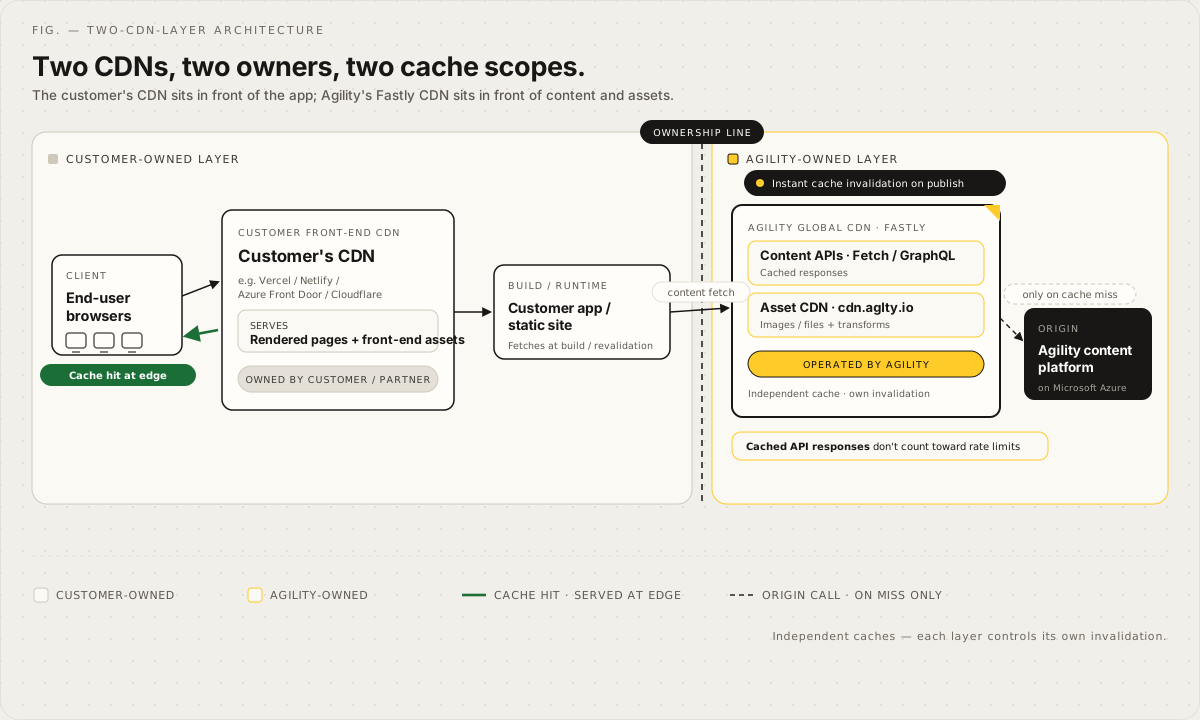
There are usually two independent caches between your visitors and your content. Agility clears its own CDN the moment content is published. Your site's CDN is yours to clear, and it's the one that goes wrong.
1. Pages are cached. Request the same page twice. The second response should come from the cache:
URL=https://staging.example.com/some-page

curl -sI "$URL" | grep -i -E 'cache|age'
curl -sI "$URL" | grep -i -E 'cache|age'

# Tracking parameters should hit the same cache entry, not create a new one
curl -sI "$URL?utm_source=test" | grep -i -E 'cache|age'
What to look for depends on your host:
| Host or CDN | Header | A cache hit looks like |
|---|---|---|
| Vercel | x-vercel-cache | HIT or STALE |
| Netlify | cache-status | contains hit |
| Cloudflare | cf-cache-status | HIT |
| Most CDNs | age | a number that grows between requests |
- Pages come back as cache hits on the second request.
- A URL with
?utm_source=or?gclid=added hits the same cache entry. If it doesn't, configure your CDN to ignore tracking parameters, or every campaign click goes back to your server. - Static files (scripts, styles, fonts) are served with a long cache lifetime. If they're cached "forever", give a replaced file a new name, because visitors who already have the old one won't download it again.
2. Publishing clears it.
- Publish a visible change (a word in a page title is enough), then request the page again. It should update within seconds, or within your build time if your site rebuilds on publish.
- If the change shows on your host's own URL (for example
*.vercel.app) but not on your domain, the CDN in front of your site isn't being cleared. Clear it from your webhook handler, or shorten its cache lifetime. - Unpublish the test change and check it disappears too. Unpublishing arrives as
Deleted, and a handler that only listens forPublishednever clears anything. - Check a listing page that shows the item, not just the item's own page. Lists and pages that include the item need clearing as well.
3. Preview is never cached.
- A preview request returns
Cache-Control: private, no-store. - After previewing a staged change, open the same page in a private window: the public must still see the published version.
See Content Delivery & CDN Architecture for how the two layers fit together, and Caching Strategies for choosing cache lifetimes.
Launch day
The Migration Cutover Runbook covers the full procedure, from the content freeze to rollback. If you're moving from another system, follow it alongside this list.
- Announce a content freeze, and name one person who makes the go or no-go call.
- Publish everything the launch needs. Publish shared content before the pages that link to it, so no page goes live pointing at something unpublished.
- Switch DNS. Lower the TTL on the records you'll change well before launch, so the switch, and a rollback, spread quickly.
- Check the domain basics: the certificate covers both the bare domain and
www, one of them is the canonical host and the other redirects to it, andhttp://redirects tohttps://. - Remove the crawl block from step 1, and confirm the production
robots.txtallows crawling. - Point the webhook and the deployment in Settings > Sitemaps at the production domain, if they still point at staging.
- Publish a small change and watch it appear on the production domain.
- Spot-check the key pages and a sample of old URLs that should redirect.
- Keep the rollback plan in reach, with the trigger agreed in advance, and keep the old site running (out of public view) until the new one is stable. It's your real rollback.
The first two weeks
- Watch for 404s in your logs or analytics, and add redirects for real URLs that still get traffic.
- Check the webhook's Delivery History for failures.
- Submit the sitemap in Google Search Console and Bing Webmaster Tools, and watch how pages get indexed.
- Watch Core Web Vitals from real visitors, not only lab scores.
- Confirm analytics and conversions against your numbers from before launch.
- Run the link checker again, against production.
- Set up monitoring if you haven't: an uptime check, error tracking, and an alert when your webhook endpoint starts failing, so you hear about problems before your visitors do.
- Subscribe to status.agilitycms.com, so you can tell a platform issue from one on your side.
- Remove access that was only for the build: agency and developer accounts that are no longer needed, and API keys or personal access tokens created for the build.
- Hand over: name who owns the site now, where its runbook and settings are written down, and how editors get help. That last one can be us: see below.
Talk to our concierge team
You don't have to work through this alone. Our concierge team can help at any stage: reviewing a checklist, checking a preview or webhook setup, or being on hand while DNS switches over.
- Chat with us using the chat button on any docs page, or inside Agility.
- Email support@agilitycms.com.
It helps to include your instance GUID, the URL of your staging site, and your planned launch date.
Have an idea for something this checklist should cover? Let us know.
On this page