What is your developer-dependent CMS actually costing you? Calculate your costs and get a full report


Authentication
Enterprise Single Sign-On with Agility
Connect Microsoft Entra ID, Okta or any SAML or OpenID Connect identity provider, make it the only way to sign in, and understand how users, roles and offboarding work with SSO.
Enterprise single sign-on (SSO) lets your people sign in to Agility through your own identity provider. They use their work account, nobody has a separate Agility password, and your MFA, device and network policies apply to every sign-in.
Enterprise SSO is available on Enterprise plans. To set it up, contact your customer success representative or support@agilitycms.com.
Supported identity providers
Agility supports SAML 2.0, OpenID Connect (OIDC) and WS-Federation, so you can connect:
- Microsoft Entra ID (Azure Active Directory) and ADFS
- Okta
- Google Workspace
- OneLogin
- PingFederate
- Salesforce
- SiteMinder
- Any other SAML 2.0 or OIDC provider
For the details we need from a SAML provider, and the values to enter in it, see SAML Identity Provider Integration.
Setting it up
- We create a connection for your organization and the email domains you name, and give you the values to configure in your identity provider.
- You configure your identity provider, for example an Entra enterprise application, and send us its sign-in URL, sign-out URL and signing certificate.
- We test the connection with you.
- We turn off the other sign-in methods, if you want SSO to be the only way in. We recommend this. Otherwise users can still sign in with a password or a social account.
How sign-in works with SSO
- The user enters their work email address on Agility's sign-in page. Agility recognizes the domain and hides the password field.
- The user is sent to your identity provider, which authenticates them and applies your policies: MFA, Conditional Access, device compliance.
- Your identity provider sends a signed response back to Agility.
- Agility matches the email address to an existing Agility user and issues a short-lived access token.
- The Management API checks the user's access and role on every request.
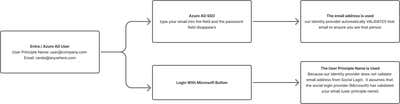
Your identity provider can also start the sign-in (IdP-initiated SSO), for example from a tile in your company's app portal.
Users and roles are managed in Agility
SSO decides who someone is. What they can do is still set in Agility.
- Add each user in Agility before their first sign-in, in Settings > User Access or through the Management API, and give them a role. See User Access.
- Roles are assigned in Agility. Groups and roles in your identity provider aren't read, and nothing else about the user is copied from it. See User Permissions.
Automatic provisioning with SCIM, and mapping identity-provider groups to Agility roles, are on our roadmap. Vote for it to tell us you need it.
Restricting access by network or device
Agility doesn't offer IP allowlisting (request it on our roadmap if you need it). With SSO as the only way in, your identity provider's policies decide who can sign in and from where. In Microsoft Entra ID, a Conditional Access policy targeting the Agility enterprise application can require a named location, a compliant device or MFA.
Conditional Access is evaluated when the user signs in. A session that is already open isn't re-checked if the user moves to another network.
When someone leaves
- Disable the user in your identity provider. They can't sign in again. A session that is already open stays valid until it expires.
- Remove the user from your Agility instances in Settings > User Access. This takes effect on their next request, and also stops any Personal Access Tokens they created from working on those instances. Tokens are checked by Agility, not by your identity provider, so this step matters.
Signing in with Microsoft Entra ID
Entra users can sign in from the email field on the sign-in page, as above, or with the Sign in with Microsoft button. The button requires the user's UPN (User Principal Name) as their Agility email address. See Authenticate with Microsoft or Azure AD/Entra.
Direct link to your sign-in
To send users straight to your identity provider, for example from your company's app portal, use:
https://manager.agilitycms.com/login?connection=<connection-name>
We give you the connection name when we set up your connection.
For a summary written for security reviewers, see the Security Review Guide.
On this page