Built-in AI Translation using DeepL in Agility CMS
Copy content and pages between locales, translated as they go.

Starting today, every Agility CMS customer has Built-in AI Translation using DeepL, so content is translated as it’s copied into another locale. Install the DeepL app with your own DeepL API key, tick Translate Content when you copy a page or a list, and each locale gets a translated draft that you review before anything goes live.
Running a site in two languages shouldn’t mean doing the work twice
If you run a bilingual or multilingual site, you know the routine. Write the English page, copy it into the French locale, then paste every field into a translator and paste the result back, one field at a time. Locales have been in Agility for a long time. What was missing was a way to move content between them without the copy and paste, and that’s what this release fixes.
How DeepL translation works in Agility CMS
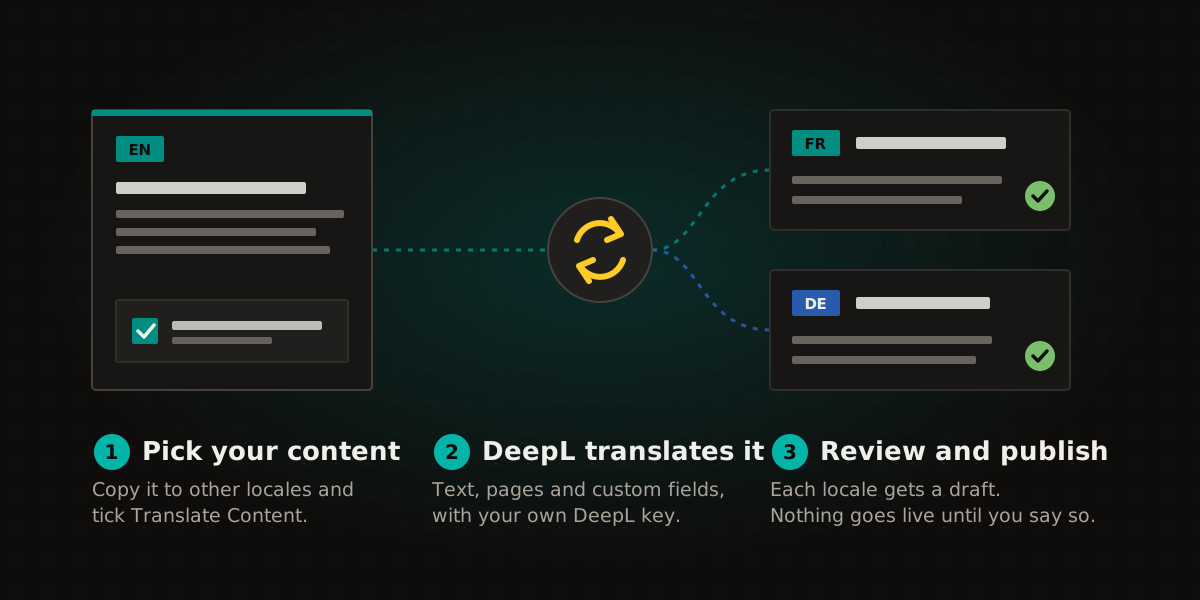
- Pick your content. Select content items, or a whole list, and choose Copy to Locales. For a page, open Pages in the other locale and click Initialize Page. Either way, tick Translate Content.
- DeepL translates it. Text and rich text fields, page components, and the text inside custom fields such as Power Fields Markdown and Block Editor content go to DeepL using your API key.
- Review and publish. Each locale gets a draft. Nothing is published until you publish it.
You can also translate one item at a time. Open the DeepL panel in the content editor’s sidebar, pick the fields you want, and translate them in place. Fields DeepL leaves alone are listed with the reason, and nothing is saved until you save the item.
The localization tools are now on for every instance
DeepL sits on top of a rebuilt localization experience that, until today, was only switched on for some instances. It’s now on for everyone:
- an Other Locales column and filter in content lists, so you can see which locales each item exists in
- Copy to Locales for one item, a selection, or a whole list
- Save & Localize, to copy an item to other locales as you save it
- copying a page into several locales at once
You don’t need DeepL to use any of these. Without the app, a copy is an exact copy, ready for your translator.
What you need to get started
- An Agility CMS instance with more than one locale.
- A DeepL API key. DeepL API Free is fine for trying it out, and DeepL API Pro for production. DeepL’s Translator and Write plans don’t include API access, so check that your plan does. DeepL bills you directly for what you translate.
- An administrator to install the DeepL app from Settings, then Apps, and paste in the key.
Setup takes a couple of minutes, and the DeepL app guide walks through it, including where to find your key.
What to check before you publish
Machine translation is a strong first draft, not the final word. A few things deserve a look:
- URL slugs in plain text fields get translated. If your model stores the slug in a plain text field, check it. A Friendly URL field from Power Fields is left alone.
- A page’s URL path stays as it is. Its title, menu text and meta description are translated, but set a localized path yourself if you want one.
- Code samples pasted into body text can come back changed. Check any code or JSON in a translated item.
The known limitations are listed in the docs, and we’ll keep that list current as we fix them.
Learn more
- DeepL app: install and set up
- Translating content with DeepL
- Copying and translating content across locales
- Working with localized content
- Background on how we approach locales: multilingual headless CMS enablement
Frequently asked questions
Do I need my own DeepL account?
Yes. The app uses your DeepL API key, so translation runs on your DeepL account and DeepL bills you directly. A DeepL API Free key works for trying it out.
Does translated content publish automatically?
No. Every translated copy is saved as a draft in its locale. You review it and publish it when it’s ready, the same as any other change.
Which languages can I translate into?
Any language DeepL supports that matches a locale on your instance. That covers dozens of languages, including French, German, Spanish, Italian, Portuguese, Dutch, Polish, Japanese and Chinese, and regional versions where DeepL has one: Canadian French, Latin American Spanish, Traditional Chinese, Brazilian and European Portuguese, and US and UK English. Canadian French comes out Canadian. We’re Canadian, so we checked.
Can I translate just one field?
Yes. Open the DeepL panel on the item, pick the fields you want, and translate. Nothing is saved until you save the item.

About the Author
Joel is CTO at Agility. His first job, though, is as a father to 2 amazing humans.
Joining Agility in 2005, he has over 20 years of experience in software development and product management. He embraced cloud technology as a groundbreaking concept over a decade ago, and he continues to help customers adopt new technology with hybrid frameworks and the Jamstack. He holds a degree from The University of Guelph in English and Computer Science. He's led Agility CMS to many awards and accolades during his tenure such as being named the Best Cloud CMS by CMS Critic, as a leader on G2.com for Headless CMS, and a leader in Customer Experience on Gartner Peer Insights.
As CTO, Joel oversees the Product team, as well as working closely with the Growth and Customer Success teams. When he's not kicking butt with Agility, Joel coaches high-school football and directs musical theatre.