
Best Storyblok Alternatives for 2026

Key Takeaways
-
Storyblok is well suited to creative brands and fast-growing startups, but companies operating in regulated industries or those managing a large number of brands usually end up outgrowing it in the areas like governance, and cost predictability.
-
Most teams begin to look since routing is contained in the code and not in the CMS. Marketing cannot move a page, change a URL, or launch a section without the involvement of engineering, and this cost occurs each time the sitemap is changed.
-
Since the model allocates one space for each subscription, brands and regions are required to have separate environments, causing content that should be shared to be duplicated and resulting in roles and workflows having to be set up again every time a property is added.
-
Agility CMS allows marketers to have ownership of pages and sitemaps, enables the management of multiple brands and regions within a single instance by default sharing of content and models, and makes its consumption limits available at each level rather than agreeing on them when the contracts are renewed.
Storyblok is a headless CMS built around a block-based component model with a visual editor that supports both marketers and developers. If you’re a creative brand or high-growth startup, it could be a good fit. However, if you’re in a highly regulated industry or have a large multi-site or multi-brand portfolio, you likely need an alternative.
Here is what to check before you shortlist a replacement.
-
Marketers who can build new page structures, not only fill in the ones that already exist
-
Consumption limits that are published at every tier rather than negotiated at each renewal
-
Multi-brand and multi-region architecture that lives in a single instance
-
Governance that holds when AI agents start creating and updating content
-
Security, data residency, and backup controls that ship as standard rather than as add-ons
This guide will show you what to look for in a Storyblok alternative and also list seven platforms that are worth considering.
Running content across multiple brands or regions? Book a personalized demo, and we will show you how Agility handles it all.
What to Look For in a Storyblok Alternative
Storyblok fits many teams well, but what matters is whether it keeps working at the scale you are heading toward. Here are some of the things to consider in an alternative:
Whether page routing is a product or something you build
Storyblok stores content as stories within a nested folder structure. Each story has a slug, and the frontend reads that structure to generate the appropriate routing. This way, the URL structure is incorporated into the code so developers can reason about it.
However, it also means the sitemap is not an object anyone can manage. When the marketing team wants to move a campaign page under a different parent, change a URL ahead of a launch, or spin up a section for a new product line, they have to reflect the change in the routing layer your team wrote.
Some platforms treat page routing as a first-class part of the CMS, where an editor sees the page tree, places a page in it, sets the URL, and assembles the page from templates and components the developers built, without a deployment. Teams considering an alternative need to know who owns the sitemap, and what it costs in engineering time every time it changes.
Whether your multi-site unit shares anything
The number of Storyblok subscriptions is based on spaces; each space is a separate CMS environment with its own content, users, and assets, and all self-serve plans, including Growth Plus at $349 per month, come with exactly one.
For a company that operates four brands in six different markets, the practical result is that content which should be shared ends up being duplicated and the roles and workflows have to be set up again in each environment. A separate-environment approach is appropriate for organizations in which the brands actually have nothing in common.
Other platforms make the multi-site unit a sitemap inside a single instance, where properties share users, content, assets, templates, and content models by default, and each still runs on its own domain. Before you shortlist anything, map your brands, regions, and microsites on one page. Then ask each vendor what those properties share by default and what has to be duplicated.
What traffic and content volume cost as you grow
The Growth plan costs $99 per month and includes five seats with a limit of ten, 400GB of traffic, one million API requests, and one space. The Growth Plus plan is $349 and comes with fifteen seats and a limit of twenty. Each additional million API requests is charged at $10, each extra 250GB of traffic costs $75, and each additional locale is $20 per month. For Premium and Elite, spaces, users, API requests, traffic, and locales are all described as custom.
Every enterprise platform negotiates something, so the useful comparison is which axes are priced, not whether any are. Traffic and API request volume are the two that move without anyone on your team deciding they should, such as when a campaign performs better than expected.
When evaluating vendors, try to understand which axes carry an overage rate and what a deployment actually costs in API calls. Platforms that support incremental content sync pull only what changed since the last build rather than re-fetching the full content set, which can vary widely as the site grows.
6 Storyblok Alternatives for Enterprises
1. Agility CMS
Agility CMS is a hybrid headless CMS built for enterprise teams that need marketing to own page structure and routing. At the same time, developers keep control of the content model and the components that render it.
Having run enterprise content operations since 2003, Agility CMS is SOC 2 Type II certified and GovRAMP registered, runs on Microsoft Azure with a published SLA of 99.9% or better. Here are some of the other features that make it a suitable Storyblok alternative.
Sitemaps your marketing team owns
In Agility, the sitemap is a CMS object rather than a structure your frontend infers from a content tree. Editors see the page hierarchy, create a page inside it, set the URL, choose a page template, and drop modules into the content zones that template defines.
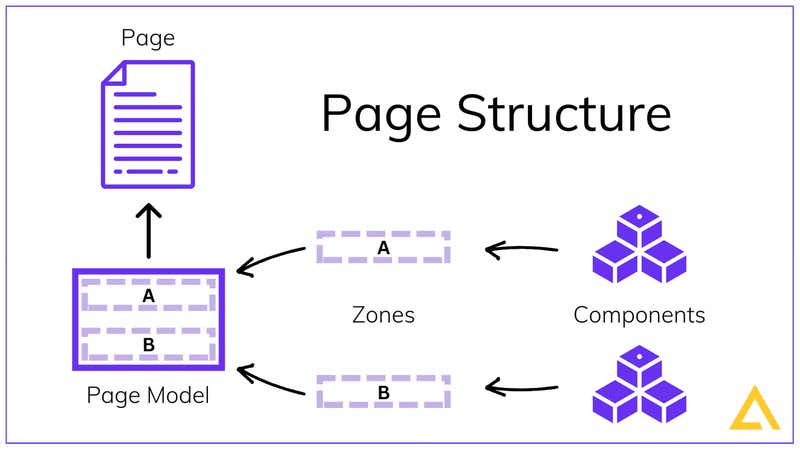
Once developers build the initial component library, marketing can build, move, rename, and reorganize pages without a ticket. URL changes ahead of a campaign do not touch your routing code.
Agility exposes page routing through the API as well, so your frontend requests a page object and receives the template, the modules on it, and their content in one place rather than assembling routing logic from slugs.
Try out Agility’s Developer-Dependent CMS Calculator to estimate what developer dependency is costing your team in a year.
Multiple sites in one instance, sharing by default
In Agility CMS, multiple sites live inside a single instance, each capable of running on its own domain, and they share users, content, assets, page templates, and content models by default, not by configuration. Granular permissions and workflow apply across all of them from one place.
That means a global template built once is available to every property, and adding a new microsite or regional site is a sitemap rather than a new environment to provision and staff.
Agility also supports separate instances too, for organizations that need hard separation between brands. However, when properties are meant to share, sharing should not be the thing you have to build.
For instance, Oxford Properties runs multiple property and brand sites on Agility from a centralized content hub, with shared models and reusable components holding consistency across properties. In contrast, each site keeps its own content, permissions, and publishing workflow.
Delivery and build APIs that do not bill for traffic
Agility’s pricing lists API and asset requests as unlimited, along with content models and locales, so a campaign that performs or a market that opens does not generate consumption charges. The Enterprise package covers 50 users, 500,000 or more entries, 20TB of asset storage, and 10 or more page management sitemaps.
Two APIs handle delivery, and both are built to keep request volume low rather than to bill for it. The Content Fetch API resolves linked content in a single request and serves it from a global CDN that never touches the content database directly. Hence, a page with nested references is one call rather than a chain of them.
Meanwhile, the Content Sync API uses a sync token, so a build pulls only what has changed since the last one instead of re-fetching your entire content set on every deployment. On a large content estate, this can impact build times as much as cost.
Want to see the Content Fetch and Content Sync APIs against a real content model? Book a technical demo.
Recovery and platform controls that are included rather than quoted
Point-in-time backup and recovery for 30 days is standard on every Agility package, with extended retention available at Enterprise. Content versioning with rollback and full audit trails come with the platform, not a tier.
Several other things large organizations treat as baseline are included in the same way, including:
-
Digital asset management with a built-in image editor and real-time transformations behind Fastly.
-
Nine built-in roles, plus custom roles and Teams for managing permissions across groups instead of person by person.
-
Approval workflows, scheduled publishing, and batch publishing.
Enterprise customers get SSO through Azure Active Directory, SAML, LDAP, or ADFS, a choice of data center across the USA, Canada, Europe, and Australia, custom asset and API domains, and support for independent security audits run by your own team.
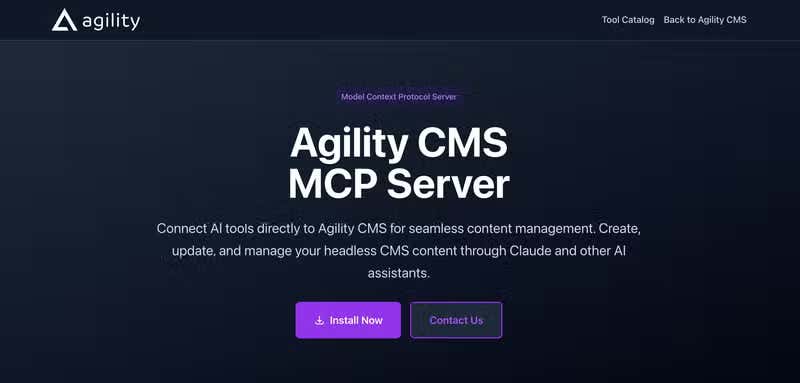
For teams working with AI assistants, Agility’s MCP server connects Claude, GitHub Copilot, Cursor, and Windsurf to your content over OAuth 2.0 rather than a pasted access token, with role-based permissions and approval workflows applying to anything an agent does.
Ready to see how Agility handles your content operation? Book a demo.
2. Contentstack
Contentstack is an enterprise composable DXP that pairs headless content management with a built-in personalization engine and no-code automation. It is a common shortlist entry for large organizations that want content, personalization, and orchestration from one vendor rather than assembled from several. It includes features such as:
-
Personalization and experimentation built into the platform
-
Extensible workflows with granular role and permission controls
-
Automation Hub for connecting content operations to other systems
-
A large marketplace of enterprise integrations and extensions
3. Contentful
Contentful is an API-first content platform built for teams delivering across many channels at once. Its integration marketplace and SDK coverage are among the largest in the category, which makes it a frequent choice for enterprise teams running high-traffic, multi-channel content operations. It includes features such as:
-
REST and GraphQL APIs with SDKs across major platforms and frameworks
-
Structured, reusable content modeling across channels
-
Role-based access controls and content versioning
-
An extensive app marketplace covering search, personalization, and asset management
4. Sanity
Sanity is a developer-first platform built around a real-time content store, Portable Text for structured rich content, and GROQ, its own query language. Its Studio is a React application that teams host and customize themselves, which suits engineering-led product teams with complex, evolving content models. Some of its key features include:
-
GROQ query language for filtering and joining content in one request
-
Real-time collaborative editing with live presence
-
A fully customizable React-based Studio
-
Agent tooling and an MCP server available across plans
5. Kontent.ai
Kontent.ai is a headless CMS focused on content operations and governance. Structured workflows, collaboration tooling, and multi-team publishing controls make it a fit for large organizations where content passes through several approval stages before it goes live.
-
Configurable multi-step workflows and publishing governance
-
Collaboration and task assignment inside the editing experience
-
Localization and translation management across markets
-
Enterprise security controls and audit capability
6. Hygraph
Hygraph is a GraphQL-native platform built around content federation, which lets teams query content alongside data from other systems through a single endpoint. That suits organizations whose content lives across several sources and needs to be assembled at query time rather than duplicated.
-
GraphQL-native API with a no-code schema builder
-
Content federation across remote sources and third-party systems
-
Fine-grained permissions and role management
-
Localization built into the content model
Choosing a Storyblok Alternative that Scales with Your Team
Every platform on this list is a capable headless CMS. However, the right fit depends on where your constraint actually is. If it is developer capacity, focus on how much a marketer can do alone. If it is cost predictability, read the enterprise column of the pricing table rather than the headline number. If it is architecture, start from your map of brands and markets and work backward.
Agility CMS was built for enterprise teams that need all three at once. Here is what your organization can do with it.
-
Give marketers full page building, sitemap control, batch publishing, and rollback without a deployment.
-
Scale traffic, content, and markets on unlimited API and asset requests, unlimited locales, and unlimited content models across every package
-
Run multiple brands, regions, and microsites from one instance with custom roles, Teams, and a choice of data center across four regions.
-
Connect Claude, Copilot, Cursor, and Windsurf to your content through an OAuth-secured MCP server with permissions and approval workflows still in force.
-
Migrate off a legacy platform in phases, with your existing systems live throughout, supported by a team that has done it for multiple enterprise organizations.
Scotiabank perfectly exemplifies what’s possible with Agility CMS. Six Latin American markets each run their own content instance in Agility, so regional teams manage the content and the language variations that matter to them without waiting on a central queue. Their people sign in with existing Scotiabank corporate credentials through Azure Active Directory, carrying forward the access rules and branding already in place.
Over the years, their development teams have rebranded and rebuilt the front end for each country while reusing the same content underneath, and Scotiabank’s own security team has audited the platform independently each year.
Ready to see whether Agility fits your content operation? Book a demo, and we will walk through your brands, your markets, and your publishing workflow.

About the Author
Joanna Olaru-Boyle is a B2B SaaS marketing manager specializing in demand generation and lifecycle campaigns. She has built her career across companies in technology, retail and events, driving multi-channel programs that create demand and attract new customers.
She holds a Bachelor's degree in History and English from the University of Toronto, a Corporate Communications diploma from Centennial College, and is certified as both a Salesforce AI Associate and Salesforce Pardot Specialist.
Joanna thrives where data and creativity meet and is just as passionate about supporting others in their mental health journey as she is about pipeline growth.


