Content Operations: a pipeline for your content with the Agility CLI
Pull, preflight, sync and verify content between instances.

Content Operations is how you move content between Agility instances the way you move code between environments. It's the Agility CLI, available now on npm: pull an instance to disk, preview a sync before it writes anything, copy models, components, content and pages to another instance, and then prove the target matches the source. It runs from your terminal or a CI job, and it's available to every Agility customer today.
Why it matters
Your code has a pipeline. It moves from a branch to test to production, and at every step something checks it. Most content doesn't get that. If you run a dev, test and production instance, or one instance per brand or region, you know the routine: build the model in dev, rebuild it by hand in the next instance, do it again in production, and hope nobody missed a field.
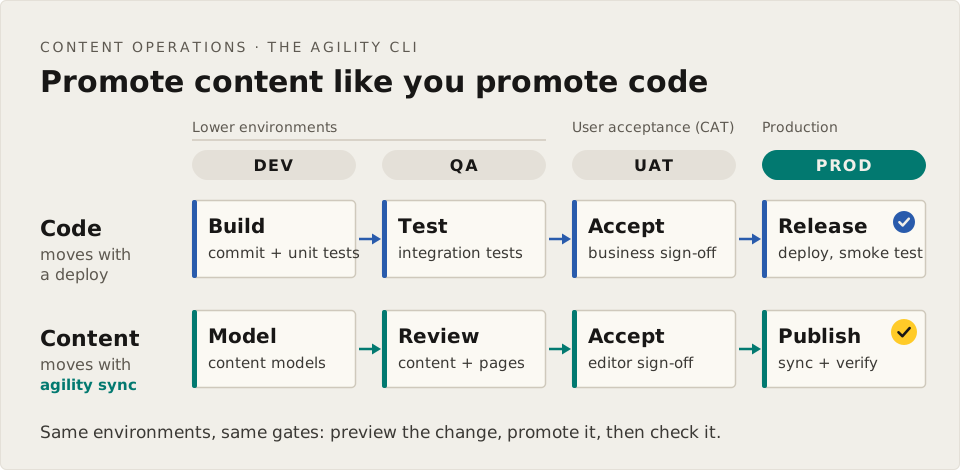
DevOps solved this for code a decade ago. Content Operations solves it for content, and it does it with the same habits developers already trust: a dry run first, a scripted change, and a check afterwards.
How it works
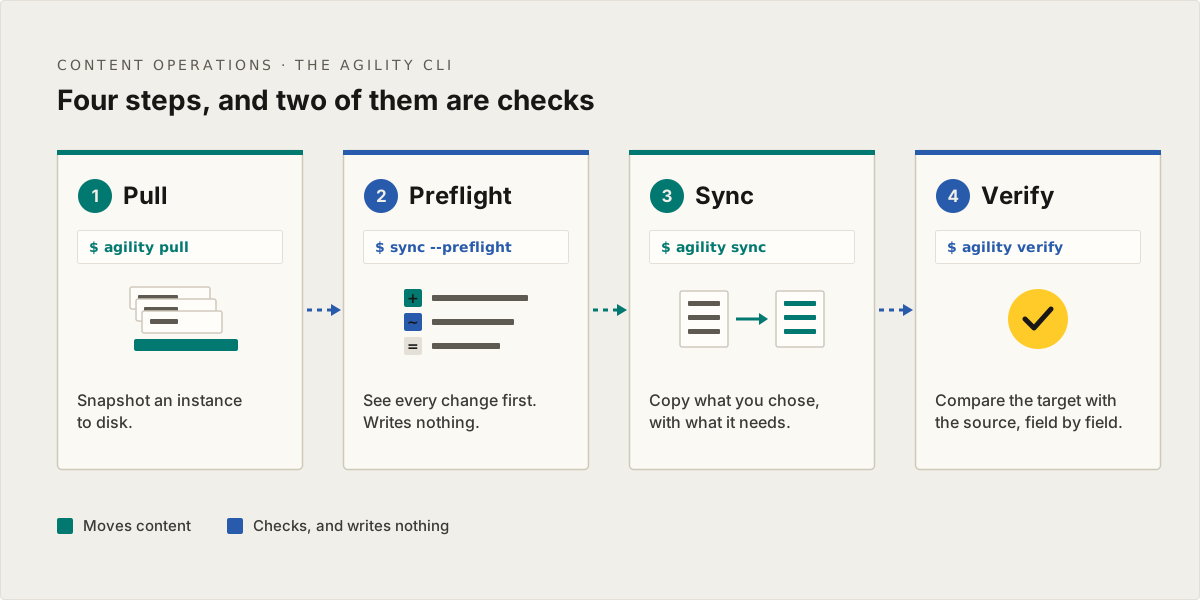
- Pull.
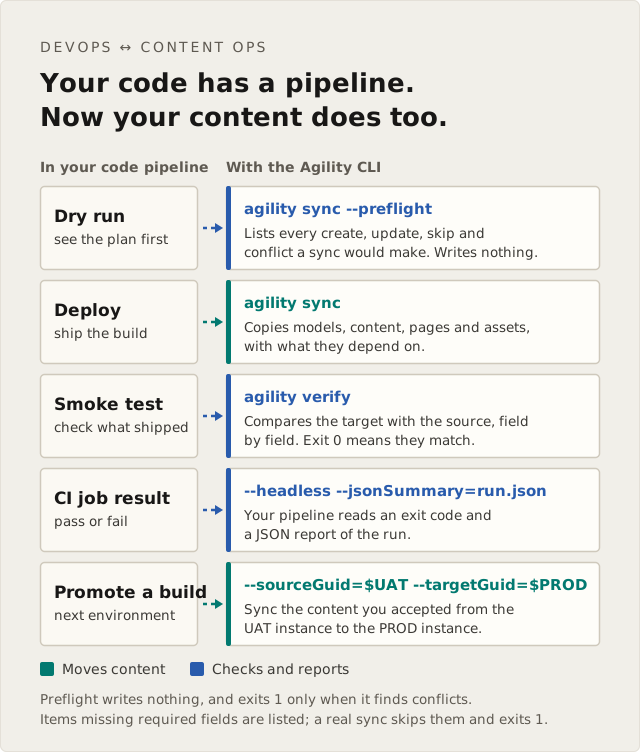
agility pulltakes a snapshot of an instance to disk: models, components, content, pages, templates, assets and URL redirections. - Preflight.
agility sync --preflightwrites nothing. It reports every create, update and skip a real sync would make, and lists any item that's missing a required field, so you see the problems before anything is written. - Sync.
agility synccopies what you chose into the target, with everything it depends on. Scope it to a few models, one page and its children, one container or one locale, and publish on arrival if you want to. - Verify.
agility verifycompares the target with the source, field by field, without relying on the sync's own logs, and lists every difference it finds.
Two of the four steps change nothing, and that's on purpose. A sync you can't check before and after isn't one you'll run on production.
There's more in the CLI than the four steps. agility reverse-sync sends edits made in the target back to the source, using the mappings from the original sync, which is what you want after a blue-green cutover. agility workflows publishes, unpublishes, approves or declines synced content and pages in bulk. And --jsonSummary gives your pipeline a pass or fail it can read.
Who it's for
Most teams run one Agility instance per project, often with a sandbox on the side, and that's all they need. If that's you, it's still good to know this is here, because the CLI handles two everyday jobs as well:
- Working with a sandbox. Build a model or a page in your sandbox and move it into your main instance, or bring production content back into the sandbox to test against.
- Starting a new project from a template. Use a previous instance as the template for a new one, with its models, Components and pages already in place. Agencies do this for every new client.
And it's built for the teams who run more:
- Teams with lower environments. The model change that ships with your code reaches dev, QA, UAT and production with it, so every environment is ready for the deploy that needs it.
- Developers, platform and DevOps engineers who want content changes scripted, reviewed in a pull request and run from CI, with a pass or fail at the end.
- Multi-brand and multi-region teams. Roll one model change out to every site in a single run.
The CLI or the MCP server?
The Agility MCP server can move content between instances too, and it's great for a one-off move from your AI assistant. The CLI keeps a mapping log of every item it has synced, with versions and conflict detection, so each run picks up where the last one left off and catches edits made in the target since. That makes it the right tool for syncs you run again and again.
A sync adds and updates, and never deletes: anything that exists only in the target stays where it is. Edits someone made in the target are kept unless you choose --overwrite.
What you need
- Two Agility instances, and an Org Admin, Instance Admin or Manager role on both.
- Node.js, then
npm install -g @agility/cli. - A developer, or anyone comfortable in a terminal.
- For CI, a Personal Access Token, so the CLI can sign in without a browser. A token lasts up to two years, and each person can hold up to 10. Each token is tied to the person who made it, and stops working when their access is removed. Today you create one through the Management API, and the Personal Access Tokens guide walks through it.
Learn more
- The Agility CLI: install, sign in and every command.
- CI/CD integration guide: a working pipeline to start from.
- Personal Access Tokens.
- The Content Operations page.
FAQ
Is there a button for this in the Content Manager? Not yet. Today Content Operations runs from the Agility CLI, in a terminal or a CI job, on top of the Management API. Copying pages and items between instances from the Content Manager is on our roadmap.
Will a sync overwrite changes someone made in the target? Not by default. The CLI skips a target item that has its own changes and reports a conflict. Pass --overwrite when you want the source version to win.
How do I run it in CI without a browser login? Create a Personal Access Token and pass it with --token or the AGILITY_TOKEN environment variable. The CI/CD guide has a pipeline to copy.
Can edits flow back from the target to the source? Yes, with agility reverse-sync. Run it with --preflight first.

About the Author
Joel is CTO at Agility. His first job, though, is as a father to 2 amazing humans.
Joining Agility in 2005, he has over 20 years of experience in software development and product management. He embraced cloud technology as a groundbreaking concept over a decade ago, and he continues to help customers adopt new technology with hybrid frameworks and the Jamstack. He holds a degree from The University of Guelph in English and Computer Science. He's led Agility CMS to many awards and accolades during his tenure such as being named the Best Cloud CMS by CMS Critic, as a leader on G2.com for Headless CMS, and a leader in Customer Experience on Gartner Peer Insights.
As CTO, Joel oversees the Product team, as well as working closely with the Growth and Customer Success teams. When he's not kicking butt with Agility, Joel coaches high-school football and directs musical theatre.