What is your developer-dependent CMS actually costing you? Calculate your costs and get a full report


Evaluating Agility
How Agility Works: A 10-Minute Architecture Tour
The Agility mental model in ten minutes: the building blocks, content vs pages and sitemaps, the read path and the write path, where things run, and what Agility is not.
This page gives you the mental model for the rest of the documentation. It covers the building blocks, how content is read and how it is written, how pages differ from content, and what Agility deliberately leaves to other tools. For the full training version, see Core CMS Concepts in the Training Guide.
The one-paragraph version
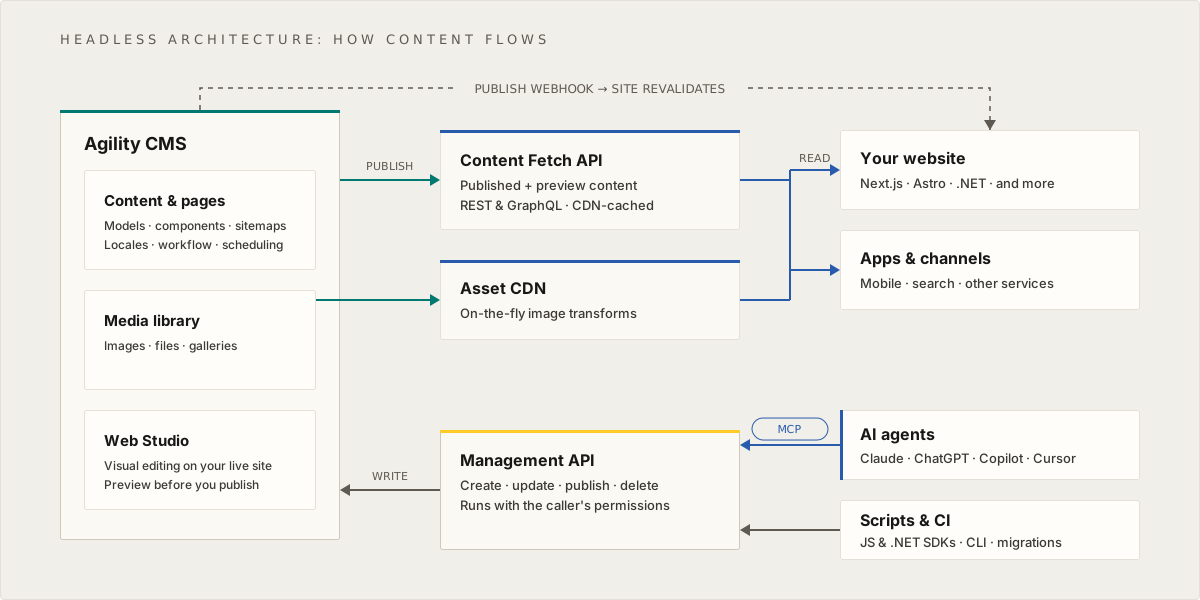
Agility is a hosted, headless CMS. Editors create content and pages in the Agility Content Manager. When they publish, that content becomes available through Agility's content APIs and asset CDN. Your website or app, which you build and host yourself, reads it from there. Writes come in through the editors' UI, or through the Management API for scripts, migrations and AI agents. Webhooks tell your systems when something changed.
The building blocks
| Block | What it is |
|---|---|
| Organization | Groups your instances, plans and billing, and controls how users sign in (single sign-on, MFA). |
| Instance | A dedicated area where editors create, manage and publish content. One instance can power one site or app, or several. Users, locales and API keys belong to an instance. |
| Models | The schemas. Content models define structured content, component models define the building blocks editors place on pages, and page models define page layouts with zones where components go. Each component model and page model corresponds to code in your front end. |
| Content | Items and lists based on content models. Content isn't tied to a page, so the same item can appear on many pages and in other channels through the API. |
| Pages and sitemaps | A sitemap is a page tree for one destination, such as a website, an app or digital signage. An instance can have several. Pages hold page-level SEO and the components editors arrange in each zone. |
| Assets | Images and files in the media library, served from a global CDN. |
The Concepts page lists the full hierarchy.
Content vs pages and sitemaps
This is the distinction that most shapes an Agility project.
- Content is structured and reusable. A blog post, a product, a team member or a footer is content. Your code can request it from anywhere: a website, an app, a search index.
- Pages are how editors control a website. They add and remove pages in the sitemap, choose a page model, place components in its zones and set SEO properties, without a developer. A component can show its own fields or pull in content from a list.
- Dynamic pages connect the two: one page in the sitemap generates a page per item in a content list, such as one page per blog post. See Generating Dynamic Pages From Content.
You can use content alone, with your code deciding what pages exist, or use page management as well. Headless, Hybrid or Traditional: Choose Your Delivery Model compares the options, and Pages vs Content explains the difference for editors.
The read path
How content gets from Agility to the people using your site:
- An editor publishes. Content and pages have states. Saved changes stay in Staging until they are published, either directly, on a schedule, or together in a batch. Approval workflows can sit in between.
- The content APIs serve it. The Content Fetch API (REST) and the GraphQL API return published content with a fetch API key, or the latest saved content with a preview key. Responses are served through a global CDN, and Agility invalidates the cached content at the edge when you publish (Content Delivery & CDN Architecture).
- Assets come from the asset CDN. Images can be resized and converted on the fly with query strings.
- Your front end renders and caches. Your site fetches content at build time or on request, renders it, and serves it from its own hosting and CDN.
- A webhook tells your site to refresh. Agility calls your webhook endpoint when content is published, so your site can revalidate just what changed.
If your app needs its own copy of the content, for offline use, a search index or very high read volume, the Content Sync API returns everything that changed since your last sync.
The write path
How content gets into Agility:
- Editors work in the Content Manager and in Web Studio, which shows your real site inside Agility for preview, commenting and in-context editing.
- Scripts, migrations and CI use the Management API, through the JavaScript and .NET Management SDKs or the Agility CLI.
- AI agents use the Agility CMS MCP Server, which calls the Management API on the user's behalf.
All three act with a user's own permissions. Content saved through the Management API or the MCP server lands in Staging, the same as an editor's save, and goes live only when it is published. That keeps workflow and approvals in force no matter who, or what, made the change (Governing AI Access to Agility CMS).
Where things run
- Agility hosts the CMS on Microsoft Azure. There is nothing to install or patch.
- Agility's APIs and assets are served through a global CDN in front of the platform.
- Your front end runs wherever you host it. Agility has built-in integrations with Vercel and Netlify, but you can deploy anywhere.
- Each instance lives in a data region. See Data Residency & Data Regions.
What Agility is not
Knowing the edges makes the rest easier to plan:
- Not your website host. You build and deploy the site or app. Agility provides the content and the editing experience.
- Not a self-hosted CMS. Agility is a cloud service. You don't install it on your own servers.
- Not a search engine. Agility feeds the search provider you choose. See Searching Content at Scale.
- Not a forms, analytics or experimentation tool. Apps connect those tools to the CMS, and editors can manage A/B test variants as content, but the tools themselves are separate.
- Not a commerce engine. For a store, Agility manages the content and a commerce platform manages products, carts and checkout. See Building a Headless Ecommerce Website.
What Your Team Builds vs What Agility Provides turns this into a full responsibility map.
Go deeper
- Core CMS Concepts: the data model and headless architecture in detail
- Architecture Deep Dive in the Developer Training Guide
- Content Architecture
- Content Sync Explained: Sync vs Fetch vs GraphQL
On this page