What is your developer-dependent CMS actually costing you? Calculate your costs and get a full report


Developers
Architecture Deep Dive
Understanding Agility CMS architecture is essential for effective development. This guide covers the headless architecture pattern and how it applies to your applications.
Understanding Agility CMS architecture is essential for effective development. This guide covers the headless architecture pattern and how it applies to your applications.
Headless Architecture
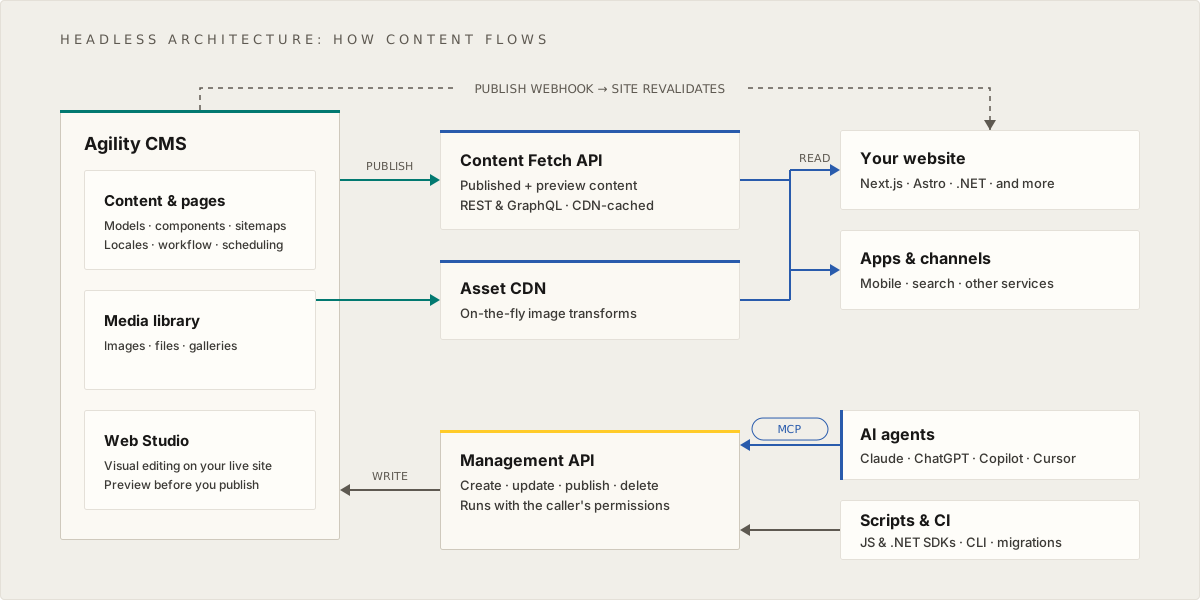
Agility CMS follows a headless architecture pattern that separates content management from content delivery.
Architecture Components
1. Content Management Layer (Backend)
- Content Manager: Web-based interface for content editing
- Content APIs: RESTful APIs exposing content as JSON
- Asset CDN: Content delivery network for media assets
- Database: Content storage and management
2. Content Delivery Layer (Frontend)
- Your Application: Website, mobile app, or other frontend
- API Consumption: Fetching content from Agility APIs
- Rendering: Displaying content in your application
- Caching: Optimizing content delivery
3. User Layer
- End Users: Accessing your application
- Content Editors: Managing content in CMS
- Developers: Building and maintaining the application
Data Flow
- Content Creation: Editors create content in Content Manager
- API Exposure: Content is exposed via Content APIs
- Frontend Consumption: Your app fetches content via APIs
- Asset Delivery: Images/assets served via CDN
- User Access: Users access the rendered application
Benefits
- Multi-Channel: Same content for web, mobile, IoT
- Technology Freedom: Use any frontend framework
- Performance: CDN delivery, optimized caching
- Scalability: Independent scaling of CMS and frontend
- Developer Experience: Modern APIs and SDKs
Data Model Architecture
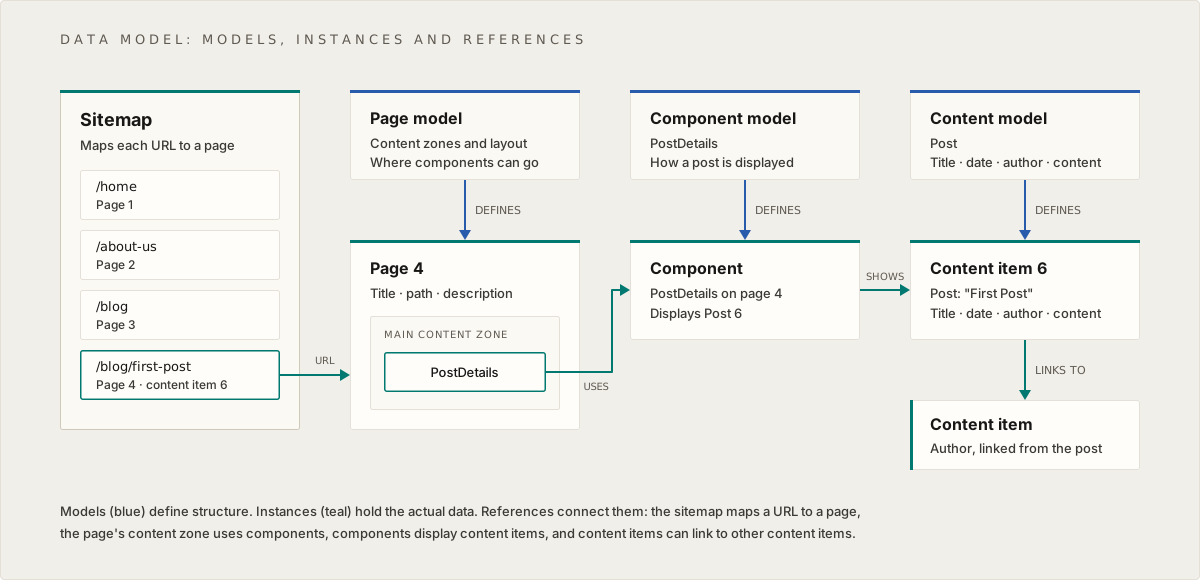
The Agility data model uses a three-layer architecture:
Layer 1: Models (Schema Layer)
Purpose: Define structure and schema
- Page Models: Define page structure (content zones, layout)
- Component Models: Define reusable UI component structure
- Content Models: Define reusable content item structure
Models are like blueprints—they define what fields exist and what types of data they hold.
Layer 2: Instances (Data Layer)
Purpose: Actual data instances
- Pages: Page instances created from page models
- Components: Component instances with actual data
- Content Items: Standalone content pieces created from content models
Instances are the actual data—the filled-out forms, the real content.
Layer 3: Relationships (Reference Layer)
Purpose: Connect entities together
- Sitemap: Organizes pages and defines URLs
- Page → Components: Pages contain references to components
- Component → Content: Components display content items
- Content → Content: Content items can link to other content items
Key Relationships
- Sitemap → Page: Each URL maps to a page
- Page → Components: Pages contain multiple components in zones
- Component → Content: Components display content items
- Content → Content: Content items can reference other content items
API Architecture
RESTful API Design
Agility CMS provides RESTful APIs with standard HTTP methods:
- GET: Retrieve content
- POST: Create content (Management API)
- PUT: Update content (Management API)
- DELETE: Delete content (Management API)
API Endpoints
Content Fetch API:
GET /{instance-guid}/fetch/{locale}/page/{pageID}
GET /{instance-guid}/fetch/{locale}/list/{referenceName}
GET /{instance-guid}/fetch/{locale}/item/{contentID}
Content Management API:
POST /{instance-guid}/content/{locale}/item
PUT /{instance-guid}/content/{locale}/item/{contentID}
DELETE /{instance-guid}/content/{locale}/item/{contentID}
Authentication
- API Keys: Used for authentication
- Fetch Key: For production content access
- Preview Key: For draft content access
- Security Key: For preview key validation. It isn't used for webhooks: signed webhooks use a per-webhook
whsec_signing secret that you get by ticking Enable secure delivery
SDK Architecture
SDK Layers
- Core SDK (
@agility/content-fetch): Base JavaScript SDK - Framework SDKs: Framework-specific wrappers (such as
@agility/nextjsfor Next.js) - Your Application: Uses SDKs to fetch and render content
SDK Features
- Type Safety: TypeScript support
- Caching: Built-in caching strategies
- Preview Mode: Support for draft content
- Error Handling: Comprehensive error handling
- Type Definitions: Full TypeScript definitions
Component Architecture
Component Registration
Components must be registered in your application:
const allModules = [
  { name: "ComponentName", module: ComponentName },
  // ... more components
]
Note: The variable name
allModulesand propertymoduleare from the Next.js SDK's legacy terminology. In Agility CMS, these are now called "components" and "component models."
Component Pattern
All components follow this pattern:
- Async Function: Components are async to fetch data
- Props: Accept
module,languageCode,isPreview, etc. - Data Fetching: Use
getContentItem()orgetContentList() - Rendering: Return JSX with content
- Attributes: Include
data-agility-*attributes for inline editing
Caching Architecture
Cache Layers
- CDN Cache: Assets cached at edge locations
- API Cache: API responses cached
- Application Cache: Next.js cache tags and revalidation
- Browser Cache: Client-side caching
Cache Strategy
- Cache Tags: Tag-based cache invalidation
- Revalidation: Time-based revalidation (60 seconds default)
- On-Demand: Webhook-triggered revalidation
- Static Generation: Pre-render at build time
Performance Architecture
Optimization Strategies
- CDN Delivery: Assets via CDN
- Image Optimization: Automatic resizing and formats
- Caching: Multi-layer caching
- Static Generation: Pre-render pages
- Incremental Regeneration: Update pages on-demand
Scalability
- Horizontal Scaling: Scale frontend independently
- Content Scaling: Efficient content querying
- Asset Scaling: CDN for global delivery
- API Scaling: Optimized API responses
Next: Setup - Project setup and configuration
On this page