
Content Operations: How Your CMS Makes or Breaks Enterprise Content Velocity

Key Takeaways
Your content management system (CMS) choice often determines whether your content operations succeed or fail, regardless of your people or well-designed processes.
Slow content publishing velocity, a lack of a single source of truth, workflow breakdowns, and difficulty scaling are often signs of content operations issues.
Legacy CMSs with monolithic architecture and inflexible workflows can’t handle the requirements of modern content teams. Many of them also force businesses to hire outside agencies to implement or add new features.
Modern CMSs like Agility CMS offer the API-first architecture, customizable workflows, reliable performance, and hands-on support that enterprises need from content operations software.
Every organization creates content to engage buyers and prospects, using content platforms to distribute it at scale. But with the rise of AI and automation, many content teams can’t keep up with the growing demand.
Content must be personalized not only for buyers and customers, but also for AI algorithms to understand and surface. To do this effectively, teams need a strong content operations strategy, supported by scalable systems.
However, instead of focusing on content strategy, original research, and the high-quality pieces your ICP actually needs, many teams are pulled into low-value operational work. They spend hours opening Jira or Asana tickets for simple changes, or waiting on developers to respond on Slack because they can’t access or update their CMS directly.
Strategy Alone Won’t Fix Fragmented Content Operations
Forrester’s research into content operations shows that enterprise teams using fragmented workflows and systems, such as legacy CMS platforms, experience slower content delivery cycles and missed publishing timelines.
Those teams are then unable to publish a single landing page quickly because they need help from another team, such as the developer team, to make changes and add content to their various channels (app, website, etc.). So even when teams seemingly have everything in order (content plans, research, content built for customers, buyers, and AI algorithms), things aren’t as easy as they seem when you have the wrong systems.
Problems like this don’t stem from content strategy or execution, but rather bottlenecks created by your content operations software, or lack thereof.
These content bottlenecks have always been frustrating. But today, they're existential.
Customer expectations for timely, personalized, real-time content have exploded, and more agile competitors are delivering those experiences faster and on all their various channels, while you're stuck. Many enterprises focus on people and processes when trying to solve these content operations problems, but the culprit is usually their systems, specifically their content management systems (CMS).
Modern headless CMSs like Agility CMS were built to eliminate these bottlenecks that legacy CMSs weren’t. In this blog, we’ll explain how to identify whether your platform is the problem and which enterprise CMS features actually eliminate operational friction.
What Is Content Operations (And Why Your CMS Determines Success)
Content operations encompasses the people, processes, systems, and governance that enable enterprises to create, manage, and deliver content on their digital platforms. But that’s just the textbook definition, and it’s also why most companies focus on the first two aspects when they think they have operations issues.
What that definition doesn’t make clear is that your CMS choice often determines whether your content operations succeed or fail, regardless of how talented your people are or how well-designed your processes look on paper.
For example, even though your new marketing or content manager has established style guides and approval processes, documented everything, and trained the rest of the team on best practices, content velocity might still not improve after three months. The real reason is that every time your content team wants to publish, they need to create a developer ticket.
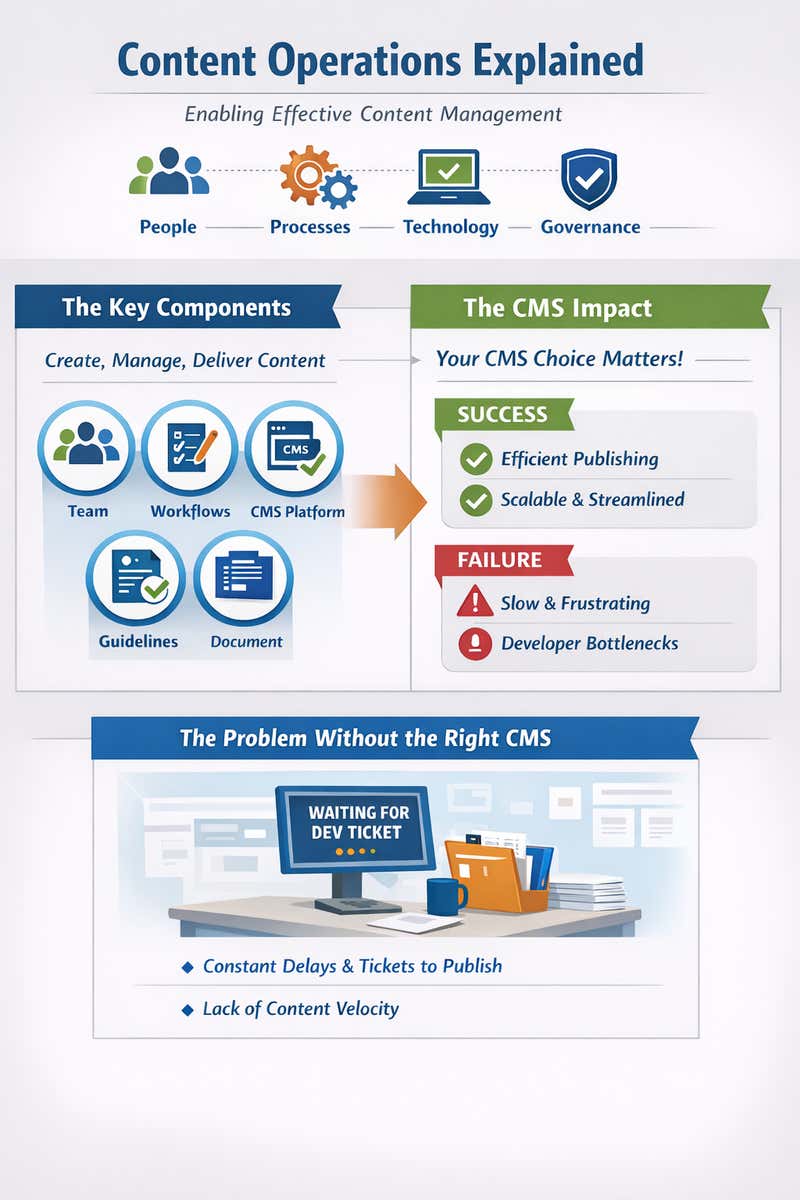
Modern content operations require four capabilities that legacy CMS platforms simply weren't built to support:
-
Collaboration: Writers, designers, and editors need to collaborate in real time on the same content asset. Legacy CMS users default to Google Docs to get the job done, which leads to further content siloes, prolonged publication processes, and duplicated work. A modern CMS brings all of those features in-house.
-
Flexibility: As content teams launch new products and campaigns, they need the flexibility to add different content types and adapt without requiring weeks of developer resources.
-
Content Velocity: Marketing teams need to respond quickly to competitor moves, breaking news, viral moments, and new customer feedback, rather than simply adding tickets to the backlog.
-
Omnichannel Delivery: Content appears on your website, mobile app, email campaigns, and partner portals. That shouldn’t require a separate content entry or independent updates, as it can create uncomfortable overhead that limits a business’s ability to scale and expand.
These are baseline requirements for organizations that publish content across multiple properties, manage distributed teams, or operate in competitive markets where content velocity matters.
However, many legacy content management systems don’t provide the capabilities that content teams need for modern content operations. And if your CMS wasn't designed for how you actually work, no matter how talented your team or how well-documented your processes are, the architectural limitations will remain.
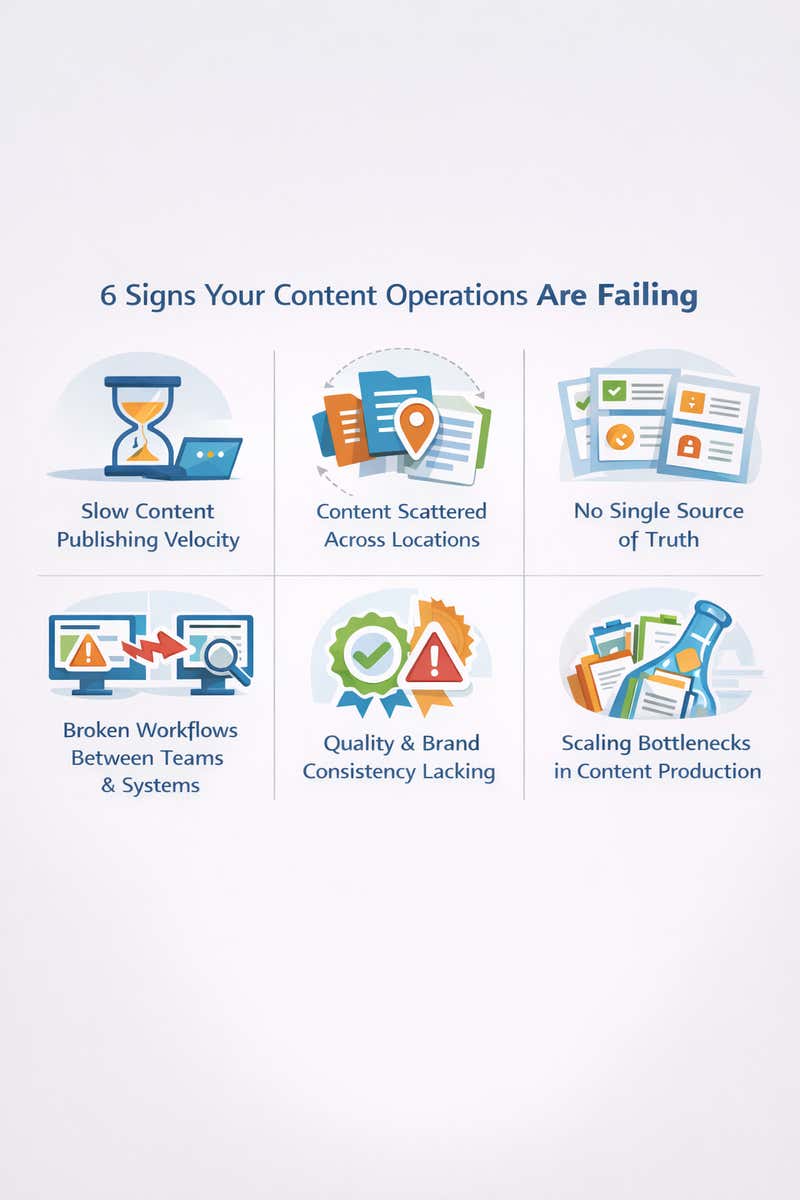
6 Signs Your Content Operations Are Failing
So how do you know if your content operations are the cause of your issues?
-
Content Publishing Velocity Is Slow Even With Increased Team Capacity
Even if you have the right number of team members, content velocity could still be slow. That’s because for many teams the bottleneck isn’t necessarily the creation process, but rather what happens before content goes live.
When content operations fail, what should be routine publishing work requires technical intervention and coordination across multiple roles. For customers, this means that movie theater show times are available for the entire state instead of just your area, or that a retail site can’t offer truly personalized product recommendations because content teams can’t update fast enough.
-
Content Is Scattered Across Multiple Locations
Another sign of a platform content operations problem is when content is scattered across multiple locations. For example, a blog might live on WordPress while help docs reside in a separate knowledge base. Meanwhile, the sales team maintains its content library in the CRM.
Most teams don’t set out to rely on so many disparate tools to manage content, but it can accumulate over time as different teams choose tools that work for their specific needs, and creates additional friction.
-
There's No Single Source of Truth for Shared Content
Let’s say your team recently went through a product launch. Despite the best efforts to ensure consistency, the announcement said the feature would be available in Q2. The product page said April, and the help docs said it would be coming in the Spring.
Of course, technically each of these answers is correct, but it can create confusion for customers.
The same problem happens with pricing, feature availability, company information, and anywhere else content gets referenced multiple times. Without a single source of truth, it’s simple for content accuracy to drift out of sync the moment something changes. Agility CMS solves this problem with its content-first, API-driven approach, which allows marketers to manage and control content in one place and deliver it across multiple channels.
-
Workflows Break Down Between Teams and Systems
Content teams often think of workflow issues as process issues. While this is true, it’s not always the case. For example, if the workflow involves moving from draft to technical review to legal approval and then final edits before publishing, the process should be straightforward.
However, the problem occurs when content gets stuck in technical review because the reviewer is in a different timezone, and your CMS doesn't notify them when something needs attention. The problem here is that your CMS treats workflow as something external to the system instead of something the system should enforce and facilitate.
-
Quality and Brand Consistency Become Constant Struggles
Every content team has its own set of brand and style guidelines, and a team trained in aspects such as proper messaging, tone, and structure. Yet an inability to maintain that consistency is another sign of a content operations problem, particularly if an enterprise needs that consistency enforced to meet certain legal or compliance requirements.
-
Scaling Content Production Is an Operational Bottleneck
If, after doubling your content team or hiring an outside agency for support, you haven’t been able to scale content production, the bottleneck is usually your CMS. Developers now have more tickets to juggle, and the platform can’t handle multiple projects at once. Essentially, those scaling efforts have resulted in more people waiting in the same queues. CMS solutions that let teams store and templatize assets fix these issues. Some platforms, like HubSpot's CMS, let users create and store reusable page components, layouts, and code snippets so new pages can go live with less developer involvement.
Why Legacy Solutions of Yesteryear Can’t Support ContentOps Today
Legacy CMS platforms were built for a different era that often included a single website, a single team, and centralized control. Yes, many of these platforms have added new features over the years, but the limitations inherent to that architecture can't be fixed with plugins or workarounds. Here are some of the reasons that your legacy CMS can’t support your modern content operations journey:
Architectural Restrictions
If you want to add a new content model that allows marketers to create customer stories independently and reuse them across the homepage, case study pages, and product pages, it’s a simple process in a modern CMS. You simply need to define the content type, specify the fields, set up validation, and it’s done.
This is achievable because modern headless CMSs separate content from presentation, a fundamental difference between traditional or legacy CMSs and headless architecture. In Agility CMS, for example, developers can easily create content models that enable editors to update and publish content.
However, in a legacy CMS, a developer needs to modify the database schema, write backend code to handle the new content type, and create frontend templates for its display. With this monolithic architecture, which tightly couples content, presentation, and code, even simple changes often require developer intervention, limiting content teams' ability to adapt to business needs independently.
Collaboration Issues
Legacy CMS platforms were built under the assumption that one person works on one page at a time, saves it, and moves on. They weren't designed for five people working on the same content simultaneously or distributed teams across time zones.
Meanwhile, modern content operations require real-time collaboration, version control that tracks multiple contributors, and the ability for different roles to work on the same content concurrently.
Inflexible Workflows
Sometimes brands want to introduce new workflows as they expand into new territories. For example, regional teams need their managers' approval before publishing localized content, or the executive team might require final sign-off on investor-related announcements.
Unfortunately, not every CMS is built to handle these types of workflows. Most of the time, content teams build workarounds, which only exacerbate the problem. Modern organizations have complex workflows that vary by content type, urgency, department, and compliance requirements. When your CMS can't model these workflows natively, they become manual coordination efforts that break under any real complexity.
Developer Dependency
Content teams can often run into scenarios where a piece of content they want to update takes forever because it’s a custom component that only one senior developer knows how to modify safely, and he's focused on another task.
When routine content updates require developer intervention, your content velocity is structurally limited by developer availability, and the content team can't respond to business needs as quickly as they'd like.
This problem is even worse with legacy CMSs, as many enterprises need to rely not only on internal developers but also on third-party agencies to manage their content needs. Contrast this with Agility’s hands-on approach and above-par support, which makes it easier for teams to maintain a high content velocity.
What a Marketing Team Needs to Accelerate Enterprise Content Operations
For enterprises with content across multiple website properties, modern content operations require certain capabilities that legacy platforms often struggle to provide.
API-First Architecture That Treats Content as Data
When you update a product description, it should appear correctly across your website, mobile app, email campaigns, and other channels. In a legacy CMS, that same content lives in five different places, each requiring a separate update.
However, with a modern headless CMS, content is treated as data accessible via APIs, allowing teams to update it once and have every channel reflect the change automatically. Agility CMS was built API-first from day one, ensuring that every piece of content is accessible via RESTful APIs and enabling true omnichannel delivery.
Customizable Workflows
A modern CMS lets you model and configure workflows in the system itself. When your process changes, you update the workflow definition, not your codebase. This allows teams to launch in a new region with different compliance requirements and simply create a new workflow without developer intervention. It also makes it easier for content teams to manage content flow and review as necessary. Agility CMS’s approvals and workflows improve collaboration and help maintain content quality.
Reliable Performance
Modern CMS platforms separate content management from content delivery. Editorial work happens in the management layer and never impacts the live site, while content gets published to a delivery layer, usually a global CDN that handles traffic independently from the editorial system.
This separation of concerns allows developers to deploy code changes without affecting live content and content teams to publish updates without coordinating deployment windows, ensuring reliable performance when needed.
Read More: The 50-point Checklist for Choosing a Headless CMS
How Agility CMS Solves Content Operations Challenges
Having a modern headless CMS like Agility CMS in place of a legacy CMS can help address many of the content operations challenges enterprises face. Those challenges are what drove companies like Shoppers Drug Mart, EMSB, and others to replace their legacy platforms with Agility.
EMSB Transforms Content Operations
Before Agility CMS, the English Montreal School Board's 27 schools operated in what one team member described as "chaos and disorganization." With 70+ editors and no workflow coordination, schools constantly overwrote each other's content. There was no single source of truth, no approval process, and no way to know which content version was current.
However, after implementing the modern CMS, EMSB editors gained structured workflows and a centralized content hub. This meant that they could publish confidently knowing their work wouldn't vanish. The central office could enforce standards without micromanaging every edit. And the platform that once created chaos became the infrastructure enabling coordinated content operations across a distributed organization.
Shopper’s Drug Mart Relies on API-First Architecture
As Canada’s largest pharmacy chain with a website that receives thousands of visitors daily, Shoppers Drug Mart was buckling under the weight of its own success and the need to support customers in multiple languages. Before Agility CMS, they couldn’t deliver content quickly enough or handle more than one language, a clear sign of content operations struggles.
However, thanks to Agility’s API-first architecture, Shoppers Drug Mart now manages its websites from a single instance. The company saves time by reusing components and sharing content and code to launch its solutions faster, enabling it to manage multiple websites in different languages from a single centralized location.
Book a demo to see how Agility CMS can eliminate the bottlenecks slowing down your content team. We'll walk through your specific content operations challenges and show you exactly how our platform addresses them.
FAQs
-
How do I know if my CMS is causing content operations problems?
Look at where your team spends time by measuring time from "content finished" to "content live." In modern content operations, this should be minutes to hours, not days to weeks. If you have a backlog of finished content waiting for technical resources, platform limitations, or manual coordination, your CMS has become the bottleneck.
-
Can we fix content operations without changing our CMS?
Many organizations try to solve platform problems with people and processes, which just adds operational overhead. But you can't fix architectural problems with workflow adjustments. If your CMS requires developer intervention for routine publishing, no amount of process documentation will make it self-service.
-
Is a headless CMS required for good content operations?
No, but it solves specific problems that legacy architectures can't. If you only publish to a single website and have no plans to expand to mobile apps, digital displays, or other channels, a traditional CMS might work fine. If your content team is small, your publishing frequency is low, and you don't need developers to move faster, you may not need headless architecture. However, a modern headless CMS supports how modern content operations need to function.

About the Author
Joanna Olaru-Boyle is a B2B SaaS marketing manager specializing in demand generation and lifecycle campaigns. She has built her career across companies in technology, retail and events, driving multi-channel programs that create demand and attract new customers.
She holds a Bachelor's degree in History and English from the University of Toronto, a Corporate Communications diploma from Centennial College, and is certified as both a Salesforce AI Associate and Salesforce Pardot Specialist.
Joanna thrives where data and creativity meet and is just as passionate about supporting others in their mental health journey as she is about pipeline growth.


