What is your developer-dependent CMS actually costing you? Calculate your costs and get a full report


Search
Indexing Agility Content for Search
The provider-agnostic pattern for keeping a search index in sync with Agility: signed webhooks, re-fetching from the Fetch API, deletes, full reindexes and URLs.
Every search provider — Algolia, Azure AI Search, Elastic, Coveo or any other — needs the same thing from Agility: a copy of your published content, kept in sync as editors publish, unpublish and delete.
This article is the part of that job that doesn't change between providers. Each provider guide builds on it and only adds the provider-specific calls. It also covers splitting content into sections, making sure a full reindex sees every item, and how to measure search quality before you choose.
How it fits together
- An editor publishes, unpublishes or deletes a content item or page.
- Agility sends a webhook to an endpoint you host.
- Your endpoint verifies the signature, then works out what changed.
- For a publish, it re-fetches the item from the Fetch API, turns it into a search record, and upserts it. For an unpublish or delete, it deletes the record.
- A full reindex script, run once at the start and then on a schedule, backfills everything and corrects any drift.
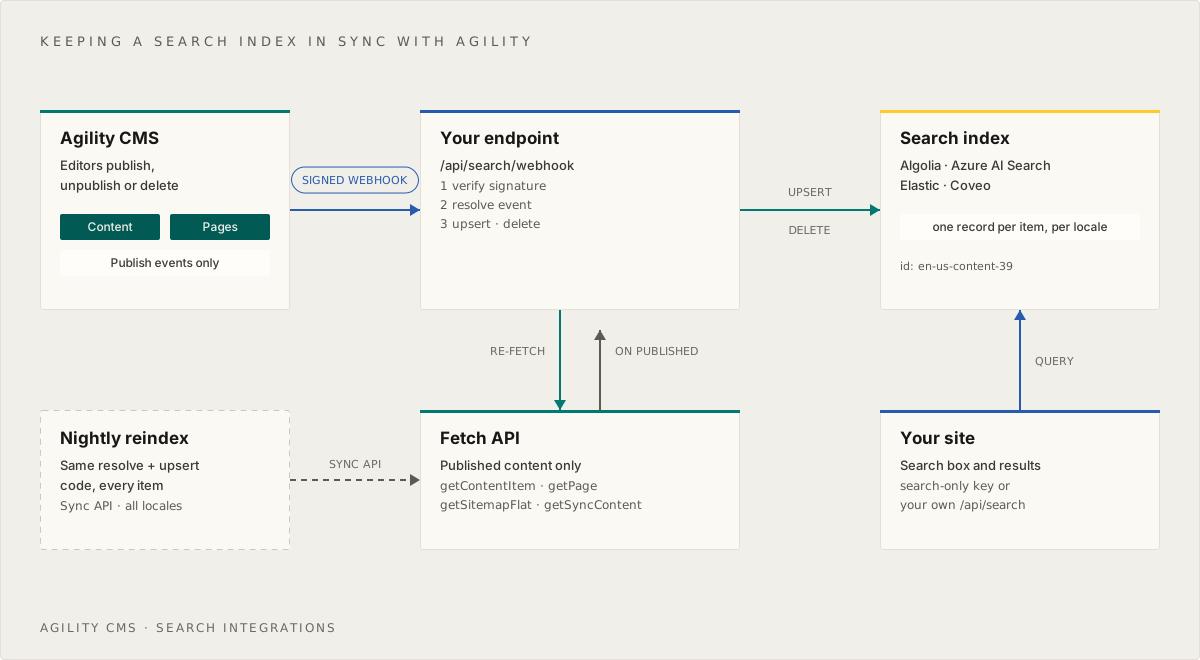
The webhook keeps the index fresh. The reindex makes it correct. You need both, because a webhook only tells you about changes made after you set it up, and a missed or failed delivery otherwise goes unnoticed.
Decide what is searchable
Before writing code, decide which of these you are indexing:
- Pages — a traditional site search. Every static page in the sitemap becomes a record, built from the text in its components.
- Content items — products, articles, locations, people. Only the content models you choose become records. If they render on dynamic pages, the record links to that page.
- Both — common for marketing sites. Give each record a
kindso the search UI can group or filter them.
Write the decision down as configuration, because the webhook handler and the reindex script both need it:
// lib/search/config.ts
export const SEARCH_CONFIG = {
  // The sitemap channel your site renders (usually "website")
  channel: "website",

  // Index static pages from the sitemap?
  indexPages: true,

  // Content models to index, by reference name (lowercase), and how each maps to text
  content: {
    posts: (f: any) => ({ title: f.title, description: f.excerpt, body: f.content }),
    products: (f: any) => ({ title: f.name, description: f.summary, body: f.description }),
  } as Record<string, (fields: any) => { title: string; description?: string; body: string }>,
}
The search record
Keep one provider-neutral shape, and convert it to each provider's format at the very edge. It is simpler to reason about, and it makes switching providers a small job.
// lib/search/types.ts
export interface SearchRecord {
  id: string            // "en-us-content-39" or "en-us-page-2"
  kind: "content" | "page"
  agilityId: number
  locale: string
  referenceName?: string
  title: string
  description?: string
  body: string          // plain text, HTML stripped
  bodyHtml?: string     // the original rich text, kept only to split into sections (never indexed)
  url: string           // the public path, e.g. "/blog/my-post"
  updatedAt: string     // ISO 8601
}

export const recordId = (locale: string, kind: "content" | "page", id: number) =>
  `${locale}-${kind}-${id}`
The id format matters:
- Include the locale. A content ID is the same item in every locale, so
39alone would overwrite the French record with the English one. - Include the kind. Page IDs and content IDs are separate number spaces, so page
2and content item2would collide. - Stick to letters, digits and dashes. That's valid as an Algolia
objectID, an Azure AI Search document key and an Elasticsearch_id. Coveo needs a URI, and its guide shows how to wrap the ID.
Receive and verify the webhook
Create a webhook in Settings > Webhooks:
- URL — your endpoint, e.g.
https://www.example.com/api/search/webhook. - Events — tick Content Publish Events only. That covers publish, unpublish and delete. Save events fire on every draft save, and indexing drafts risks leaking unpublished content into public search.
- Enable secure delivery — tick it, and copy the signing secret into an environment variable such as
AGILITY_WEBHOOK_SECRET. - Retries — turn them on. With retries, an endpoint that returns a non-2xx response (for example because the search provider was briefly unavailable) is retried automatically.
Agility implements Standard Webhooks, so verification is one library call. See Verifying Signed Webhooks for the details.
npm install @agility/content-fetch standardwebhooks
// lib/search/webhook.ts
import { Webhook } from "standardwebhooks"

export interface AgilityWebhookPayload {
  state: "Published" | "Deleted" | "Saved" | "AwaitingApproval" | "Approved" | "Declined"
  instanceGuid: string
  languageCode?: string
  referenceName?: string
  contentID?: number
  contentVersionID?: number
  pageID?: number
  pageVersionID?: number
  changeDateUTC: string
}

const wh = new Webhook(process.env.AGILITY_WEBHOOK_SECRET!) // the whole whsec_… string

/** Throws if the signature is missing or wrong. Pass the RAW body, not parsed JSON. */
export function verifyWebhook(rawBody: string, headers: Headers): AgilityWebhookPayload {
  return wh.verify(rawBody, {
    "webhook-id": headers.get("webhook-id") ?? "",
    "webhook-timestamp": headers.get("webhook-timestamp") ?? "",
    "webhook-signature": headers.get("webhook-signature") ?? "",
  }) as AgilityWebhookPayload
}
What the payload tells you
state | When you receive it | What to do |
|---|---|---|
Published | A content item or page was published | Re-fetch it and upsert the record |
Deleted | A content item or page was unpublished, deleted, or reached its scheduled unpublish date | Delete the record — don't re-fetch |
Saved | A draft was saved (only with Save events on) | Ignore |
AwaitingApproval, Approved, Declined | Workflow changes (only with Workflow events on) | Ignore |
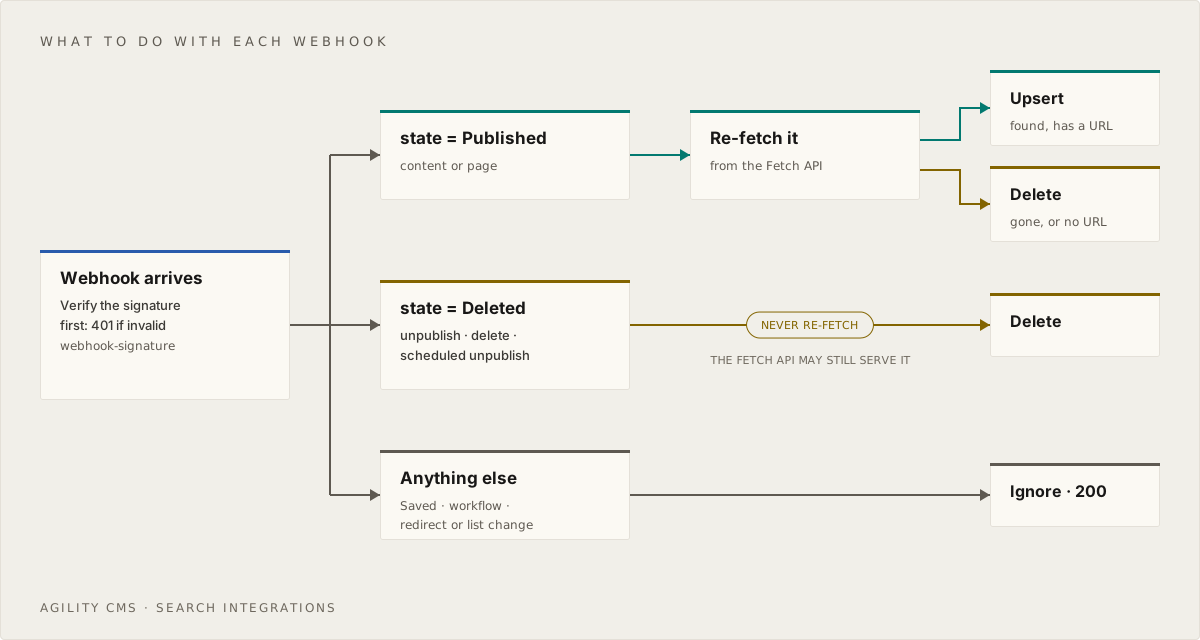
A content event carries contentID and referenceName. A page event carries pageID and no referenceName. Some payloads carry neither: a URL redirect change or a whole list change arrives as Deleted with only instanceGuid, languageCode and changeDateUTC. Ignore those. The scheduled reindex picks up anything they imply.
Why not re-fetch on
Deleted? For an unpublish, the webhook can reach you a moment before the Fetch API stops serving the old version. If you re-fetched and found the item, you'd put it straight back into the index. Trust the state and delete.
Turn an event into an index action
Re-fetch published content rather than trusting the payload. It gives you the full item, and it makes the handler safe against duplicate and out-of-order deliveries: whatever order the webhooks arrive in, you always write what's currently published.
// lib/search/agility.ts
import agility from "@agility/content-fetch"
import { SEARCH_CONFIG } from "./config"
import { SearchRecord, recordId } from "./types"
import type { AgilityWebhookPayload } from "./webhook"

export const fetchApi = agility.getApi({
  guid: process.env.AGILITY_GUID!,
  apiKey: process.env.AGILITY_API_FETCH_KEY!, // the Live (fetch) key — never the preview key
})

export type IndexAction =
  | { action: "upsert"; record: SearchRecord }
  | { action: "delete"; id: string }
  | { action: "ignore"; reason: string }

export async function resolveEvent(evt: AgilityWebhookPayload): Promise<IndexAction> {
  const locale = evt.languageCode
  if (!locale) return { action: "ignore", reason: "no locale (redirect or list event)" }
  if (evt.state !== "Published" && evt.state !== "Deleted") {
    return { action: "ignore", reason: `state ${evt.state}` }
  }

  // ---- Pages ----
  if (evt.pageID) {
    if (!SEARCH_CONFIG.indexPages) return { action: "ignore", reason: "pages not indexed" }
    const id = recordId(locale, "page", evt.pageID)
    if (evt.state === "Deleted") return { action: "delete", id }

    const page = await fetchApi.getPage({ pageID: evt.pageID, languageCode: locale })
    const node = page && (await findSitemapNode(locale, (n) => n.pageID === evt.pageID))
    if (!page || !node || page.pageType !== "static") return { action: "delete", id }
    return { action: "upsert", record: pageToRecord(page, node.path, locale) }
  }

  // ---- Content items ----
  if (evt.contentID && evt.referenceName) {
    const ref = evt.referenceName.toLowerCase()
    const map = SEARCH_CONFIG.content[ref]
    if (!map) return { action: "ignore", reason: `${ref} is not searchable` }
    const id = recordId(locale, "content", evt.contentID)
    if (evt.state === "Deleted") return { action: "delete", id }

    const item = await fetchApi.getContentItem({ contentID: evt.contentID, languageCode: locale })
    const url = item && (await urlForContent(locale, evt.contentID))
    if (!item || !url) return { action: "delete", id } // not published, or no page renders it
    return { action: "upsert", record: contentToRecord(item, map, url, locale) }
  }

  return { action: "ignore", reason: "not a page or content event" }
}
URLs
Agility doesn't store a URL on a content item. The URL comes from the dynamic page that renders it. The flat sitemap lists every dynamic item with its dynamicItemContentID, so look the item up there:
// lib/search/agility.ts (continued)
async function findSitemapNode(locale: string, match: (n: any) => boolean) {
  const sitemap = await fetchApi.getSitemapFlat({ channelName: SEARCH_CONFIG.channel, languageCode: locale })
  return Object.values(sitemap ?? {}).find(match) as any | undefined
}

async function urlForContent(locale: string, contentID: number) {
  const node = await findSitemapNode(locale, (n) => n.dynamicItemContentID === contentID)
  return node?.path as string | undefined
}
If a model has no dynamic page — say, locations shown only in a list — build the URL yourself (for example /locations#${item.contentID}) instead of dropping the record.
Text
Search engines want plain text. Strip HTML from rich text fields, and extract text from each component on a page:
// lib/search/agility.ts (continued)
export const toText = (html?: string) =>
(html ?? "").replace(/<[^>]*>/g, " ").replace(/ /g, " ").replace(/\s+/g, " ").trim()
function contentToRecord(item: any, map: (f: any) => any, url: string, locale: string): SearchRecord {
const { title, description, body } = map(item.fields)
return {
id: recordId(locale, "content", item.contentID),
kind: "content",
agilityId: item.contentID,
locale,
referenceName: item.properties.referenceName,
title,
description: toText(description),
body: toText(body),
bodyHtml: body,
url,
updatedAt: new Date(item.properties.modified).toISOString(),
}
}
function pageToRecord(page: any, path: string, locale: string): SearchRecord {
// Every zone holds a list of components; each component's content is in `item.fields`
const body = Object.values(page.zones ?? {})
.flat()
.map((c: any) => Object.values(c.item?.fields ?? {}).filter((v) => typeof v === "string").join(" "))
.join(" ")
return {
id: recordId(locale, "page", page.pageID),
kind: "page",
agilityId: page.pageID,
locale,
title: page.title,
description: page.seo?.metaDescription,
body: toText(body),
bodyHtml: body,
url: path,
updatedAt: new Date(page.properties.modified).toISOString(),
}
}
Taking every string field is a reasonable start, but it also picks up CSS classes, button styles and image alt text. Once you know your Component Models, map the fields you actually want, the same way SEARCH_CONFIG.content does for content.
Index sections, not whole pages
A page about webhooks might cover setup, signatures, retries and debugging. If the whole page is one record, a search about retries returns the whole page, and an AI assistant has to read all of it to find the answer. Split each page or item into one record per section, at its H2 and H3 headings, and the hit lands on the passage that answers the question. You get a snippet from the right part of the page, a link straight to the right heading, and a passage a chatbot can quote.
Be clear about what sections don't do. When we measured search on the Agility docs (see Measure before you choose), Algolia ranked pages the same with one record per section as with one record per article (MRR 0.594 against 0.587, with 8 questions better and 9 worse). Splitting did not change ranking in our test. The ranking method made the difference. Index sections for the results they give you, not to fix ranking.
Three rules make sections work:
- Keep a parent id on every section, so you can show one result per page and delete every section of a page at once.
- Keep code blocks. Developer questions are often answered by a code sample. Stripping code makes snippets tidier but throws answers away.
toTextabove keeps the text inside<pre>and<code>, so don't add a step that removes it. - Don't cap the body. A length cap silently drops the end of long articles, which is often where the details are. Sections are short, so they remove the reason for a cap.
// lib/search/sections.ts
import { toText } from "./agility"
import type { SearchRecord } from "./types"

export interface SectionRecord extends Omit<SearchRecord, "bodyHtml"> {
  parentId: string   // the page or item's record id, shared by all its sections
  heading: string    // "" for any text before the first heading
  anchor: string     // "#heading-id" to link straight to the section, or ""
  position: number   // 0, 1, 2 ... in reading order
}

// Match however your site generates heading ids, so the anchors resolve.
const slugify = (s: string) => s.toLowerCase().replace(/[^a-z0-9]+/g, "-").replace(/^-|-$/g, "")

/** Split a record's rich text at <h2> and <h3>. Each section keeps its own code blocks. */
export function toSections(record: SearchRecord): SectionRecord[] {
  const { bodyHtml, ...base } = record
  const parts = (bodyHtml ?? record.body).split(/(?=<h[23][\s>])/i)

  return parts
    .map((part, position) => {
      const h = part.match(/^<h[23][^>]*>([\s\S]*?)<\/h[23]>/i)
      const heading = h ? toText(h[1]) : ""
      return {
        ...base,
        id: `${record.id}-s${position}`, // e.g. "en-us-content-39-s2"
        parentId: record.id,
        heading,
        anchor: heading ? `#${slugify(heading)}` : "",
        position,
        body: toText(h ? part.slice(h[0].length) : part),
      }
    })
    .filter((s) => s.heading || s.body) // drops an empty intro before the first heading
}
If your content is Markdown rather than rich text, split at lines that start with ## or ### , and skip lines inside fenced code blocks. Normalize line endings first (text.replace(/\r\n?/g, "\n")). Markdown saved with Windows line endings leaves a \r at the end of every line, . in a regular expression doesn't match it, and a heading pattern such as ^##\s+(.+)$ then silently matches nothing. That happened to more than half of the Agility docs' articles until we read the stored records and caught it.
Some providers can split content for you, such as Elastic's semantic_text and Coveo's passage retrieval. Their guides say how. Splitting it yourself keeps the headings, anchors and parent ids under your control, which the rest of this section relies on.
When you re-index a page
A page can lose a heading between publishes, which would leave its old last section behind in the index. After writing a page's new sections, look up the sections the index holds for that parentId and delete any you didn't just write. Each provider guide shows the calls.
At query time, collapse to one result per page
A search can return three sections of the same page. People want a list of pages, so keep the best-ranked section of each page and link to its anchor:
// lib/search/collapse.ts
export function onePerPage<T extends { parentId: string }>(hits: T[], limit = 10): T[] {
  const seen = new Set<string>()
  return hits.filter((h) => !seen.has(h.parentId) && seen.add(h.parentId)).slice(0, limit)
}
Ask the engine for more hits than you show (for example 50), so that collapsing still leaves enough pages. Some engines can collapse for you. Algolia's distinct setting does exactly this, and its guide shows how.
Embedding sections for vector search
If you add vector search, embed each section with its context in front of it: the page title and the section heading, then the text.
const embeddingInput = (s: SectionRecord) =>
  `${s.title}${s.heading ? ` > ${s.heading}` : ""}\n\n${s.body}`
A section called "Retries" means little on its own. "Webhooks > Retries" tells the embedding model what the text is about. Embed that string, but store and display the plain body.
The endpoint
Each provider guide supplies a searchIndex object with upsert, remove and upsertMany functions. upsert always receives a whole page or item, and remove receives its id. A provider that indexes sections, as the Algolia and Azure AI Search guides do, splits the record with toSections in upsert and deletes every section of the page in remove. The route handler is the same for every provider:
// app/api/search/webhook/route.ts
import { verifyWebhook } from "@/lib/search/webhook"
import { resolveEvent } from "@/lib/search/agility"
import { searchIndex } from "@/lib/search/provider" // from the provider guide

export async function POST(req: Request) {
  const raw = await req.text() // raw body — needed for the signature

  let evt
  try {
    evt = verifyWebhook(raw, req.headers)
  } catch {
    return new Response("invalid signature", { status: 401 })
  }

  const result = await resolveEvent(evt)
  if (result.action === "upsert") await searchIndex.upsert(result.record)
  if (result.action === "delete") await searchIndex.remove(result.id)

  return Response.json(result.action === "upsert" ? { upserted: result.record.id } : result)
}
Three behaviours to keep:
- Fail loudly. If the provider call throws, let the handler return a 500. With retries on, Agility tries again later. Returning a 200 on failure hides the problem until someone notices a missing search result.
- Stay under 30 seconds. That's Agility's delivery timeout. A single upsert takes well under a second. If you add slow steps, like generating embeddings, acknowledge first and do the work afterwards — with
after()in Next.js, or by pushing to a queue. Once you've acknowledged, a failure won't be retried, so the scheduled reindex becomes your safety net. - Don't worry about duplicates. Delivery is at-least-once, but upserts and deletes are idempotent, and re-fetching means a stale duplicate can't overwrite newer content.
Full reindex
Run this once to fill a new index, and then nightly (a Vercel Cron job, a GitHub Action, or an Azure Function timer) to correct anything webhooks missed. It walks the Sync API, which pages through every published item in a locale:
// scripts/reindex.ts
import { fetchApi } from "@/lib/search/agility"
import { SEARCH_CONFIG } from "@/lib/search/config"
import { searchIndex } from "@/lib/search/provider"
import { resolveEvent } from "@/lib/search/agility"

const locales = (process.env.AGILITY_LOCALES ?? "en-us").split(",")

for (const locale of locales) {
  // Content items
  let syncToken = 0
  do {
    const page = await fetchApi.getSyncContent({ syncToken, languageCode: locale, pageSize: 500 })
    const actions = await Promise.all(
      (page?.items ?? [])
        .filter((i: any) => SEARCH_CONFIG.content[i.properties?.referenceName?.toLowerCase()])
        .map((i: any) =>
          resolveEvent({
            state: i.properties.state === 3 ? "Deleted" : "Published",
            instanceGuid: process.env.AGILITY_GUID!,
            languageCode: locale,
            referenceName: i.properties.referenceName,
            contentID: i.contentID,
            changeDateUTC: new Date().toISOString(),
          }),
        ),
    )
    await searchIndex.upsertMany(actions.flatMap((a) => (a.action === "upsert" ? [a.record] : [])))
    for (const a of actions) if (a.action === "delete") await searchIndex.remove(a.id)
    syncToken = page?.syncToken ?? 0
  } while (syncToken)

  // Pages: getSyncPages works the same way (default pageSize 1000)
}
This reuses resolveEvent, so the webhook and the reindex can never disagree about what a record looks like. It makes one Fetch API call per item, which is fine for thousands of items. For much larger instances, build records directly from the Sync API items instead, since they already include fields.
Make sure the reindex sees every item
A full reindex that replaces the whole index also deletes anything it didn't read. List calls have default page sizes: the Fetch API returns 10 items unless you pass take, GraphQL lists return 50, and both stop at 250 per request. Our own docs reindex read categories through GraphQL without take, so three categories came back with exactly 50 articles and 89 of 437 articles were missing. Replacing the index with that result would have removed them from live search.
- Pass an explicit
take, and page withskipuntil a page comes back short. - Refuse to replace the index when any list comes back exactly at the page size, or when the new record count is far below the current one. Fail the job loudly instead.
// A list that fills the page exactly is probably truncated
if (items.length === take) throw new Error(`${listName}: got ${take} items, the page limit. Not replacing the index.`)
Tip: For the cleanest possible rebuild, index into a new index and swap it in when it's complete. Algolia, Azure AI Search and Elastic all support an alias or atomic replace. Coveo does it natively with a full rebuild of a source. Each provider guide shows how.
A minimal search box
Algolia and Coveo have their own UI libraries, and their guides use them. For Azure AI Search and Elastic, or any provider you query through your own /api/search route, a small client component is all you need. It expects the route to return { count, hits }, where each hit has an id, title, url and an optional highlighted caption:
// components/SiteSearch.tsx
"use client"
import { useEffect, useState } from "react"
import Link from "next/link"

export function SiteSearch({ locale = "en-us" }) {
  const [q, setQ] = useState("")
  const [hits, setHits] = useState<any[]>([])

  useEffect(() => {
    if (q.length < 2) return setHits([])
    const ctrl = new AbortController()
    const t = setTimeout(() => {
      fetch(`/api/search?q=${encodeURIComponent(q)}&locale=${locale}`, { signal: ctrl.signal })
        .then((r) => r.json())
        .then((d) => setHits(d.hits))
        .catch(() => {})
    }, 200)
    return () => { clearTimeout(t); ctrl.abort() }
  }, [q, locale])

  return (
    <div role="search">
      <input type="search" value={q} onChange={(e) => setQ(e.target.value)} placeholder="Search…" aria-label="Search" />
      <ul>
        {hits.map((h) => (
          <li key={h.id}>
            <Link href={h.url}>{h.title}</Link>
            {h.caption && <p dangerouslySetInnerHTML={{ __html: h.caption }} />}
          </li>
        ))}
      </ul>
    </div>
  )
}
It waits 200 ms after the last keystroke before searching, and cancels any request still in flight, so fast typing doesn't flood your search route.
Locales
Every webhook carries languageCode. Choose one of two layouts:
- One index per locale (
site_en-us,site_fr-ca). This is the simplest way to get correct stemming and stop words per language, and each index stays small. - One index with a
localefield that every query filters on. It's easier to manage, but you'll need to configure language analysis per field or per record.
Either way, the locale-prefixed id keeps records from colliding.
Preview content
Index published content only. Use the Fetch API key, not the preview key, and subscribe only to publish events. If editors need to search drafts, build a separate preview index fed by Save events and the preview key, and never expose it to the public site.
Measure before you choose
Search quality is easy to argue about and easy to measure. Before you pick an engine, or change how you index, build a small test set and score every option against it.
- Write the questions. Use real searches from your site's search analytics, the pages people and AI agents read most, and questions phrased the way an assistant would ask them, in full sentences. We used 52.
- Write down the correct page or pages for each question. Add one or two questions your content can't answer, so you can see what the engine does when there is no right answer.
- Commit the questions and answers before you score anything. If you write the answers after seeing results, you will grade the engine you already prefer.
- Score each engine on two numbers:
- hit@k: how many questions have a correct page in the top 1, 3 or 5 results. Count distinct pages, not sections.
- MRR (mean reciprocal rank): for each question, 1 divided by the position of the first correct page (1 for first place, 0.5 for second, 0 if it's missing from the top 10), averaged over all questions. One number that rewards putting the right page first.
- Query the engine's API directly from the test script, not through your site or chatbot. Test runs then don't pollute your search analytics or trigger zero-result alerts.
Then read the misses one by one. Some will be engine problems. Others are content gaps: on our docs, a question about letting editors click on the page to change it ranked poorly on every engine, because no page describes the feature in those words. Zero-result and low-click queries in your search analytics tell you which words to add to your content.
What we measured on the Agility docs
We did this on the Agility docs themselves in October 2026: 451 articles managed in Agility, split into 4,890 sections, with two test sets (51 questions phrased the way AI agents ask them, and 36 short queries copied as people typed them into the search box) plus 9 questions the docs can't answer. This is one measurement on one site's content, not a general benchmark. Your content and your questions will give different numbers.
| Setup | Agent questions: right page first (of 51) | Agent questions: MRR@10 | Search-box queries: MRR@10 |
|---|---|---|---|
| Algolia, search-box defaults | 13 | 0.291 | 0.886 |
| Algolia, settings for sentence-style questions | 25 | 0.587 | 0.821 |
| Azure AI Search, keyword only | 32 | 0.762 | 0.718 |
| Azure AI Search, keyword + vector (hybrid) | 40 | 0.853 | 0.824 |
| Azure AI Search, hybrid + semantic ranker | 34 | 0.796 | not measured |
Read it with these caveats:
- Different searchers favour different engines. Hybrid search was clearly best for questions asked in sentences. For short, misspelled search-box queries, Algolia's defaults were as good as anything and much faster. The Agility docs now use both: see Search for People and for AI Agents.
- Splitting didn't change the ranking. Algolia scored the same with one record per section as with one record per article (0.594 against 0.587).
- The semantic ranker didn't improve the order on this content. Its 0 to 4 score is still useful for deciding when a chatbot should say it doesn't know.
- Small differences are noise. With about 50 questions, one question moves MRR by about 0.02. AI Search Explained shows which differences held up question by question.
For how to set up each layer, see the provider guides.
Debugging
- "Did the webhook arrive?" Open Settings > Webhooks, then History on your webhook. Each delivery shows the response code, the payload and your endpoint's response body. That's why the handler above returns what it did.
- Local development — Agility can't reach
localhost. Use a tunnel such as ngrok orcloudflared, and add a second webhook pointing at the tunnel URL. - Signature failures — almost always a parsed body. Read
req.text()before anything parses the JSON. - A record is stale — run the reindex for that locale. If the reindex fixes it, a webhook was missed or failed. Check History.
Next steps
Pick a provider guide:
- Algolia — hosted, fast to set up, with the richest ready-made UI libraries.
- Azure AI Search — for teams on Azure, with strong hybrid and vector search for AI assistants.
- Elastic — the most flexible engine, as a serverless cloud project or self-managed.
- Coveo — enterprise relevance, personalization and generative answering.
Or read Searching Content at Scale for help choosing.
Building an AI assistant rather than a search box? AI Search Explained and Build a Chatbot or AI Agent on Your Agility Content cover what changes when the reader is a language model.
On this page