What is your developer-dependent CMS actually costing you? Calculate your costs and get a full report


Search
Azure AI Search
Index Agility content in Azure AI Search with signed webhooks, then query it with keyword, semantic and hybrid vector search — or ground an AI assistant on it.
Azure AI Search is Microsoft's managed search service. It combines keyword search, vector and hybrid search, a semantic ranker, and knowledge bases that ground AI assistants on your content. If your team already runs on Azure, it keeps search in the same subscription, identity model and billing as everything else.
This guide builds on Indexing Agility Content for Search. Read that first. It covers the webhook, signature verification, re-fetching from the Fetch API, deletes and the full reindex, which are the same for every provider. This guide adds the Azure-specific parts.
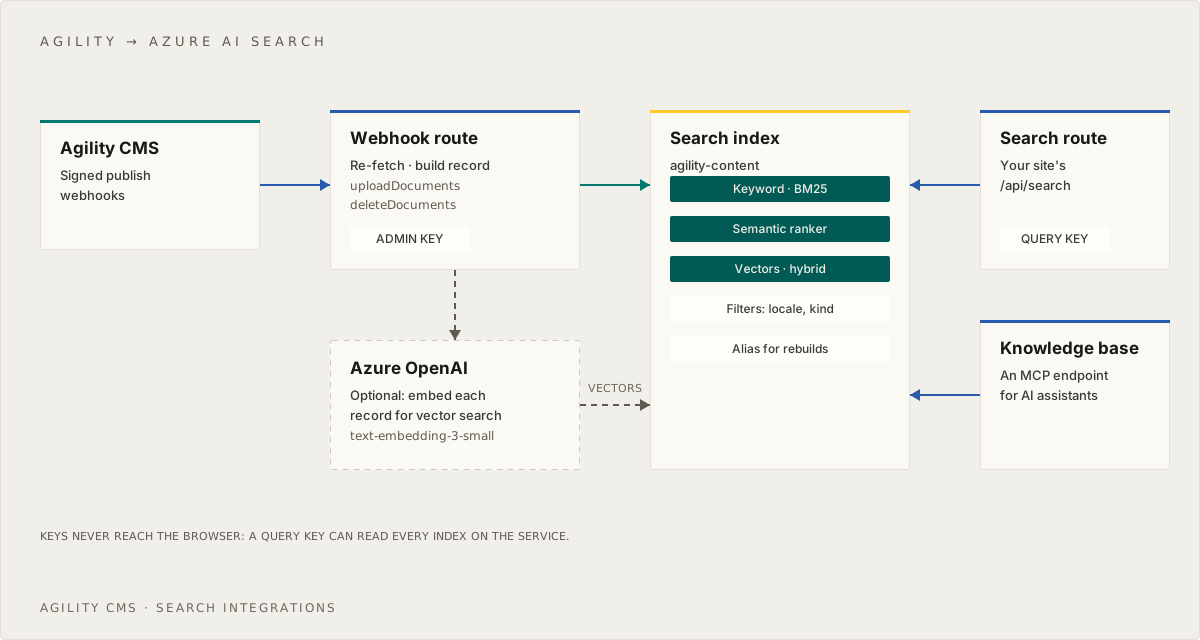
Before you start
- An Azure subscription and an Azure AI Search service. Basic is the practical starting tier. Free (50 MB, 3 indexes) is fine to experiment with, but it's shared hardware, can be removed when inactive, and doesn't support managed identities.
- The service endpoint (
https://<service>.search.windows.net), an admin key for indexing and a query key for searching (Settings > Keys in the portal). You can create a named query key per site, so you can revoke one site's access without affecting others. - An Azure OpenAI (or Microsoft Foundry) resource with a deployment of an embedding model. This guide uses
text-embedding-3-large, which produces 3,072-dimension vectors. - An Agility webhook with secure delivery on, set up as described in the indexing guide.
npm install @azure/search-documents openai
# .env.local
AZURE_SEARCH_ENDPOINT=https://<service>.search.windows.net
AZURE_SEARCH_INDEX=agility-content
AZURE_SEARCH_ADMIN_KEY=...            # server only: webhook + reindex
AZURE_SEARCH_QUERY_KEY=...            # server only: the search route
AZURE_OPENAI_ENDPOINT=https://<resource>.openai.azure.com
AZURE_OPENAI_EMBED_DEPLOYMENT=...     # your text-embedding-3-large deployment name
AZURE_OPENAI_KEY=...                  # server only: embedding at publish time
AZURE_SEMANTIC_RANKER=                # "on" to use the semantic ranker; off by default
Push, not pull. Azure AI Search can pull data with indexers, but only from Azure data sources (Blob, SQL, Cosmos DB and so on). Agility isn't one. So you push documents from your webhook handler, which is also the only way to get changes into the index within seconds.
What this guide builds
We built an index like this one for the Agility docs (451 articles, 4,890 sections) and measured each layer with the same 51 questions, asked in sentences the way AI agents ask them. The method and the full results are in AI Search Explained.
| Layer | Right page first | In top 3 | In top 5 | MRR@10 |
|---|---|---|---|---|
| Keyword search (BM25) over heading-level sections | 32 | 45 | 46 | 0.762 |
| + vector search (hybrid) | 40 | 47 | 48 | 0.853 |
| + semantic ranker | 34 | 47 | 48 | 0.796 |
What each layer did on our content:
- Keyword ranking alone scored 0.762, against 0.587 for Algolia on the same questions. BM25 gives more weight to rare words, which helps on question-style queries.
- Vectors gave the best result and fixed vocabulary mismatch: questions that use a different word from the docs, such as "languages" for pages that say "locales". Hybrid search found the right page first for 40 of 51 questions.
- The semantic ranker didn't improve the order. It put the right page first less often than hybrid alone (34 against 40). What it does add is a score on a fixed 0 to 4 scale, which can tell a chatbot when to say "I don't know". So this guide uses hybrid search by default and makes the semantic ranker optional.
These are numbers from one site's content. Use them to see what each layer can add, then measure on your own content.
For a search box where people type a word or two, Azure needs extra query syntax to match typos and half-typed words, and hybrid search adds a call to the embedding model on every keystroke. The Agility docs keep Algolia for the search box and use this setup for AI agents. See Search for People and for AI Agents.
Create the index
Run this once, from a script or a deployment step. Each document is one section of a page or item, as produced by toSections in the indexing guide, plus a vector of its text.
// scripts/create-index.ts
import { SearchIndexClient, AzureKeyCredential, type SearchIndex } from "@azure/search-documents"

const indexClient = new SearchIndexClient(
  process.env.AZURE_SEARCH_ENDPOINT!,
  new AzureKeyCredential(process.env.AZURE_SEARCH_ADMIN_KEY!),
)

const index: SearchIndex = {
  name: process.env.AZURE_SEARCH_INDEX ?? "agility-content",
  fields: [
    { name: "id", type: "Edm.String", key: true, filterable: true },
    { name: "parentId", type: "Edm.String", filterable: true },
    { name: "kind", type: "Edm.String", filterable: true, facetable: true },
    { name: "agilityId", type: "Edm.Int32", filterable: true },
    { name: "locale", type: "Edm.String", filterable: true, facetable: true },
    { name: "referenceName", type: "Edm.String", filterable: true, facetable: true },
    { name: "title", type: "Edm.String", searchable: true, analyzerName: "en.microsoft" },
    { name: "heading", type: "Edm.String", searchable: true, analyzerName: "en.microsoft" },
    { name: "description", type: "Edm.String", searchable: true, analyzerName: "en.microsoft" },
    { name: "body", type: "Edm.String", searchable: true, analyzerName: "en.microsoft" },
    { name: "url", type: "Edm.String", filterable: true },
    { name: "anchor", type: "Edm.String" },
    { name: "position", type: "Edm.Int32", filterable: true, sortable: true },
    { name: "updatedAt", type: "Edm.DateTimeOffset", filterable: true, sortable: true },
    {
      name: "contentVector",
      type: "Collection(Edm.Single)",
      searchable: true,
      hidden: true,
      vectorSearchDimensions: 3072, // text-embedding-3-large
      vectorSearchProfileName: "vector-profile",
    },
  ],
  vectorSearch: {
    algorithms: [{ name: "hnsw", kind: "hnsw" }],
    // The vectorizer embeds each query inside the search service, so your search route sends plain text
    vectorizers: [
      {
        vectorizerName: "openai",
        kind: "azureOpenAI",
        parameters: {
          resourceUrl: process.env.AZURE_OPENAI_ENDPOINT,
          deploymentId: process.env.AZURE_OPENAI_EMBED_DEPLOYMENT,
          modelName: "text-embedding-3-large",
          apiKey: process.env.AZURE_OPENAI_KEY, // in production, leave this out and use a managed identity (below)
        },
      },
    ],
    profiles: [{ name: "vector-profile", algorithmConfigurationName: "hnsw", vectorizerName: "openai" }],
  },
  suggesters: [{ name: "sg", searchMode: "analyzingInfixMatching", sourceFields: ["title"] }],
  semanticSearch: {
    defaultConfigurationName: "default",
    configurations: [
      {
        name: "default",
        prioritizedFields: {
          titleField: { name: "title" },
          contentFields: [{ name: "heading" }, { name: "body" }],
        },
      },
    ],
  },
}

await indexClient.createOrUpdateIndex(index)
A few things to know:
- Keys can contain letters, digits,
-,_and=, can't start with_, and are case-sensitive. Section ids such asen-us-content-39-s2are valid as-is. - Analyzers set the language rules for stemming and stop words.
en.microsoftsuits English. For other locales, create one index per locale with the matching analyzer (fr.microsoft,es.microsoftand so on). - You can't change an existing field's type, analyzer or vector dimensions. To change them, or to switch embedding models, build a new index and switch to it (see Rebuilding without downtime).
- The semantic configuration costs nothing until you send a semantic query, so it's fine to define it now and decide later.
Use a managed identity for the vectorizer
The vectorizer calls Azure OpenAI on every vector query. In production, don't give it an API key:
- Turn on the search service's system-assigned managed identity (Settings > Identity in the portal). The Free tier doesn't support managed identities.
- On the Azure OpenAI resource, assign that identity the Cognitive Services OpenAI User role. It needs nothing broader.
- Remove
apiKeyfrom the vectorizer'sparameters. With bothapiKeyandauthIdentityempty, the search service uses its system-assigned identity automatically. SetauthIdentityonly if you use a user-assigned identity.
Your own indexing code still calls Azure OpenAI to embed documents (see the next section), so it needs its own credential: a key, or Microsoft Entra ID as described in Using Microsoft Entra ID instead of keys.
Write to the index
In the push model you generate the embeddings for your documents. Azure's integrated vectorization at indexing time only works with indexers. At query time the vectorizer embeds the query for you, so the frontend doesn't change.
Embed each section with its context prefix, Title > Heading, followed by the section text, using the same model as the vectorizer:
// lib/search/embed.ts
import OpenAI from "openai"

const openai = new OpenAI({
  baseURL: `${process.env.AZURE_OPENAI_ENDPOINT}/openai/v1/`,
  apiKey: process.env.AZURE_OPENAI_KEY!,
})

export async function embed(texts: string[]) {
  const res = await openai.embeddings.create({ model: process.env.AZURE_OPENAI_EMBED_DEPLOYMENT!, input: texts })
  return res.data.map((d) => d.embedding)
}
This is the searchIndex object the webhook route and the reindex script import:
// lib/search/provider.ts
import { SearchClient, AzureKeyCredential, odata } from "@azure/search-documents"
import type { SearchRecord } from "./types"
import { toSections, type SectionRecord } from "./sections"
import { embed } from "./embed"

type AzureDoc = Omit<SectionRecord, "updatedAt"> & { updatedAt: Date; contentVector: number[] }

const writeClient = new SearchClient<AzureDoc>(
  process.env.AZURE_SEARCH_ENDPOINT!,
  process.env.AZURE_SEARCH_INDEX ?? "agility-content",
  new AzureKeyCredential(process.env.AZURE_SEARCH_ADMIN_KEY!),
)

// "Title > Heading" in front of the text tells the embedding model what the section is about.
// The model has an input limit, so trim only the text you embed, never the stored body.
const embeddingInput = (s: SectionRecord) =>
  `${s.title}${s.heading ? ` > ${s.heading}` : ""}\n\n${s.body}`.slice(0, 8000)

async function toDocs(records: SearchRecord[]): Promise<AzureDoc[]> {
  const sections = records.flatMap(toSections)
  const vectors: number[][] = []
  for (let i = 0; i < sections.length; i += 100) {
    vectors.push(...(await embed(sections.slice(i, i + 100).map(embeddingInput))))
  }
  return sections.map((s, i) => ({ ...s, updatedAt: new Date(s.updatedAt), contentVector: vectors[i] }))
}

/** The keys of every section currently indexed for one page or item. Azure has no delete-by-query. */
async function sectionIds(parentId: string) {
  const res = await writeClient.search("*", { filter: odata`parentId eq ${parentId}`, select: ["id"], top: 1000 })
  const ids: string[] = []
  for await (const r of res.results) ids.push(r.document.id)
  return ids
}

async function upload(docs: AzureDoc[]) {
  // At most 1,000 documents or 16 MB per request. 3,072-dimension vectors are large, so send 100 at a time.
  for (let i = 0; i < docs.length; i += 100) {
    await writeClient.uploadDocuments(docs.slice(i, i + 100), { throwOnAnyFailure: true })
  }
}

export const searchIndex = {
  async upsert(record: SearchRecord) {
    const docs = await toDocs([record])
    await upload(docs)

    // A heading removed since the last publish leaves an old section behind
    const keep = new Set(docs.map((d) => d.id))
    const stale = (await sectionIds(record.id)).filter((id) => !keep.has(id))
    if (stale.length) await writeClient.deleteDocuments("id", stale, { throwOnAnyFailure: true })
  },

  async upsertMany(records: SearchRecord[]) {
    await upload(await toDocs(records))
  },

  async remove(id: string) {
    const ids = await sectionIds(id)
    if (ids.length) await writeClient.deleteDocuments("id", ids, { throwOnAnyFailure: true })
  },
}
Why these calls:
uploadDocuments, notmergeOrUploadDocuments. You always rebuild the whole document from Agility, anduploadreplaces the document completely.mergeOrUploadwould keep values for any field you've since stopped sending.throwOnAnyFailure: true. A batch can partly succeed, and by default the SDK returns per-document results rather than throwing. Throwing makes the webhook return a 500, so Agility retries.- Deletes are idempotent. Deleting a key that doesn't exist still succeeds, so a duplicate
Deletedwebhook is harmless.
Plug this into the route handler and reindex script from the indexing guide, and publishing in Agility now updates Azure AI Search.
Time and cost. Embedding adds a call to Azure OpenAI on every publish. For one page that's well within the 30-second webhook timeout. If it isn't, acknowledge the webhook first and embed afterwards (see the indexing guide). The first full reindex is the slow part: embedding all 4,890 sections of the Agility docs took about two minutes, sending several batches in parallel, and cost cents. Store a hash of each section's embedded text, and a later rebuild can skip every section that hasn't changed.
Query from your site
Keep both keys on the server. A query key is service-wide: anyone who has it can read every index on the service, and there's no per-key rate limit. So put a small search route in front of the index rather than calling it from the browser.
This route runs hybrid search in one request: a keyword query and a vector query that the vectorizer embeds for you, merged by the service. It collapses sections to one result per page. The semantic ranker is off unless you turn it on, and if its free allowance runs out, the route searches without it instead of failing:
// app/api/search/route.ts
import { SearchClient, AzureKeyCredential, odata, type SearchOptions } from "@azure/search-documents"
import type { SectionRecord } from "@/lib/search/sections"
import { onePerPage } from "@/lib/search/collapse"

type IndexedSection = SectionRecord & { contentVector?: number[] }

const queryClient = new SearchClient<IndexedSection>(
  process.env.AZURE_SEARCH_ENDPOINT!,
  process.env.AZURE_SEARCH_INDEX ?? "agility-content",
  new AzureKeyCredential(process.env.AZURE_SEARCH_QUERY_KEY!),
)

// Off by default: measure on your own content before paying for it (see below)
const useSemanticRanker = process.env.AZURE_SEMANTIC_RANKER === "on"

function search(q: string, locale: string, semantic: boolean) {
  const options: SearchOptions<IndexedSection> = {
    filter: odata`locale eq ${locale}`, // odata`` escapes user input
    vectorSearchOptions: {
      queries: [{ kind: "text", text: q, fields: ["contentVector"], kNearestNeighborsCount: 50 }],
    },
    select: ["parentId", "title", "heading", "url", "anchor", "kind"],
    top: 50, // sections, not pages: collapse below
    ...(semantic
      ? {
          queryType: "semantic" as const,
          semanticSearchOptions: { configurationName: "default", captions: { captionType: "extractive" as const, highlight: true } },
        }
      : { highlightFields: "body" }),
  }
  return queryClient.search(q, options)
}

export async function GET(req: Request) {
  const url = new URL(req.url)
  const q = (url.searchParams.get("q") ?? "").slice(0, 200)
  const locale = url.searchParams.get("locale") ?? "en-us"
  if (!q) return Response.json({ count: 0, hits: [] })

  let results
  try {
    results = await search(q, locale, useSemanticRanker)
  } catch (err) {
    // 402: the semantic ranker's free monthly allowance is used up. Search without it rather than fail.
    if (!useSemanticRanker || (err as { statusCode?: number }).statusCode !== 402) throw err
    results = await search(q, locale, false)
  }

  const sections = []
  for await (const r of results.results) {
    sections.push({
      ...r.document,
      score: r.rerankerScore ?? null, // 0 to 4 with the semantic ranker; null without it
      snippet: r.captions?.[0]?.highlights ?? r.captions?.[0]?.text ?? r.highlights?.body?.[0],
    })
  }

  const hits = onePerPage(sections, 10).map((s) => ({
    id: s.parentId,
    title: s.heading ? `${s.title} > ${s.heading}` : s.title,
    url: `${s.url}${s.anchor ?? ""}`,
    snippet: s.snippet,
    score: s.score,
  }))

  return Response.json(
    { count: hits.length, hits },
    { headers: { "Cache-Control": "s-maxage=60, stale-while-revalidate=300" } },
  )
}
The search route also lets you enforce the locale filter, cap query length, cache popular queries at the CDN and add rate limiting, none of which you can do from the browser.
A few things to know:
- Ask for 50. Collapsing sections to pages needs more results than you show, and the semantic ranker, if you turn it on, reranks the top 50. So set
kNearestNeighborsCountandtopto 50 even though you show 10. - Hybrid scores are small (around 0.03 for the merged keyword and vector score). That's normal for the Reciprocal Rank Fusion method Azure uses to merge them, and they're only good for ordering. Don't show them or use them as a confidence threshold.
- Snippets. Without the semantic ranker there are no captions, so
highlightFields: "body"returns the passage where the keywords matched, wrapped in<em>tags. - Hybrid search always returns something. Every query has a nearest vector, so the result list is rarely empty, even when your content can't answer the question. If you used zero-result searches to find content gaps, watch low semantic scores or follow-up searches instead.
Should you turn on the semantic ranker?
Set AZURE_SEMANTIC_RANKER=on when you need its score, for example so a chatbot can refuse when the best result is weak (see below), or when it measurably improves ranking on your content. On the Agility docs it didn't.
It's billed separately from the search service. Every service starts on the free plan, with a monthly allowance of semantic queries. After that, semantic queries fail with HTTP 402 until you switch the service's semantic ranker plan to Standard (paid, Basic tier or higher) under Settings > Premium features in the portal. A public chatbot or AI agent will use the free allowance quickly, because one conversation can make several searches. The route above retries without the ranker on a 402, so search keeps working either way.
Search UI
Microsoft doesn't ship an InstantSearch-style UI library for Azure AI Search, and no maintained adapter exists. The route returns { count, hits } with a highlighted snippet on each hit, which is what the minimal search box in the indexing guide expects (it calls the field caption, so rename one or the other).
Snippets contain only highlight tags from Azure around text from your own content. That makes them safe to render as HTML if your indexed text is already plain text, as the indexing guide's toText makes it.
For a search box where people type a word or two, plain Azure keyword search doesn't match half-typed words or typos. Use the sg suggester defined above for type-ahead, or a full Lucene query (queryType: "full") with ~1 after each word for one typo and * after the last word for a prefix.
Let a chatbot say "I don't know"
An AI assistant that answers from search results should refuse when the results don't contain an answer, rather than guess. With the semantic ranker on, its score is a good signal for that. Microsoft describes the scale like this: 4 means the result answers the question completely, 2 means it's somewhat relevant, and 0 means it's irrelevant.
On the Agility docs we tested 9 questions the docs don't cover. Their top results scored between 1.96 and 2.62, while every answerable question's top result scored 2.28 or more:
| Refuse below | Unanswerable questions refused | Answerable questions wrongly refused |
|---|---|---|
| 2.0 | 1 of 9 | 0 of 51 |
| 2.2 | 5 of 9 | 0 of 51 |
| 2.3 | 7 of 9 | 1 of 51 |
| 2.4 | 8 of 9 | 3 of 51 |
const top = hits[0]?.score ?? 0
if (top < 2.3) {
  // Tell the user the docs don't cover this, and suggest where to ask, instead of answering
}
The ranges overlap, so the score is a signal, not a guarantee. The highest-scoring unanswerable question matched a near-miss page that discusses a related topic. Calibrate the threshold on your own content with several questions you know it can't answer, decide which mistake is worse for you, and let the model also judge whether the passage it read answers the question. Microsoft notes that reranker score distributions can vary slightly with infrastructure conditions and ranking model updates, so don't make the threshold too fine-grained.
AI Search Explained and Build a Chatbot or AI Agent on Your Agility Content cover the rest of the chatbot side.
Measure it yourself
To compare setups on your own content, call the search REST API directly from a test script, so test runs never reach your site's analytics. This is the shape of the hybrid request we scored (any API version from 2024-07-01 on supports it):
curl -s "https://<service>.search.windows.net/indexes/agility-content/docs/search?api-version=2024-07-01" \
  -H "api-key: $AZURE_SEARCH_QUERY_KEY" -H "content-type: application/json" \
  -d '{
    "search": "how do I preview content before it goes live",
    "vectorQueries": [{ "kind": "text", "text": "how do I preview content before it goes live", "fields": "contentVector", "k": 50 }],
    "select": "url,heading",
    "top": 50
  }'
Add "queryType": "semantic" and "semanticConfiguration": "default" to score the semantic ranker too, and drop vectorQueries to score keyword search alone. Collapse the results to distinct pages before you score them. The scoring method is in Measure before you choose.
Ground an AI assistant on your content
Azure AI Search knowledge bases (GA in REST API 2026-04-01) turn an index into a retrieval endpoint for AI agents. Each knowledge base is also an MCP server, so assistants such as Microsoft Foundry agents, GitHub Copilot, Claude and Cursor can use your Agility content as a tool, with no extra code.
import { SearchIndexClient, KnowledgeRetrievalClient, AzureKeyCredential } from "@azure/search-documents"

const endpoint = process.env.AZURE_SEARCH_ENDPOINT!
const indexClient = new SearchIndexClient(endpoint, new AzureKeyCredential(process.env.AZURE_SEARCH_ADMIN_KEY!))

await indexClient.createOrUpdateKnowledgeSource({
  name: "agility-content",
  kind: "searchIndex",
  searchIndexParameters: {
    searchIndexName: "agility-content",
    semanticConfigurationName: "default", // required
    sourceDataFields: [{ name: "title" }, { name: "url" }],
  },
})

await indexClient.createOrUpdateKnowledgeBase("agility-kb", {
  name: "agility-kb",
  knowledgeSources: [{ name: "agility-content" }],
})

// Retrieve grounding passages from your own chat route…
const kb = new KnowledgeRetrievalClient(endpoint, "agility-kb", new AzureKeyCredential(process.env.AZURE_SEARCH_QUERY_KEY!))
const res = await kb.retrieve({
  intents: [{ type: "semantic", search: "How do I return a product?" }],
  knowledgeSourceParams: [
    { kind: "searchIndex", knowledgeSourceName: "agility-content", filterAddOn: "locale eq 'en-us'", includeReferences: true },
  ],
})
…or point an MCP client at https://<service>.search.windows.net/knowledgebases/agility-kb/mcp?api-version=2026-04-01, authenticated with a Microsoft Entra token that has the Search Index Data Reader role.
A knowledge source needs the semantic configuration defined above. To run your own MCP server in front of the index instead, with hybrid search and a fallback, see Build an MCP Server over Your Agility Content and Search for People and for AI Agents. The Agility docs' own Knowledgebase MCP server works that way.
The GA API returns extractive passages for your own model to answer from. LLM query planning and synthesized answers are still in preview (2026-08-01-preview). Agentic retrieval is billed separately from the semantic ranker and has its own monthly free allowance.
Rebuilding without downtime
Build the new index under a versioned name (agility-content-v2), run the full reindex into it, then point an index alias (agility-content) at it and delete the old one. Queries that use the alias switch over atomically. Aliases are GA in REST 2026-04-01 (indexClient.createOrUpdateAlias). They aren't available on the preview Serverless tier.
Using Microsoft Entra ID instead of keys
For production, you can turn off keys and use role-based access instead: Search Index Data Contributor for the indexing code and Search Index Data Reader for the search route. Swap AzureKeyCredential for DefaultAzureCredential from @azure/identity, and run those routes on the Node.js runtime, not Edge. Outside Azure, for example on Vercel, supply a service principal through AZURE_CLIENT_ID, AZURE_TENANT_ID and AZURE_CLIENT_SECRET. Custom roles can also limit access to a single index, which keys can't do.
Troubleshooting
- The webhook returns 500 with a per-document error. Check the key (invalid characters, a leading
_) and the field types. A string sent toEdm.Int32, or a date that isn't ISO 8601, fails that one document. - Semantic queries suddenly fail with 402. The free monthly allowance is used up. The route above falls back to hybrid search; to keep the ranker, switch the semantic ranker plan to Standard.
- Vector queries fail with 401 or 403. The vectorizer can't reach Azure OpenAI. Check the API key, or that the search service's managed identity has the Cognitive Services OpenAI User role on the Azure OpenAI resource.
- Searches return nothing at all, with no error. The SDK reports a missing index as an error, but code that calls the REST API and treats 404 as "no results" will hide a wrong
AZURE_SEARCH_INDEX. Treat a 404 on a search as a failure. - A dimension mismatch error. The vector field's
vectorSearchDimensionsmust match the embedding model's output: 3,072 fortext-embedding-3-large. - Sections have no headings. If your content is Markdown saved with Windows line endings, heading patterns that use
.don't match. Normalize\r\nto\nbefore splitting. See AI Search Explained. - Deleted content still appears for a minute. Deletes are applied asynchronously. They're usually gone within seconds, occasionally minutes.
- A result is stale. Check the webhook's History in Agility, then run the reindex. See Debugging.
Learn more
On this page