What is your developer-dependent CMS actually costing you? Calculate your costs and get a full report


Search
Coveo
Push Agility content into a Coveo Push source with signed webhooks, then build search with Coveo Atomic — plus Coveo's generative answering and MCP options.
Coveo is an enterprise search and relevance platform. It pairs a hosted index with machine-learning relevance, personalization and analytics, plus generative answering grounded in your content. It's typically used where search drives revenue or support deflection across several content sources, with Agility as one of them.
This guide builds on Indexing Agility Content for Search. Read that first. It covers the webhook, signature verification, re-fetching from the Fetch API, deletes and the full reindex, which are the same for every provider. This guide adds the Coveo-specific parts.
Before you start
- A Coveo organization. Coveo is sold through its sales team, and a 14-day free trial is available for evaluation. Note that trial organizations index more slowly than production ones.
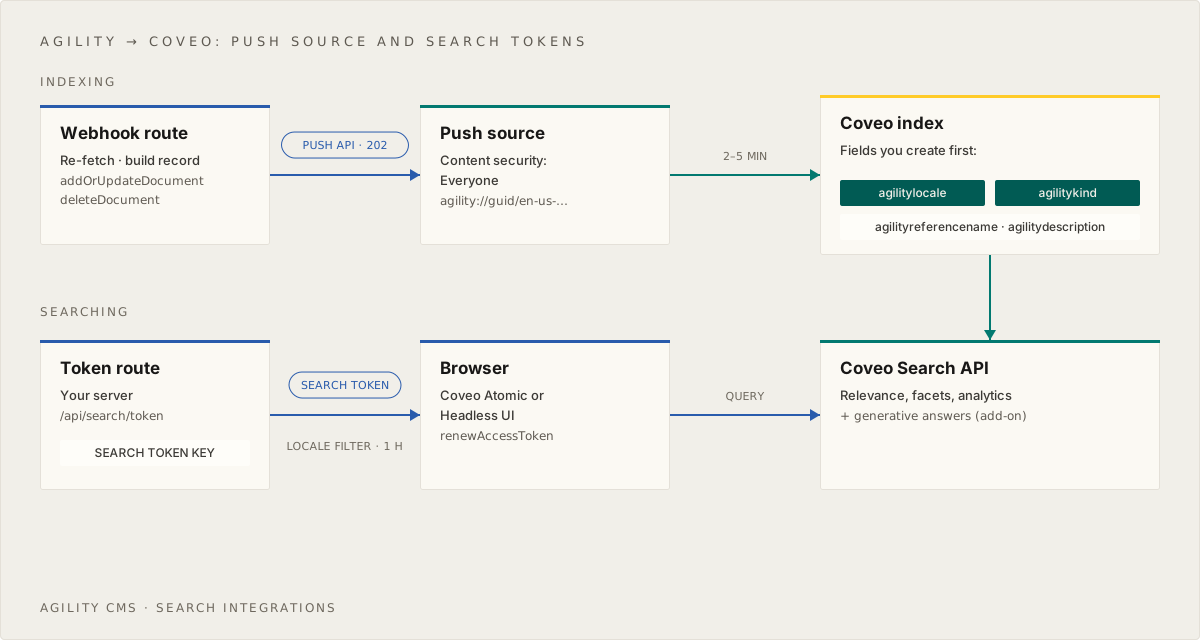
- A Push source. In the Coveo Administration Console, open Content > Sources, add a Push source, and set Content security to Everyone (the right choice for public website content). Copy the source ID.
- Two API keys:
- A push key, used only on your server: Content > Push items to sources on your source, plus Sources > View all and Organization > View.
- A key created from the Authenticated search template, also server-only. It's used to issue short-lived search tokens to the browser.
- An Agility webhook with secure delivery on, set up as described in the indexing guide.
npm install @coveo/push-api-client @coveo/headless @coveo/atomic-react
# .env.local
COVEO_ORG_ID=...
COVEO_SOURCE_ID=...
COVEO_PUSH_API_KEY=...         # server only: webhook + rebuild
COVEO_SEARCH_TOKEN_KEY=...     # server only: issues search tokens
NEXT_PUBLIC_COVEO_ORG_ID=...   # the same org ID, for the browser
SITE_URL=https://www.example.com
Why a Push source? Coveo has no Agility connector. Its Sitemap and Web sources can crawl your published site with no code (see Alternatives), but a Push source fed by webhooks gives you structured fields and near-immediate updates. Coveo also recommends Push for headless CMSs.
Create the fields
On a Push source, each metadata key you send is mapped to the Coveo field with the same name, but only if the field already exists. Otherwise the value is dropped. Create these once in Content > Fields:
| Field | Type | Options |
|---|---|---|
agilitylocale | String | Facet |
agilitykind | String | Facet |
agilityreferencename | String | Facet |
agilitydescription | String | (none) |
Field names must be lowercase letters, digits and underscores. Coveo supplies title, date, uri and clickableuri itself.
Write to the index
This is the searchIndex object the webhook route and the reindex script import:
// lib/search/provider.ts
import { DocumentBuilder, PushSource, Region } from "@coveo/push-api-client"
import type { SearchRecord } from "./types"

export const sourceId = process.env.COVEO_SOURCE_ID!

export const push = new PushSource(process.env.COVEO_PUSH_API_KEY!, process.env.COVEO_ORG_ID!, {
  region: Region.US, // or EU, CA, AU — wherever your organization lives
  maxRetries: 2, // the default retries on 429 for well over an hour, which outlives any serverless function
  retryAfter: 1000,
  timeMultiple: 2,
})

// Coveo document IDs must be URIs. Wrap the record ID in a custom scheme,
// and keep the public URL in clickableUri, so renaming a page doesn't orphan its document.
const documentId = (id: string) => `agility://${process.env.AGILITY_GUID}/${id}`

const toDocument = (r: SearchRecord) =>
  new DocumentBuilder(documentId(r.id), r.title)
    .withData(r.body)
    .withFileExtension(".txt")
    .withClickableUri(new URL(r.url, process.env.SITE_URL).toString())
    .withDate(r.updatedAt)
    .withMetadata({
      agilitylocale: r.locale,
      agilitykind: r.kind,
      agilityreferencename: r.referenceName ?? "",
      agilitydescription: r.description ?? "",
    })

// Fields are created once in the Admin Console, so skip the client's per-call field check
const options = { createFields: false }

export const searchIndex = {
  async upsert(record: SearchRecord) {
    await push.addOrUpdateDocument(sourceId, toDocument(record), options)
  },

  async upsertMany(records: SearchRecord[]) {
    // The client uploads each batch as one file; keep batches modest
    for (let i = 0; i < records.length; i += 500) {
      const addOrUpdate = records.slice(i, i + 500).map(toDocument)
      await push.batchUpdateDocuments(sourceId, { addOrUpdate, delete: [] }, options)
    }
  },

  async remove(id: string) {
    // deleteChildren must stay false: it deletes every document whose ID *starts with* this one
    await push.deleteDocument(sourceId, documentId(id), false)
  },
}
Plug this into the route handler from the indexing guide, and publishing in Agility now updates Coveo.
Things to know:
- Indexing is asynchronous, and slower than other providers. Coveo accepts a push with a
202, then processes it. Allow 2–5 minutes before it's searchable. A202doesn't guarantee success: rejected items only show up in the Log Browser in the Administration Console, so check there first when something is missing. createFields: false. By default, the client lists and creates fields before every push. That adds API calls to each webhook, and it needs a key with field-management rights.- Throttling. Coveo rate-limits pushes (HTTP 429). With retries on in Agility, a throttled webhook is simply retried later, so keep the client's own retries short.
Rebuilding the whole source
Coveo's recommended full rebuild re-pushes everything, then deletes anything that wasn't re-pushed:
// scripts/rebuild-coveo.ts
import { push, sourceId } from "@/lib/search/provider"

const startedAt = Date.now() // must be the current time — never a future value

await push.setSourceStatus(sourceId, "REBUILD")
await import("./reindex") // the full reindex from the indexing guide
await push.deleteDocumentsOlderThan(sourceId, startedAt)
await push.setSourceStatus(sourceId, "IDLE")
Anything not pushed since startedAt, such as content deleted while no webhook was running, is removed after a 15-minute queue delay. Content published during the rebuild is newer than startedAt, so it's safe. Don't pass a timestamp in the future: Coveo would reject every push until that time.
Search from your site
Issue search tokens
Browsers query Coveo directly, using a search token your server issues. A token is short-lived and can enforce a filter, so visitors can only ever see the locale you intended:
// lib/search/coveo-token.ts
export async function getSearchToken(locale: string) {
  const org = process.env.COVEO_ORG_ID!
  const res = await fetch(`https://${org}.org.coveo.com/rest/search/token?organizationId=${org}`, {
    method: "POST",
    cache: "no-store",
    headers: { Authorization: `Bearer ${process.env.COVEO_SEARCH_TOKEN_KEY}`, "Content-Type": "application/json" },
    body: JSON.stringify({
      userIds: [{ name: "anonymous", provider: "Email Security Provider", type: "User" }],
      searchHub: "AgilitySiteSearch",
      filter: `@agilitylocale=="${locale}"`,
      validFor: 60 * 60 * 1000, // one hour
    }),
  })
  if (!res.ok) throw new Error(`Coveo token request failed: ${res.status}`)
  return ((await res.json()) as { token: string }).token
}
// app/api/search/token/route.ts
import { getSearchToken } from "@/lib/search/coveo-token"

export async function GET(req: Request) {
  const locale = new URL(req.url).searchParams.get("locale") ?? "en-us"
  return Response.json({ token: await getSearchToken(locale) })
}
Build the UI with Atomic
Coveo Atomic is a library of ready-made search components (search box, result list, facets, pager, generated answers), and @coveo/atomic-react wraps them for React. Copy Atomic's static files into your site once, so the components can load their icons and translations:
cp -r node_modules/@coveo/atomic-react/dist/assets node_modules/@coveo/atomic-react/dist/lang public/
// components/CoveoSearch.tsx
"use client"
import { useMemo } from "react"
import { buildSearchEngine } from "@coveo/headless"
import {
  AtomicFacet,
  AtomicLayoutSection,
  AtomicPager,
  AtomicQuerySummary,
  AtomicResultLink,
  AtomicResultList,
  AtomicResultSectionExcerpt,
  AtomicResultSectionTitle,
  AtomicResultText,
  AtomicSearchBox,
  AtomicSearchInterface,
  AtomicSearchLayout,
} from "@coveo/atomic-react"

const renewToken = (locale: string) => async () => {
  const res = await fetch(`/api/search/token?locale=${locale}`)
  return ((await res.json()) as { token: string }).token
}

export function CoveoSearch({ locale, initialToken }: { locale: string; initialToken: string }) {
  const engine = useMemo(
    () =>
      buildSearchEngine({
        configuration: {
          organizationId: process.env.NEXT_PUBLIC_COVEO_ORG_ID!,
          accessToken: initialToken,
          renewAccessToken: renewToken(locale),
        },
      }),
    [locale, initialToken],
  )

  return (
    <AtomicSearchInterface engine={engine}>
      <AtomicSearchLayout>
        <AtomicLayoutSection section="search">
          <AtomicSearchBox />
        </AtomicLayoutSection>
        <AtomicLayoutSection section="facets">
          <AtomicFacet field="agilitykind" label="Type" />
        </AtomicLayoutSection>
        <AtomicLayoutSection section="main">
          <AtomicQuerySummary />
          <AtomicResultList
            template={() => (
              <>
                <AtomicResultSectionTitle>
                  <AtomicResultLink />
                </AtomicResultSectionTitle>
                <AtomicResultSectionExcerpt>
                  <AtomicResultText field="excerpt" />
                </AtomicResultSectionExcerpt>
              </>
            )}
          />
          <AtomicPager />
        </AtomicLayoutSection>
      </AtomicSearchLayout>
    </AtomicSearchInterface>
  )
}
// app/[locale]/search/page.tsx
import { CoveoSearch } from "@/components/CoveoSearch"
import { getSearchToken } from "@/lib/search/coveo-token"

export const dynamic = "force-dynamic"

export default async function SearchPage({ params }: { params: Promise<{ locale: string }> }) {
  const { locale } = await params
  return <CoveoSearch locale={locale} initialToken={await getSearchToken(locale)} />
}
Atomic renders in the browser. If search results must be server-rendered, for SEO or first-load speed, build the UI with Coveo Headless instead: @coveo/headless-react/ssr supports the Next.js App Router. Coveo's search-nextjs sample is the starting point.
Atomic and Headless send search analytics automatically. Coveo's Automatic Relevance Tuning and Query Suggestions learn from those events, so they get better with real traffic.
AI and generative answers
Coveo's AI features are licensed separately. Check with your Coveo account team:
- Relevance Generative Answering (RGA) generates an answer above the results, grounded in your indexed Agility content with citations. Add
<AtomicGeneratedAnswer />above the result list once it's enabled on your query pipeline. - The Passage Retrieval API returns the most relevant passages for a question. Use it to ground your own chatbot or AI assistant on Agility content.
- The hosted Coveo MCP Server exposes search, fetch and, with the add-ons above, answer and passage retrieval tools to MCP clients such as Claude, ChatGPT, Copilot and Cursor. Check your agreement before connecting AI agents: some Coveo offerings restrict automated or agent traffic.
- These features are tuned for English first. Other languages are available, some in beta, so test with your own locales.
Alternative: crawl your site
To get started without code, add a Sitemap source pointed at your site's sitemap.xml. Coveo fetches each page, renders it, and extracts the text. The trade-offs:
- Updates arrive on Coveo's refresh schedule, not seconds after publishing.
- Deleted pages disappear only after a rescan, which runs daily by default.
- Structured fields come only from meta tags or JSON-LD on the page.
You can run a Sitemap source for pages and a Push source for structured content side by side, in the same organization.
Troubleshooting
- The webhook succeeds but nothing appears in search. Wait five minutes, then check the Log Browser for your source. Most rejections are an invalid
documentIdor metadata that doesn't match a field. - Metadata values are missing on results. The field doesn't exist, or its name doesn't exactly match the metadata key. Create the field, then republish or rebuild.
- 429 errors in the webhook's History. Coveo is throttling pushes. Make sure retries are on for the webhook. For large rebuilds, push in batches rather than one item at a time.
- Search returns 419. The search token expired.
renewAccessTokenhandles this. Check that/api/search/tokenworks. - A result is stale. Check the webhook's History in Agility, then run the rebuild. See Debugging.
Learn more
On this page