What is your developer-dependent CMS actually costing you? Calculate your costs and get a full report


APIs
agility sync and agility push
agility sync (alias push) copies one Agility instance into another. Scope options, preflight and required-field validation, overwrite, auto-publish across locales, the JSON summary and exit behavior, for CLI 1.2.1.
agility sync copies a source instance into a target instance: models, containers, content, page templates, pages, assets, galleries and URL redirections. It resolves dependencies so references point at the right items on the target, and it records source-to-target mappings so repeated runs update items instead of duplicating them. agility push is the same command under another name, with two small differences listed below.
Checked against @agility/cli 1.2.1. For the options every command shares, sign-in and exit codes, see the CLI command reference. For what a sync copies, conflicts and post-sync steps, see Agility CLI.
Usage
agility sync --sourceGuid=<source> --targetGuid=<target> [options]
agility push --sourceGuid=<source> --targetGuid=<target> [options]
From agility push --help:
agility push

Push your instance using the new 2-pass dependency system.
The top-level help lists the command as agility push with [aliases: sync].
sync or push?
Both run the same pipeline: pull the source, pull the target, compare, then write to the target. In 1.2.1 they differ in two ways:
sync | push | |
|---|---|---|
--autoPublish | Publishes items that are published in the source | Ignored |
--models without --models-with-deps | Syncs those models and their direct content | Limits the run to model definitions only |
Use sync unless you have a reason not to. Earlier documentation described push as uploading files from an earlier pull; in 1.2.1 it reads both instances itself, like sync.
Required settings
| Setting | How to provide it |
|---|---|
| Source instance | --sourceGuid, or AGILITY_GUID in a .env file. One GUID per run |
| Target instance | --targetGuid, or AGILITY_TARGET_GUID in a .env file. One GUID per run |
| Locales | --locales, or leave it out to use every locale on the source. Without --locales, the target must have all of the source's locales or the run stops before writing |
| Sign-in | A browser sign-in, or a Personal Access Token with --token or AGILITY_TOKEN. The user needs access to both instances |
Passing more than one GUID, separated by commas, stops the run with an error. Earlier versions accepted a list; 1.2.1 handles exactly one source and one target per run.
Choosing what to sync
| Option | What it syncs |
|---|---|
| (none) | Everything in the nine elements below |
--elements | A comma-separated subset of Models,Galleries,Assets,Containers,Content,Templates,Pages,Sitemaps,UrlRedirections |
--models | The named models and their direct content |
--models-with-deps | The named models plus their dependency tree: content, pages, templates, assets, galleries and containers |
--pages | The named pages (by path, name or page ID), all their child pages, and the templates, content, models, containers, assets and galleries they need. Parent pages are not synced and must already exist on the target |
--containers | The named containers (by reference name, title or container ID), the content they link to and the containers holding it, the models behind all of it, and the assets and galleries it uses. No pages, templates or URL redirections |
--pages can't be combined with --containers, --models or --models-with-deps, and --containers can't be combined with --models or --models-with-deps. The run stops with an error if you try. With --pages or --containers, the CLI prints the resolved scope before it writes anything.
On Git Bash for Windows, a leading slash in --pages="/my-page" is rewritten into a Windows path. Leave the slash off (--pages="my-page") or set MSYS_NO_PATHCONV=1.
Safety options
| Option | Default | What it does |
|---|---|---|
--preflight | false | Runs the source pull, target pull and change detection, prints the creates, updates, skips and conflicts a real run would make, and writes nothing to the target or the mapping files. Exits 1 if it finds conflicts. Also lists items that would fail validation; see Preflight validation |
--overwrite | false | When an item changed on both the source and the target since the last sync, the run skips it by default. With --overwrite, the source version replaces it. Also recreates a mapped target item that was deleted or unpublished |
--autoPublish | off | sync only. After the sync, publishes on the target the items that are published in the source. content, pages or both; the flag with no value means both. Ignored with --preflight. See Publishing across locales |
--fullPull | false | Ignores stored content sync tokens and re-pulls all content and pages first |
A sync never deletes anything on the target.
Preflight validation
Since 1.2.0, the CLI checks each content item against the target's model before it sends it. An item that's missing a value for a required field of one of these types is held back: Text, LongText, HTML, Integer, Decimal, Date, DropdownList and Boolean.
- In a real sync, the item is skipped and reported as a failure that names the model and the missing fields, in the log, the ERROR SUMMARY and the JSON summary. Before 1.2.0 the item was sent and failed inside the batch with a database error. Because it's a failure, the run exits
1. - With
--preflight, the item is listed with a new action,invalid, alongside creates, updates, skips and conflicts, with a warning that a real sync would skip it.invaliditems don't change the preflight's exit code; only conflicts do.
An empty value, text longer than the field allows, or a dropdown value the field doesn't list produces a warning, not a failure.
To clear these items, fill in the required fields in the source, or make the fields optional on the target model, then sync again.
Assets from another instance's CDN
Sync, push and --preflight also warn when content uses an asset URL in a CDN container that belongs to neither the source nor the target, for example content carried over from an older instance. Those URLs can't be mapped, and image fields that use them may arrive empty on the target. Each URL is listed once, with every item, field and locale that uses it. These warnings don't change counts or exit codes. See Known issues and limits.
Publishing across locales
A page's components are shared by all of its locales. So when a sync adds, removes or reorders components on a page in one locale, Agility puts that page back in staging in its other locales.
- With
--autoPublish=pagesor--autoPublish=both(or the flag alone), the CLI republishes those pages in the other locales too, when they were published before the run and are published in the source. This is new in 1.2.0. - Without auto-publish, or with
--autoPublish=content, the pages are listed as non-blocking warnings under Pages Left in Staging by Another Locale's Save, so you can publish them yourself with workflows.
JSON summary
--jsonSummary=<path> writes a machine-readable record of the run, for CI checks and test harnesses. Parent folders are created; if the file can't be written, the run warns and carries on.
The file is written for a successful run, a failed run, a crash, and a run that stopped before it started (for example a failed sign-in). It includes:
| Field | What it holds |
|---|---|
schemaVersion | 1 in 1.2.1. The 1.2.0 additions below didn't change it |
command | sync or push |
success, exitCode | The run's own verdict and the exit code it ended with |
source, target, options | What was run, including preflight, overwrite, autoPublish, elements, locales and channel |
phases | One entry per step (galleries, assets, models, containers, content, templates, pages, URL redirections), with successful, failed and skipped counts and a status of success, error or notRun. Content and pages appear once per locale |
totals | successful, failed and skipped across all phases |
failures, warnings, operationErrors | Item failures, non-blocking warnings, and whole-step failures. A run that stopped before starting has an empty phases list and the reason in operationErrors. A validation failure also has model and fields. A foreign CDN warning has code set to foreignCdnReference, plus url, container and references |
autoPublish | Publish errors (blocking) and warnings (non-blocking). A warning of type staging is a page left in staging by another locale's save |
preflight | With --preflight: totals and per-phase counts of create, update, skip, conflict and invalid, hasConflicts, and every planned action. Otherwise null |
run | cliVersion, start and finish times, duration and log file paths. These change on every run, so drop run when you compare summaries |
agility sync --sourceGuid="$SOURCE" --targetGuid="$TARGET" \
  --preflight --headless --jsonSummary=reports/preflight.json

jq '.preflight.totals' reports/preflight.json
Examples
# Everything, every locale
agility sync --sourceGuid="abc123-u" --targetGuid="def456-u"

# One locale (the target only needs this locale)
agility sync --sourceGuid="abc123-u" --targetGuid="def456-u" --locales="en-us"

# See what would happen, write nothing
agility sync --sourceGuid="abc123-u" --targetGuid="def456-u" --preflight

# Two models and everything they depend on
agility sync --sourceGuid="abc123-u" --targetGuid="def456-u" --models-with-deps="BlogPost,BlogCategory"

# One page structure and its children
agility sync --sourceGuid="abc123-u" --targetGuid="def456-u" --pages="/products"

# One container, leaving other containers on the same model alone
agility sync --sourceGuid="abc123-u" --targetGuid="def456-u" --containers="HomeLinks"

# Let the source win where both sides changed, then publish what is published in the source
agility sync --sourceGuid="abc123-u" --targetGuid="def456-u" --overwrite --autoPublish
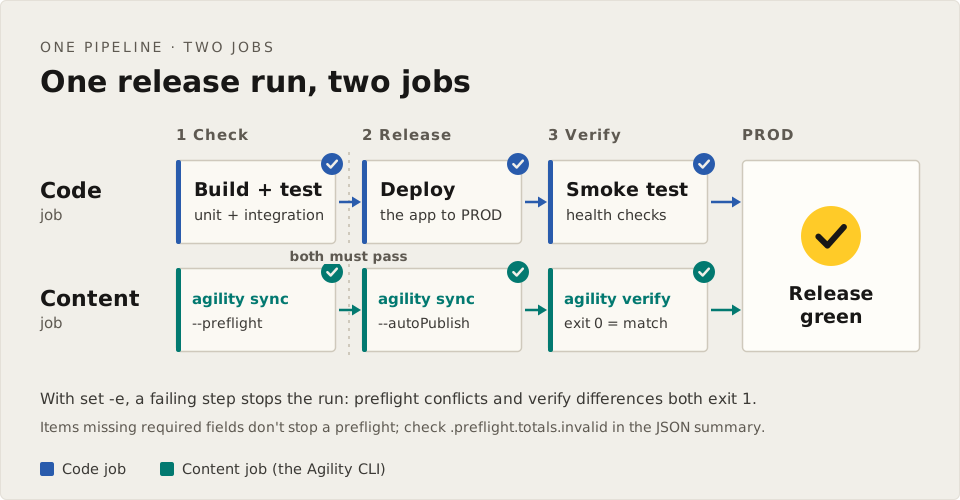
A CI pattern that gates the real run on a clean preflight:
set -e
npx agility sync --sourceGuid="$SOURCE" --targetGuid="$TARGET" --headless --preflight \
  --jsonSummary=reports/preflight.json
npx agility sync --sourceGuid="$SOURCE" --targetGuid="$TARGET" --headless \
  --jsonSummary=reports/sync.json
If the preflight finds conflicts it exits 1, so with set -e the real sync never runs. To also stop on items that would fail validation, check .preflight.totals.invalid in the JSON summary:
test "$(jq '.preflight.totals.invalid' reports/preflight.json)" -eq 0
To check the result afterwards, add agility verify as a final step.
Exit behavior
Exits 1 when sign-in fails, when the API keys for either instance can't be retrieved, when a precondition fails (such as a missing locale on the target), when the run reports failures or crashes, and when --preflight finds conflicts. Otherwise it exits 0.
Before you run it
- Keep
agility-files/mappings/between runs, for example in Git. Without it, the next sync creates duplicates on the target. - Don't run two syncs against the same source and target at the same time. Both rewrite the same mapping files.
- After syncing A to B, let B finish publishing before you use B as the source for another sync.
- Read the Known issues and limits, especially if the target is outside the USA.
Related
- verify: check that the target matches the source
- reverse-sync: bring the target's changes back to the source
- workflows: publish or approve synced items afterwards
- CLI CI/CD Integration Guide: pipeline examples
On this page