# Previewing in Web Studio
> Source: https://agilitycms.com/docs/editors/previewing-in-web-studio
When creating and editing web pages, an intuitive interface and
real-time previews are key. So is a tool that lets your team preview,
comment, approve, and collaborate seamlessly, which is why we're so excited about Web Studio and Live Previews.
There are a few different levels of Web Studio depending on how it's been integrated with your site.
## Out of The Box
As long as you have a preview and production environment set-up, you'll be able to see them right inside Agility *(hooray for fewer tabs!)*.
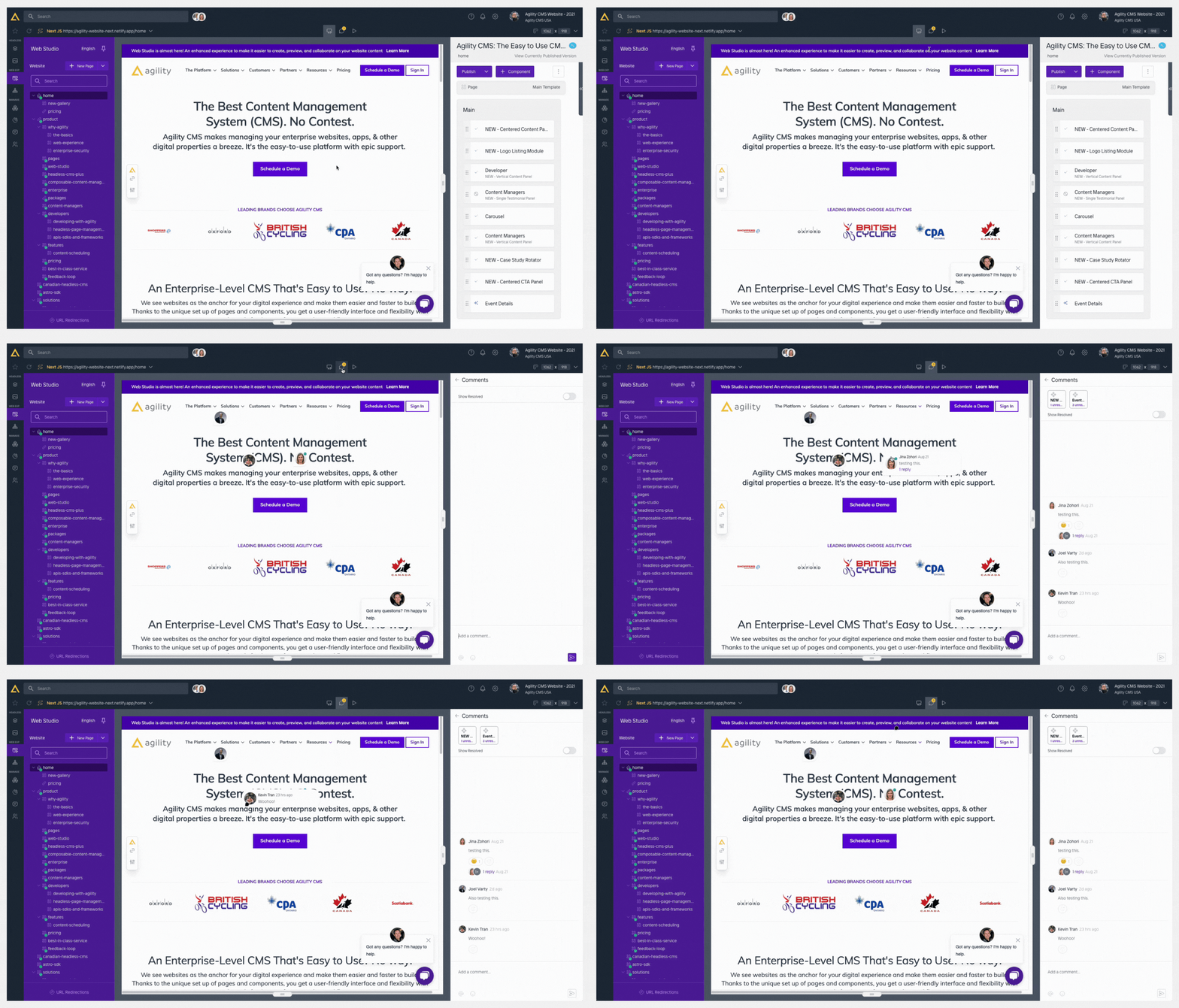
At the top of your Web Studio window you'll see a toolbar with a Preview button, a Commenting Bubble and a Play Button.
- **Preview - **Allows you to see how the changes you've made will look without leaving Agility *(they may take some time to appear after saving depending on your individual preview environment and it may require clicking the refresh button on your web studio toolbar)*
- **Commenting Mode -** Allows you to leave comments and have conversation on top of your preview environment for added context.
- **Live Mode -** Allows you to see the current live version of the item you're working on to compare.
## Copy a Preview Link from Web Studio
To send someone a link to what you're previewing:
- Go to the page you want to share in the preview.
- At the top left, click the website address to open the list of sites.
- Click the **copy** icon next to the site. You'll see *URL Copied to Clipboard*.
Use the copy icon. Don't type out the address you can see at the top of Web Studio: it leaves out the part of the link that turns preview on. The site may be called **Production**, but in normal Web Studio view the copy icon still gives you a preview link. In **Live** mode it copies the public link instead. See [Share a Preview Link](/docs/editors/share-a-preview-link) for what the person you send it to will see.
## Additional Features
Your team can unlock additional Web Studio functionality completely for free by connecting it to your site with a bit of code. You can read more details and access the technical information about that [here](https://agilitycms.com/docs/overview/web-studio).
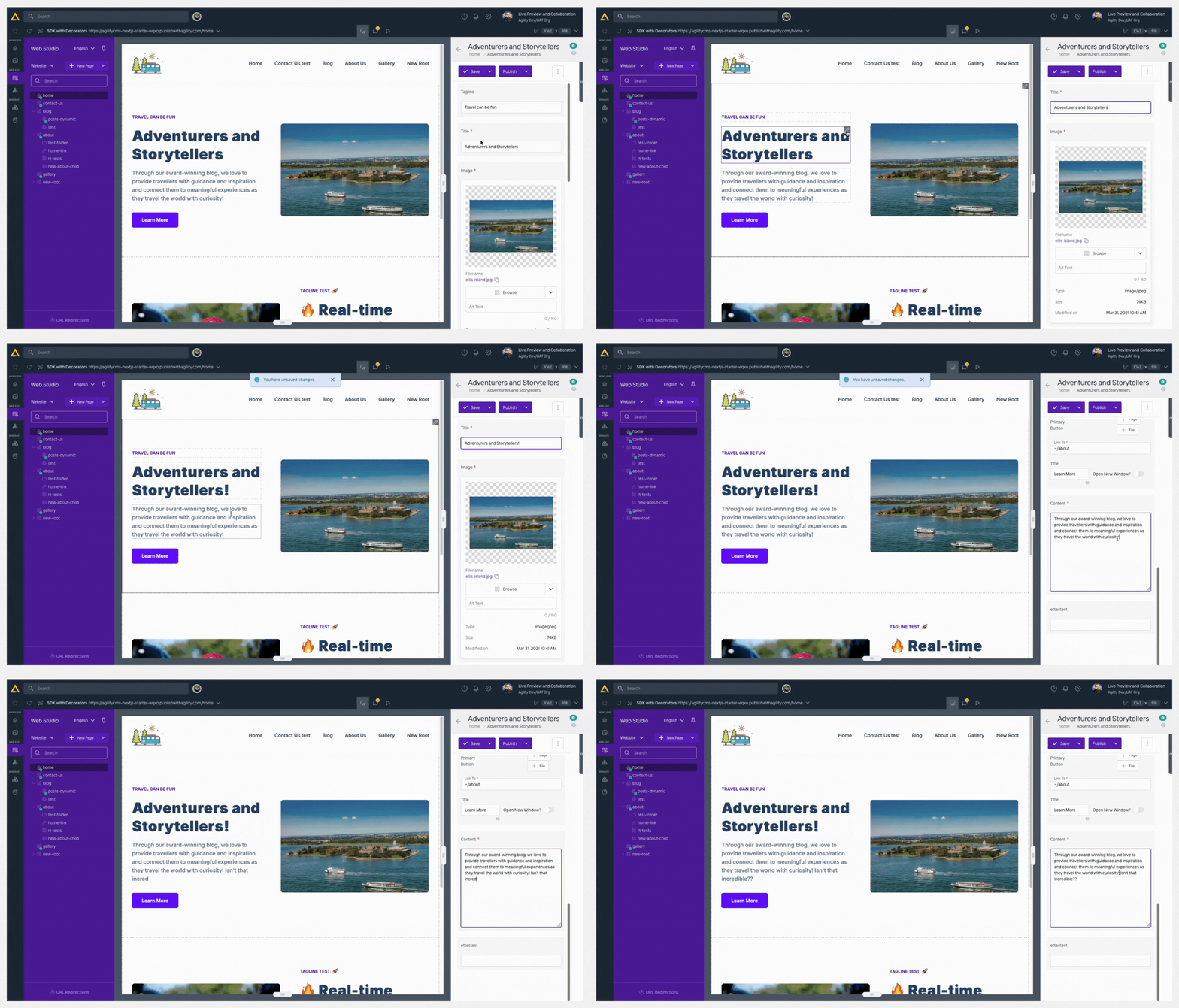
One of the most exciting aspects you can unlock is Live Previewing. Enabling this will outline each item you can edit in your Preview Window and allow you to click into them to make edits and see changes in real-time.
### Encountered an Error?
When first exploring Web Studio you may receive a `refused to connect` or `refused to display` error with your existing Preview environment depending on how your preview environment was first set-up.
This error is related to the security settings on your site and can be resolved by a developer. Send them [Troubleshooting Web Studio](https://agilitycms.com/docs/developers/troubleshooting-web-studio), which covers this error and other common setup problems, such as preview showing published content or fields that don't update as you type.
**Think that's cool? Check these out:**
- [Live Collaboration](https://agilitycms.com/docs/editors/live-collaboration)
- [Getting Started with Web Studio](https://agilitycms.com/docs/overview/web-studio)
- [Set Up Web Studio with Any Framework](https://agilitycms.com/docs/developers/web-studio-setup-any-framework) (for developers)
- [Troubleshooting Web Studio](https://agilitycms.com/docs/developers/troubleshooting-web-studio)
---
## Related pages
- [Introduction to Agility](https://agilitycms.com/docs/editors/introduction-to-agility-cms.md)
- [Pages vs Content](https://agilitycms.com/docs/editors/pages-vs-content.md)
- [Previewing, Publishing, and Content States](https://agilitycms.com/docs/editors/preview-and-publishing.md)
- [Scheduling Overview](https://agilitycms.com/docs/editors/scheduling.md)
- [Version History and Commenting](https://agilitycms.com/docs/editors/versioning.md)
- [Content Search](https://agilitycms.com/docs/editors/finding-your-content.md)
- [Approvals and Workflows](https://agilitycms.com/docs/editors/workflows.md)
- [Locales](https://agilitycms.com/docs/editors/locales.md)
- [Set your timezone and display language](https://agilitycms.com/docs/editors/timezones.md)
- [Batch Content Publishing](https://agilitycms.com/docs/editors/batch-content-publishing.md)
- [Importing and Exporting](https://agilitycms.com/docs/editors/importing-and-exporting.md)
- [Task Management](https://agilitycms.com/docs/editors/task-management.md)
- [Deleting and Restoring Content](https://agilitycms.com/docs/editors/deletions-and-restorations.md)
- [Copying and Duplicating Items](https://agilitycms.com/docs/editors/copying-and-duplicating-items.md)
- [Rich Text Editor](https://agilitycms.com/docs/editors/rich-text-editor.md)
- [Live Collaboration](https://agilitycms.com/docs/editors/live-collaboration.md)
- [Real-Time Co-Authoring & Conflict Handling](https://agilitycms.com/docs/editors/real-time-co-authoring-and-conflict-handling.md)
- [Live Commenting & Collaboration in Web Studio](https://agilitycms.com/docs/editors/live-commenting-and-collaboration-in-web-studio.md)
- [Your account menu](https://agilitycms.com/docs/editors/your-account-menu.md)
- [Manage your notifications](https://agilitycms.com/docs/editors/manage-your-notifications.md)
- [Work Faster in Agility](https://agilitycms.com/docs/editors/work-faster-in-agility.md)
Index of every docs page: https://agilitycms.com/docs/llms.txt